
Jayanti Katariya
Last Updated: August 08, 2025 Total Views: 7175
Table of Content


Blog Summary:
This blog identifies the 12 most pressing software testing challenges encountered by QA and development teams, from requirements ambiguity to automation maintenance and compliance risks. For each challenge, it outlines practical solutions, tool recommendations, and proven strategies drawn from US industry best practices, helping teams optimize quality, speed, and resource management.
Table of Content
Have you ever launched an app with full confidence, only to be hit by a production bug that sent you back to a rollback? It may seem like a nightmare, but QA professionals claim that this is pretty common.
Missed edge cases, rushed regression validations, and test environment issues can cause these outcomes for your project. If you don’t have a proactive QA strategy in place, you will find that your testing team stays in this loop forever.
Understand what is going wrong and why it keeps happening to reduce the frequency of these issues. If you closely monitor the Software Testing Challenges, you will realize they aren’t rare irregularities but patterns. By fixing them as soon as you spot them, you take a quality-first approach.
In this post, you will learn the 12 common issues your QA teams face in software testing. We will also share practice and industry-tested solutions to help streamline your processes.
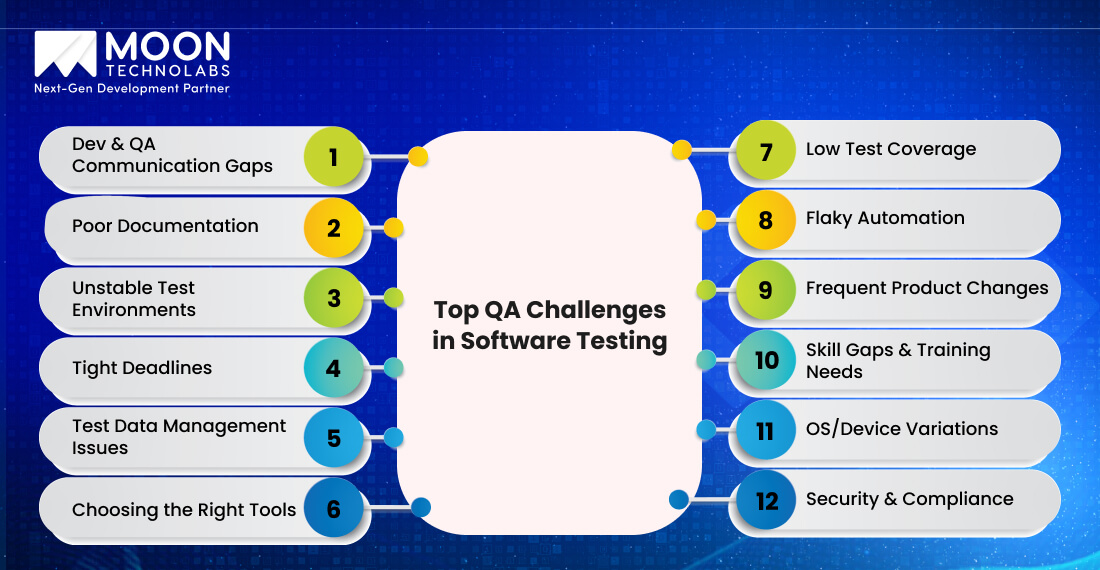
Let’s take a closer look at some of the most common roadblocks QA teams encounter. These patterns tend to slow down releases and impact the quality of software.
Misaligned expectations between developers and QA can easily ruin your best-planned sprints. If the testing teams receive vague requirements or have to work in silo, they may miss testing for specific scenarios, leading to unclear test cases. This can impact the test accuracy results across industries.
You can bridge this gap by involving testers in the planning stage of custom software development, and not just after development. This will also help capture the ambiguities during the planning and design stages. Regular cross-functional standups can help everyone stay aligned and spot QA issues early.
At the same time, don’t overlook documentation. It helps set clear standards for user stories and acceptance criteria in a way that development and QA interpret stories in the same way. You don’t need to increase meetings to improve alignment; you need to invest in smarter collaboration.
Does outdated specifications, missing details, or knowledge residing in someone’s head seem like a familiar situation to you? Incomplete and missing documentation can silently kill your QA strategy.
When your testing team doesn’t have clear and updated references, it becomes difficult for them to interpret what to validate, the features that have changed, and the underlying risks. Over time, test coverage becomes increasingly dependent on guesswork rather than a strategic approach.
You should begin by ensuring that proper documentation is in place to resolve this issue. Make it dynamic by updating the records as the product evolves. You should also include a requirement traceability matrix (RTM) that maps test cases to features and user stories.
This will help ensure full test coverage and help catch gaps before they become production issues. You can use tools like Confluence, TestRail, and Jira plugins to automate the document workflow and reduce manual effort.
If you are testing and production environments don’t match, it results in chaos. Your test may pass on a particular day, only to fail the next day, without you changing a single line of code. Known as environmental drift, this inconsistency is one of the major QA issues in the testing stage of the software development lifecycle.
Whether you are dealing with mismatched data, unreliable device clouds, or missing configurations, you may encounter gaps that make it more difficult to identify the bugs. The foundational issue is a lack of parity, where the test environment does not accurately mirror the actual one.
You can use containerization tools like Docker to build consistent and isolated environments that appear consistent. For cross-browser or mobile testing, utilize cloud platforms such as BrowserStack and Sauce Labs, which offer stable and scalable access to real devices.
Stable environments can facilitate accurate testing and lead to better outcomes.
Tight deadlines and frequent release cycles are pretty normal, but they leave your QA teams working under great pressure. As a result, there is a good chance they skip the crucial scenarios, sneak through the regressions, and thus lower the product quality.
As there is limited time to test everything, it is advisable to avoid doing so. Conducting risk-based testing enables you to focus on what matters most to your users, thereby reducing the challenges of software testing.
You can automate the regression tests to free up your resources, enabling them to focus on exploring new features. At the same time, by involving QA in early development, you can enhance test planning, incorporate edge cases, and mitigate risks.
This helps you meet your deadlines with effective planning.
Managing the test data can become a headache, especially when you are juggling privacy concerns with limited access to data. It creates conflicts among teams that use the same datasets.
The testers find themselves struggling to create or clean up the data just so that they can run the basic scenarios, which eventually slows down QA processes.
This situation worsens when your users’ data is off limits due to privacy regulations like GDPR and HIPAA issues. You can use data masking and anonymization to help you work with real datasets without stripping out sensitive information.
You can utilize test data management tools to automate data creation and refreshes, providing a more scalable approach to resolving QA issues. If real data is unavailable, you can use tools for synthetic data generation to simulate rare conditions and edge cases.
By implementing smart data practices, you can save time, reduce risks, and ensure compliance with stringent requirements.
Let our team audit your QA process and help you build a scalable, best-practices-driven approach.
Schedule an Expert Call
There are many testing tools available. You can either feel overwhelmed, make the wrong selections, or stay stuck with your legacy tools that don’t fit your current workflow.
QA teams juggle between multiple platforms that don’t integrate well, causing inefficiencies and miscommunication. You should select need-based tools for your project. Assess what your team really needs, using the tech stack, team size, and complexity as your evaluation parameters.
You should run proof of concepts (PoCs) before committing to these tools to avoid costly missteps. It is essential to standardize processes across teams after selecting them to ensure a smooth onboarding and collaboration process.
Popular tool combinations include Jira with Xray, Selenium with TestNG, and Playwright with GitHub. These duos offer better reliability and flexibility if implemented well.
A perfect tool does not add complexity; instead, it simplifies the testing process.
Prioritizing “happy path” testing scenarios can lead to blind spots in your tests. You will miss critical edge cases, error handling, and even common real-world behaviours. As your resources spend time on low-risk test cases, they fail to check the high-impact features.
You must start by analyzing the test coverage to determine what’s tested and what won’t be. Apply prioritization frameworks, such as risk-based testing or the MoSCoW method, to ensure focus on areas where failure poses the greatest challenges to QA teams.
Incorporate checklists and requirement traceability matrices to account for all the user stories, acceptance criteria, and edge cases. Using these tools, you can track progress and ensure a smooth hand-off between testers.
Imagine your test fails in one run but passes in the next. Flaky tests can frustrate QA teams, erode their trust in automation, and ultimately lead to alert fatigue.
Without automation to support the testing process, your teams would spend time debugging instead of identifying genuine issues. Poor element locators, race conditions, and timing issues can cause flaky tests, particularly with rapidly evolving UI layers.
You must create strong locators instead of relying on brittle XPath or dynamic IDs. Start incorporating explicit waits to manage the entire process asynchronously. Conduct automation script audits, peer code reviews, and diagnostics in CI pipelines regularly to identify unstable patterns.
Using the appropriate practices can help you induce trust in the test suite and make automation dependable for your QA strategy.
By updating the product frequently, you can hinder the development of the best test suite. Even a minor UI tweak or change in logic can break these automated scripts and render your test suite obsolete.
Eventually, you spend a significant amount of time on rework, trying to adjust the features while maintaining test reliability. Use a modular test design to structure tests with smaller, reusable blocks that prevent the ripple effect of changes.
You must implement a Page Object Model that separates UI locators from test logic. This way, a small update won’t make you rewrite the entire script. You must regularly review and update the regression suite to ensure your current functionality works as expected.
Adaptability is a crucial component of your test strategy, enabling you to grow and shift your product with ease.
When you don’t have the right skills supporting your strategy, tools, and processes, it may fall flat. Most challenges faced in QA teams is their struggle to find people experienced in modern testing practices, such as CI/CD integration, API-level validation, and shift-left testing. As a result, you will experience slow progress, increased manual effort, and limited scalability.
You should encourage your team members to upskill themselves with ISTQB certifications. Implement in-house mentorship programs to support the growth of junior members. When hiring resources, look for potential and adaptability, in addition to years of experience.
You should rely on development partners who stay up-to-date with evolving tools and help you choose the right software development methodologies to augment your in-house team. QA isn’t a one-time training opportunity; it is an ongoing process. You must support skill development to maintain a sharp and motivated team that is ready to tackle modern testing challenges.
Your users may access your applications on different OS versions, browsers, and devices. However, it is difficult for you to achieve full test coverage. While certain features work on Chrome for desktop, they can crash on Safari for iOS. As you update features, the testing matrix grows complex.
If you try to manage this manually, it can become complex, time-consuming, and costly. You can be smart by prioritizing the devices or browser metrics using real user analytics. Implement tools like Google Analytics and Mixpanel to determine which platforms are important to your users.
Using cloud-based testing platforms like BrowserStack, Sauce Labs, or Lambda Test, you can provide on-demand access to numerous real devices and browser combinations without real hardware.
Using the real data and scalable tools, you test everything that matters to deliver a seamless experience to your users on their desired platform.
Security and compliance aren’t optional for the healthcare, finance, and e-commerce industries; they are mission-critical.
However, your QA teams may notice gaps during testing for security coverage, tracking compliance, and traceability. Even a single missing log or undocumented change can cause failed audits or legal risks. If you conduct security testing at the end of the lifecycle, it can further damage your reputation.
You must integrate both static and dynamic security testing tools into your CI/CD pipeline to solve software testing challenges and avoid blind spots. This way, you can catch vulnerabilities early and fix them while it is cheaper. Beyond tooling, you should also maintain visibility through the right set of software development security testing metrics and KPIs.
You should maintain audit trails to track what is tested and by whom. Implement compliance checklists to meet HIPAA, GDPR, and FDA regulations, guiding all your QA activities. By utilizing proactive security and compliance testing, you can safeguard your users and foster trust in your product.
Smart QA isn’t just about catching bugs; it is about building a test culture that’s collaborative, adaptable, and efficient. Your QA teams can align early, automate well, and document everything to ensure improvement with each sprint.
By applying these best practices, they can mitigate risks associated with common QA issues, enhance the QA team’s confidence, and deliver reliable releases.
Here’s a quick recap of everything that works:
Our QA specialists can analyze your process and recommend tailored solutions based on real-world results.
Get a FREE QA Review
Software testing comes with its challenges. However, if you know what to look for and how to fix it, you can make all the difference. Whether it’s the flaky tests, tight deadlines, or messy documentation, you can manage all these issues using the right approach.
You must keep things simple, automate smartly, and improve as you go to release a stable and reliable product. That’s how your QA team can grow stronger with time.
Moon Technolabs is a leading and highly experienced partner that provides consulting, development, maintenance, modernization, and testing services for software development. If you want to extend your in-house team to overcome these common challenges, book a free consultation with our team.
01
02
03
04

Jayanti Katariya is the CEO of Moon Technolabs, a fast-growing IT solutions provider, with 18+ years of experience in the industry. Passionate about developing creative apps from a young age, he pursued an engineering degree to further this interest. Under his leadership, Moon Technolabs has helped numerous brands establish their online presence and he has also launched an invoicing software that assists businesses to streamline their financial operations.


Submitting the form below will ensure a prompt response from us.
We refine our expertise to deliver innovative business solutions.





500 N Michigan Avenue, #600, Chicago IL 60611
13500 Long Is Dr, Pflugerville, TX 78660, USA

C/105 Ganesh Meridian, S.G. Highway, Ahmedabad, GJ 380060


Ayse D.
Co-Founder France
“ I highly recommend Moon Technolabs as the quality of service is wonderful. We have hired this company to develop the product based on some complex & technical issues. We get the best quality services as compared with others in the market. Huge Thanks to Moon Technolabs as the team is always ready to give the solution all time.”

Justin G.
Founder & CEO USA
USA“ Moon Technolabs is a pioneer in the WebRTC based project as they have fixed complicated segments of the module by fulfilling different product lines by providing 24X7 customer support. We really recommended Moon Technolabs as they are able to develop products as per the module deadline and project timeline.”

Flavio S.
Founder & Managing Director Germany
“I am happy to recommend Moon Technolabs for their app development services. They successfully developed apps for me, and I am highly satisfied with the overall outcomes. The development team has swiftly addressed the issues with responsive and effective communication to understand the requirement quickly and actively resolve the back-and-forth problems that arose...”

Jay M.
Founder & CEOUSA“Moon Technolabs is the best company that provides advanced apps and websites development services in the USA and Europe. I am a newbie to develop my app with an external team. I am really happy to work with them as I am not that much mobile apps user. Here, the team and specially the CEO of Moon Technolabs helps me to let me know about the benefits of my app to generate revenue....”


Our Offices
India
C/105 Ganesh Meridian,S.G. Highway, Ahmedabad, GJ 380060USA
500 N Michigan Avenue, #600, Chicago IL 60611Contact Information


