
Jayanti Katariya
Last Updated: February 10, 2026 Total Views: 549
Table of Content


Blog Summary:
This blog is your complete guide to selecting the right SIP Softphone for Mac. We have covered features, use cases, popular softphone apps, and necessary security practices. It has everything you need to choose the best option for your organization.
Table of Content
Let’s imagine a scenario. You work on a Mac computer, engage with team meetings, and manage client calls. But the unfortunate reality is that your existing phone lines don’t help you handle everything quickly. So, what’s the solution? SIP softphone for Mac is indeed the right solution to overcome this problem. It turns your Mac into a reliable and robust calling tool you can use anywhere.
However, selecting the best SIP softphone for Mac is highly important, as it improves call quality and reduces costs compared to traditional phone lines. It also streamlines your communication system, offering greater flexibility and portability.
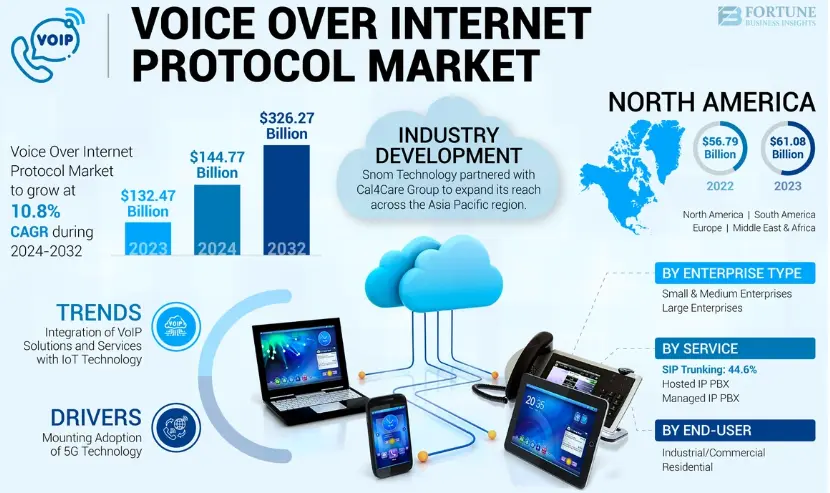
This has increased demand for cloud-based tools such as VoIP. Fortune Business Insights predicts that the global VoIP market will reach $326 billion by 2032, up from $144.77 billion in 2024.
So, how do you choose the top SIP softphone for Mac? It should be based on your organization’s core needs, features, budget, workflows, and more. We will discuss everything you need to consider to make the right selection. Let’s get going!
A SIP softphone for Mac is phone software that allows you to make and receive calls over the internet using the Session Initiation Protocol (SIP). Whether you wish to do video calls or voice calls, you can do everything with the use of this software. It can turn your Mac into a fully functional VoIP device, eliminating the need for physical desk phones.
Moreover, SIP softphones offer numerous features, including voicemail, conferencing, call forwarding, contact syncing, HD audio, and more. Thus, it allows remote teams to connect regardless of location. The major advantage of the SIP softphone for Mac is that it can be installed easily.
You can also integrate it easily with many popular CRMs. It’s indeed cost-efficient compared to traditional telephony systems. That’s why it’s considered the best option for modern workplaces seeking a flexible, reliable communication system.
Opting for a SIP softphone for Mac is a decisive choice for businesses for several reasons. Let’s explore some of them in-depth:
Several factors distinguish SIP softphones for Mac from those for Windows. These include OS-level optimization, UI design, integration capabilities, and more. With Mac softphones, you can expect smooth performance, cleaner interfaces, deeper integration, and more.
On the other hand, Windows softphones offer advanced customization, broad hardware compatibility, and enterprise-grade integration, with tools such as Active Directory, Outlook, and Microsoft Teams. The Mac version mainly focuses on stability and smooth user experience, whereas Windows softphones focus on device support, flexibility, and scalability.
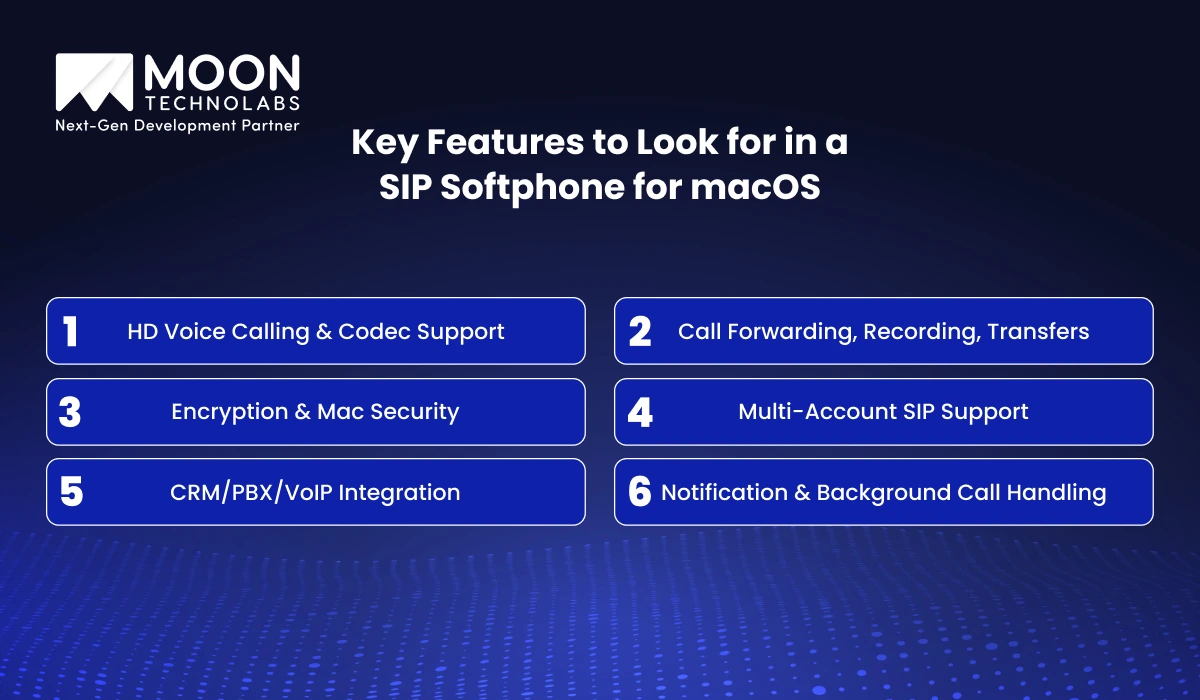
When choosing a SIP softphone for macOS, focus on key features to ensure it delivers a smooth workflow, crisp calls, and robust security. The following are some of the top features:
It’s advisable to obtain details on support for modern wideband codecs, e.g., Opus, G.722, as well as G.711. With Opus, you get excellent speech clarity across different bandwidths, while AAC-LD and G.722 also deliver a natural-sounding voice for conference calls. A perfect Mac softphone should negotiate codecs and fall back when network conditions change, maintaining clarity in conversation.
Flexible call forwarding is essential. Make sure your softphone offers busy, unconditional, time-based, and no-answer forwarding options. It should include UI controls that let users quickly turn forwarding on or off, improving the user experience for both hybrid and remote workers.
It should include built-in call recording with flexible storage options, such as encrypted local or cloud storage. It’s indeed a must for training, compliance, and dispute resolution. You should also focus on per-call consent prompts, automatic recording rules, and ease of use across several common formats. Another important thing you need to look for is support for attended and blind transfers in the transfer-to-conference workflow, and the contact list is also important.
The SIP softphone needs to include media encryption (SRTP/DTLS-SRTP) and end-to-end signaling (TLS), which should be standard for protected calls from eavesdropping. Softphones should integrate seamlessly with macOS’s system-level security.
It uses system keychains for credential storage, follows Apple’s sandboxing/App Store guidelines, requests only necessary permissions, and more. It’s important to update regularly and also signed builds minimize the attack surface while ensuring compatibility with macOS security changes.
Most users of late manage multiple SIP identities, including departmental, personal, and client. It shows that a top-quality macOS softphone should be able to manage multiple simultaneous accounts with unified voicemail, per-account settings, distinct presence indicators, and more. Therefore, you can easily obtain and manage calls across lines even without any confusion.
The macOS softphone should be able to integrate seamlessly with PBX features, CRMs, and many popular VoIP platforms to increase productivity. You should always look for webhooks, APIs, native plugins, browser extensions, and more.
macOS users always expect native notification behavior, be it Do Not Disturb-aware ringing, notification-center/lock-screen alerts, reliable background call handling, and more. Whether it’s quickly replying to actions in notifications, background media playback, or clearing missed-call logs, these are necessary for desktop and mobile workflows.
We create a SIP softphone for Mac tailored to your specific security needs, workflows, performance goals, and more. Our experts make it world-class.
Softphones are used for a variety of purposes, offering native macOS performance, reliable VoIP calling, and advanced calling features. We will explore some of the popular use cases of softphones for Mac:
Distributed teams rely extensively on high-quality, stable communication tools; macOS can deliver the same. It allows remote employees to make HD voice calls, participate in transfer calls, video meetings, and collaborate using individual apps.
It eliminates the need for a desk phone. Be it call forwarding, presence, or multi-device sync, its features include ensuring teams stay reachable across multiple time zones. Since softphones function natively on macOS, they can integrate smoothly with built-in tools such as system notifications, Spotlight search, secure keychain storage, and more.
Startups have been switching from traditional desk phones to softphones lately. The main reason is that it minimizes hardware costs while allowing employees to work from any location. Softphones for Mac are attractive to startups that already use Apple devices.
Since it’s easy to set up and configure, teams can add new users more quickly. Besides, they can scale communication infrastructure and integrate CRM systems as the organization grows.
Support teams that leverage macOS require highly efficient calling workflows for call transfers, queue management, analytics, recording, and CRM integration. A softphone for Mac includes outstanding capabilities with less setup. Support agents find it easy to handle a range of calls, including maintaining compliance, and access caller details quickly through encrypted communication and built-in call recording.
Softphones are gaining widespread popularity among freelancers and small teams alike. The main reason is that it provides a professional business number without requiring PBX hardware.
Independent professionals can leverage softphones to manage multiple SIP accounts, record client calls, switch identities, forward calls to mobile devices, and more while working on the move. These features are indeed useful for maintaining a consistent business presence.
Softphones for Mac can work the same way across all environments, whether at home, in the office, or even on the go. It provides smooth transitions across different environments through reliable background operations, consistent call quality, synchronized call logs, and more across multiple devices.
Employees can easily receive calls on their Macs in the office. They can also switch to mobile apps even while traveling and thus maintain uninterrupted communication.
SIP softphones for Mac have a significant edge over traditional desk phones for several reasons. We will describe it briefly through the following table:
| Points of Difference | SIP Softphone | Traditional Desk Phone |
|---|---|---|
| Working | It functions on macOS using VoIP or SIP. It requires the internet or a LAN to work. | It requires dedicated hardware to connect to VoIP or PSTN through a phone line or Ethernet. An adapter or PoE powers it and works independently of a computer. |
| Cost | It has a less upfront hardware cost, including an inexpensive app and headset. It also includes ongoing costs like SIP subscription/trunking and network bandwidth. | It requires a higher upfront cost per unit, including the base, handset, wiring, etc. It also needs recurring costs for maintenance and lines. |
| Call Quality | It can meet your expectations for call quality when the network and Mac are well provisioned. | It offers consistent, reliable audio quality on PSTN or stable networks. It’s developed particularly for voice with hardware and optimized codecs. |
| Ease of Use | It offers quick updates, a modern UI, and easy integration with apps. It needs basic computer knowledge to use. Meanwhile, it can be confusing for non-technical users. | It comes with an intuitive physical interface, including buttons, a handset, etc. It doesn’t require any technical proficiency to operate and also has a low learning curve. |
| Features and Functionalities | Its features and functionalities include screen sharing, video, presence, CRM integration, and more. | Its features include reliable handset control, multi-line support, a physical speed-dial button, and more. |
You Might Also Like:
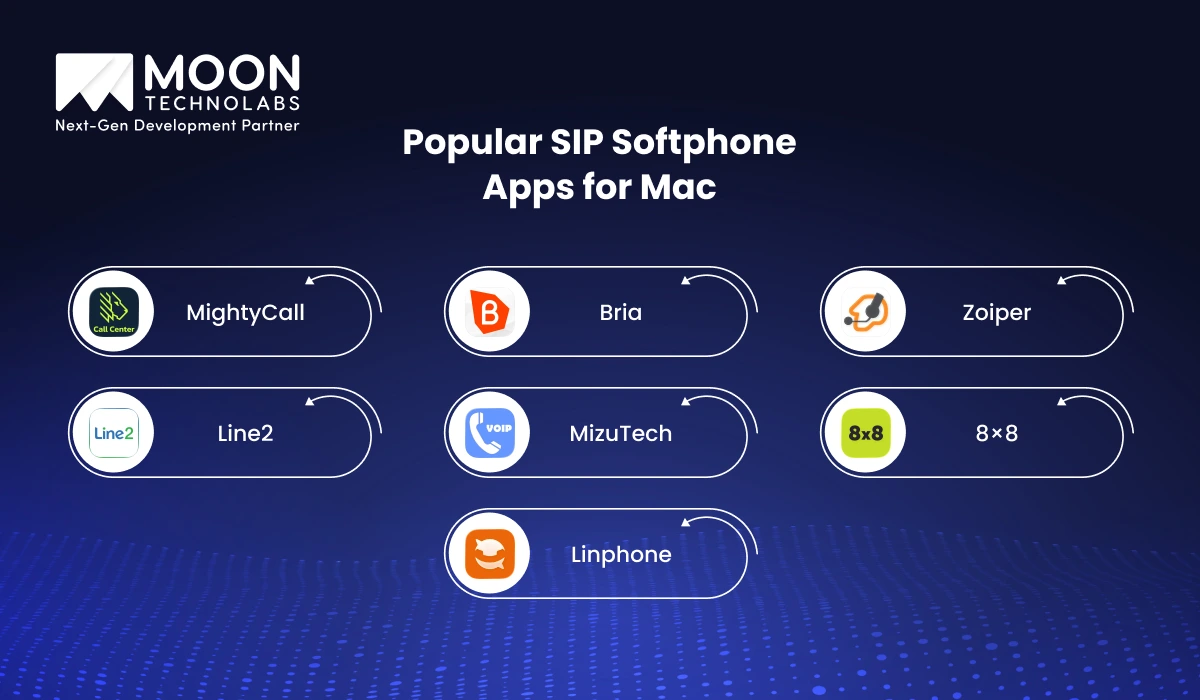
Many important types of SIP softphone apps gained vast popularity among call centers, businesses, IT teams, freelancers, and others. The following are some of them:
Developed with simplicity, MightCall is one of the well-known SIP softphones. It’s a popular choice for everyone, including small teams, startups, and even non-technical users.
The app boasts a myriad of advanced features like voicemail, call forwarding, HD voice calling, call queues, virtual numbers, and more. Apart from this, the app supports IVR configuration and smooth call recording, making it a perfect choice for customer-facing businesses.
As a high-grade softphone, Bria has gained wide acceptance among enterprises for its world-class security and SIP integrations. It’s designed exclusively for macOS and offers messaging, HD video/audio calling, advanced codec support, and more.
It integrates better with PBX systems and leading VoIP providers. That’s the reason why it’s the best choice for IT-based organizations. Be it team messaging, multiple accounts, or screen sharing, the app supports everything.
Being versatile, Zopier is a lightweight SIP softphone app. It’s better known for stability, speed, cross-platform flexibility, and more. The Mac version of this app includes a range of essential VoIP features, including call conferencing, call transfer, multi-protocol support, encryption, and more.
The app features a clean UI and supports a range of codecs, ensuring crisp voice quality on low-bandwidth networks. Zopier emerges as the right choice for businesses looking for a simple yet trusted softphone.
Line2 is an apt choice for those desiring a dedicated second business line. And for this, they don’t want to invest in hardware. It comes with unlimited calling, call routing, voicemail transcription, and auto-attendant features.
Whether you are consultants, freelancers, or small businesses, Line2 is the best option for you. It ensures consistent, smooth connectivity across a range of devices.
MizuTech includes a feature-rich softphone suitable for businesses with advanced VoIP requirements and for end users. By offering support for multiple SIP accounts and deep customization, MizuTech gained widespread appreciation among network admins and developers. Besides, its impeccable diagnostic tools and greater scalability make it well-suited for VoIP resellers and call centers.
8×8 is basically a unified communication app that blends SIP softphones’ capabilities with video meetings, messaging, team collaboration tools, and more. Businesses looking for 8×8’s cloud communication platform use the Mac app as an important communication hub.
It includes many important features such as meetings, call analytics, HD calling, CRM integrations, voicemail, presence detection, and more. Enterprises turn to 8×8 Work mainly because it centralizes communication, minimizing app switching and improving remote team productivity.
Linphone is for those looking for an open-source SIP softphone for Mac, known for its flexibility, transparency, strong security, and more. It also supports video and voice calls, encryption, and instant messaging through ZRTP and SRTP.
Linphone is also a good option for privacy-conscious users, developers, and companies that need high customization. The app offers a fully polished Mac interface and also perfect video/audio quality, despite being open-source.
We help you redefine your communication experience with a robust, tailored SIP softphone for Mac. It boosts security, quality, and productivity.
Since softphones work on the internet, they are highly vulnerable to credential misuse, penetration, and unauthorized access compared to traditional desk phones. So, it’s necessary to implement robust security measures to protect customer data, business conversations, internal workflows, and more. The following are some of the security practices you can consider implementing:
End-to-end encryption is one of the security measures you can implement to ensure a foolproof security of your VoIP communication. It gives you complete assurance that only the sender and receiver can access messaging or call data, preventing manipulation and eavesdropping.
A large number of cutting-edge softphones already support E2EE for data and voice. But organizations typically need to enable it manually. E2EE is the top security layer for teams concerned about handling sensitive information.
Whether it’s Transport Layer Security (TLS) or secure RTP, it protects VoIP traffic in transit. Secure RTP protects audio streams against interception by encrypting voice packets. On the other hand, TLS effectively secures SIP signaling, making it difficult for attackers to engage in malicious practices or hijack sessions.
Make sure your VoIP provider supports and enables both TLS and SRTP when configuring SIP softphones on Mac. Apart from this, the use of outdated protocols, such as SIP over UDP, without proper encryption, exposes the system to spoofing and packet-sniffing attacks.
Whether it’s reused or weak SIP credentials, it’s one of the common attack points in VoIP systems. You need to implement the following measures to strengthen the security of your SIP softphone:
macOS Keychain can also be used to store login details with powerful system-level encryption securely.
You need to take into account that the built-in security tools in Mac play a leading role in protecting softphone communication.
VPN acts as a necessary security layer, especially for hybrid and distributed teams. It encrypts all network traffic, providing complete protection against MITM attacks and public Wi-Fi vulnerabilities. A VPN also enables stable call routing and maintains strict privacy, even when users connect from cafes, hotels, or even shared spaces.
We specialize in creating high-performing SIP softphones for macOS, integrated with top-notch features such as a secure VoIP architecture, advanced calling capabilities, seamless Apple-native integration, and more. Our team specializes in multi-account SIP handling, HD voice, forwarding, call transfers, recording, and TLS/SRTP encryption for enhanced security.
Additionally, we have the proficiency to integrate PBX, CRM, and VoIP platforms to streamline workflow. Hire our MacOS Developers who have extensive experience with macOS frameworks and real-time communication protocols. Our team delivers intuitive, scalable, and customized softphone apps tailored to match your business requirements.
You may have now understood how to select the best softphone for Mac. It’s advisable to know your actual communication requirements, security expectations, required features, and more.
While searching for them, you get a higher flexibility than ever, right from lightweight Mac softphone apps to enterprise-grade VoIP softphone Mac solutions. To get a custom-built solution, you can approach us to build a robust, future-ready softphone tailored to your workflow.
01
02
03
04

Jayanti Katariya is the CEO of Moon Technolabs, a fast-growing IT solutions provider, with 18+ years of experience in the industry. Passionate about developing creative apps from a young age, he pursued an engineering degree to further this interest. Under his leadership, Moon Technolabs has helped numerous brands establish their online presence and he has also launched an invoicing software that assists businesses to streamline their financial operations.


Submitting the form below will ensure a prompt response from us.
We refine our expertise to deliver innovative business solutions.





500 N Michigan Avenue, #600, Chicago IL 60611
13500 Long Is Dr, Pflugerville, TX 78660, USA

C-105, Ganesh Meridian, S.G. Highway, Ahmedabad, GJ 380060


Ayse D.
Co-Founder France
“ I highly recommend Moon Technolabs as the quality of service is wonderful. We have hired this company to develop the product based on some complex & technical issues. We get the best quality services as compared with others in the market. Huge Thanks to Moon Technolabs as the team is always ready to give the solution all time.”

Justin G.
Founder & CEO USA
USA“ Moon Technolabs is a pioneer in the WebRTC based project as they have fixed complicated segments of the module by fulfilling different product lines by providing 24X7 customer support. We really recommended Moon Technolabs as they are able to develop products as per the module deadline and project timeline.”

Flavio S.
Founder & Managing Director Germany
“I am happy to recommend Moon Technolabs for their app development services. They successfully developed apps for me, and I am highly satisfied with the overall outcomes. The development team has swiftly addressed the issues with responsive and effective communication to understand the requirement quickly and actively resolve the back-and-forth problems that arose...”

Jay M.
Founder & CEOUSA“Moon Technolabs is the best company that provides advanced apps and websites development services in the USA and Europe. I am a newbie to develop my app with an external team. I am really happy to work with them as I am not that much mobile apps user. Here, the team and specially the CEO of Moon Technolabs helps me to let me know about the benefits of my app to generate revenue....”


Our Offices
India
C-105, Ganesh Meridian, S.G. Highway, Ahmedabad, GJ 380060USA
500 N Michigan Avenue, #600, Chicago IL 60611Contact Information


