
Jayanti Katariya
Last Updated: January 23, 2026 Total Views: 293
Table of Content


Blog Summary:
This blog is a detailed guide to Odoo Migration. You will learn about version updates, handling custom modules, and data transfer. It covers diverse topics related to migration, including migration types, benefits, core components, and best practices to help you plan and execute migrations with minimal risk.
Table of Content
Do you still rely on an older Odoo version, making everyday operations feel slower, harder to scale, and riskier by the day? Outdated system features, compatibility issues, and broken custom modules can turn your simple tasks into constant workarounds, extending the timeline.
Odoo migration enables you to upgrade your system without compromising critical processes or data integrity. When done right, this migration improves your system’s performance, strengthens its security, and lets you access tools designed for growth.
This blog will walk you through every aspect of Odoo migration, providing insights into the challenges you are likely to face during the transition and when to make the move. At the end, you will be able to transition to a newer version with clarity, confidence, and a defined long-term path.
Odoo migration is the process of moving your existing Odoo system from the current version to a newer one while safeguarding your data, custom modules, workflows, and integrations. It isn’t another technical upgrade; it is a strategic solution that helps you improve your current system’s performance, long-term scalability, and security.
A well-executed migration can help keep your financial data, customer records, and operational processes intact, allowing you to replace outdated features and limitations with smarter tools. With this migration, you can expect better speed, usability, and access. You can continue to receive support from the Odoo ecosystem throughout this migration.
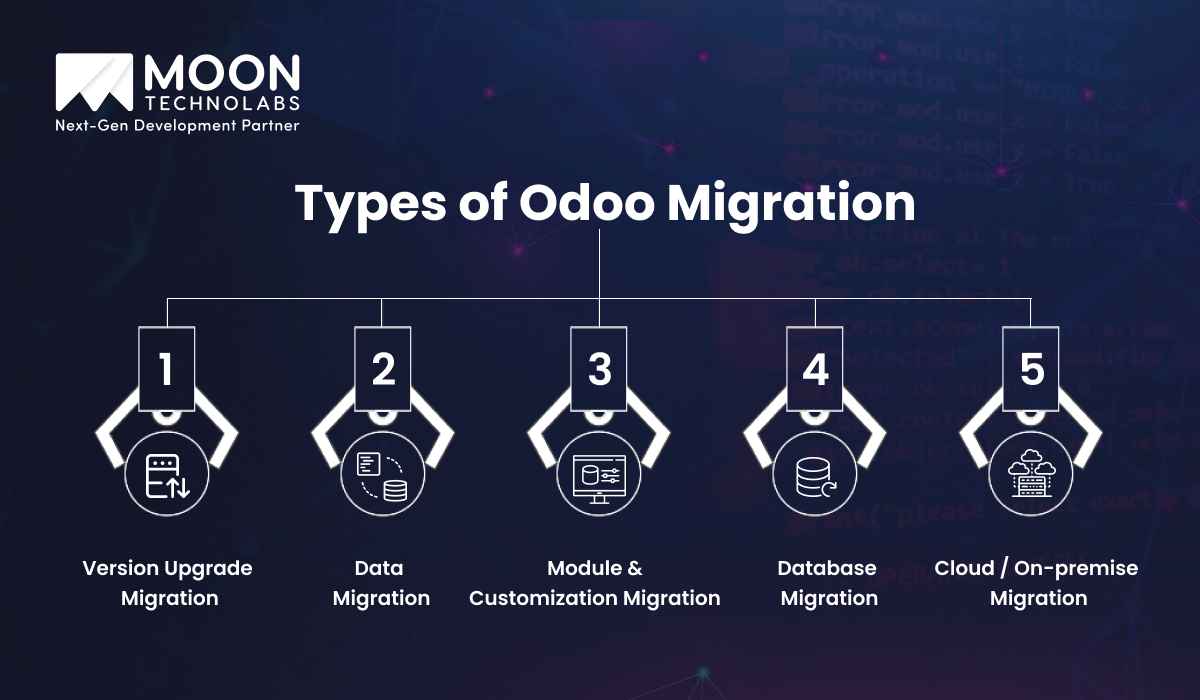
Not all Odoo migration solutions are the same. You must choose the type that best fits your current system, business complexities, and future needs.
In this migration approach, you move from an older Odoo version to a newer one. As a result, you can access enhanced features, improve system performance, enhance security, and provide long-term support while retaining core workflows. It continuously reviews deprecated features and adjusts your processes to align them with the latest platform standards.
This migration approach prioritizes securely transferring business-critical information, such as invoices, historical transactions, profile data, inventory, and other records, to the new system. The focus is on maintaining data accuracy, consistency, and completeness while ensuring the operations continue smoothly without reporting gaps or loss of visibility.
When your system relies on custom modules and third-party custom apps, you must upgrade or rebuild them during migration as well. With this migration type, you can confirm that the custom logic, automation, seamless integration, and reporting work correctly and support unique operational needs even in the new Odoo system.
In this method, you will restructure and optimize the database schema to meet the requirements of the new version. It can help in performance tuning, scalability, and stability, which is useful when your business handles high-volume transactions and complex relational data.
In this migration approach, you can choose the hosting for your Odoo online system as part of your cloud migration strategy. For example, you may move to the cloud for scalability or host it on-premises for greater control and compliance. This approach affects your system’s accessibility, security, disaster recovery, team collaboration, uptime, flexibility, data backup, governance, and other factors.
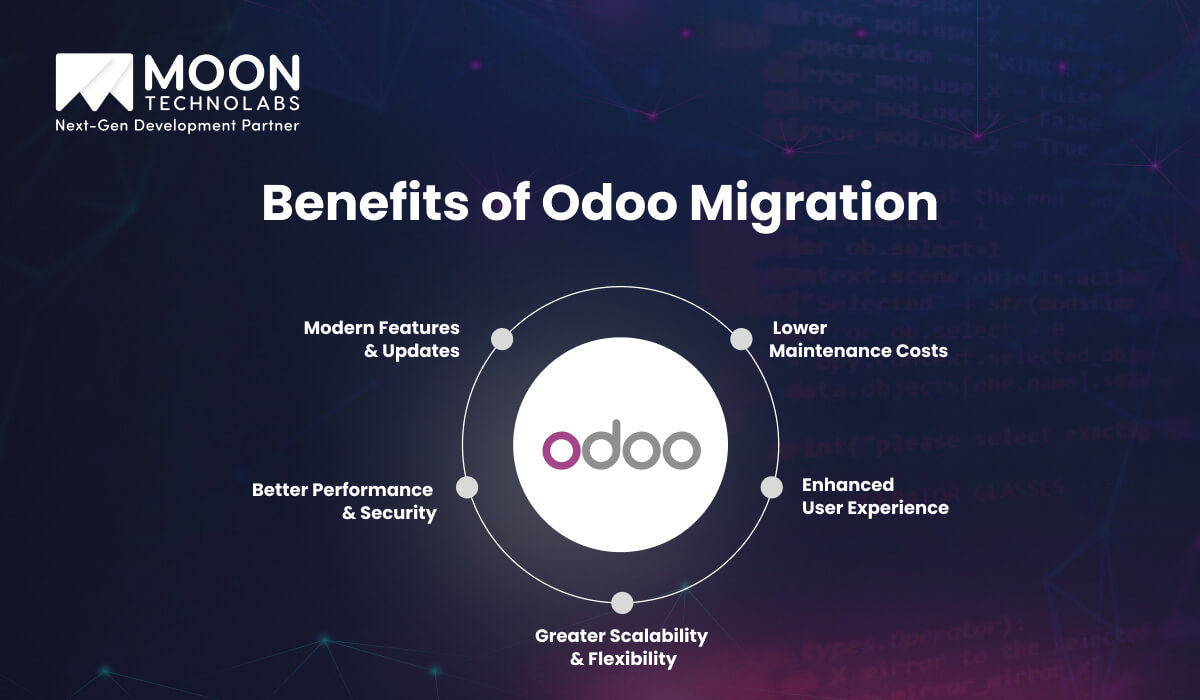
Upgrading the Odoo system isn’t just a technical decision for your business. It directly influences your operational efficiency and business growth. With migration, you can remove limitations and prepare your business for the future.
You can access smarter automation, improved accounting software, enhanced integrations, and advanced reporting capabilities with the new Odoo versions. Instead of relying on outdated or unsupported features, migration lets you use these advanced capabilities fully. As a result, you get an ERP that is aligned with your business needs and regulatory requirements.
The older Odoo versions can slow down and become vulnerable as your business grows. Migration enhances system speed and stability while protecting it against vulnerabilities that could compromise your data. It can also support global compliance and reduce exposure to modern cyber threats.
Your Odoo ERP migration must scale with your users, transactions, and processes. Flexible configurations, ease of module addition, and cloud adoption are some of the benefits you get with Odoo migration. Moreover, this flexibility lets you grow without disruptive system changes or forced reimplementation.
Modern Odoo versions feature a clean interface, role-based dashboards, and fast navigation. You can reduce the time spent training your users, improve adoption rates, and enable your team to complete tasks faster. With a smooth experience, you can improve productivity and user satisfaction across departments.
The previous version of Odoo Community relied on workarounds, unsupported code, and patches, making them harder to manage. With migration, you can address these issues, standardize the system, and reduce dependencies. Eventually, it will reduce maintenance needs, lower costs, and allow your resources to focus on improvements rather than fixes.
In Odoo migrations, several critical components work together to ensure a smooth, problem-free transition. You must understand these core components to plan the migration better and avoid surprises. By managing these core areas, you can achieve a more predictable, controlled migration journey.
Each Odoo version uses a different approach to structurally store data. Using the database schema transformation, you can let your existing database match the new structure. It also helps tables, relationships, and fields work seamlessly without corrupting the data or impacting system logic. Additionally, it maintains the reporting accuracy and system performance.
This component is crucial when you are moving from an older version to a new one. It confirms that the records are accurate, consistent, and complete. You can verify that invoices, customers, inventory, and financial data appear in the new system as they did in the previous system. Consequently, it reduces the risk of calculation errors, duplicate data, or missing records.
If you have built custom modules for older Odoo versions, they may not work with newer versions. Refactoring these modules involves updating the code, removing the deprecated features, and aligning them with the custom logic built for the new framework. This makes the custom features functional and reliable, improving the performance as well.
Businesses rely on integrations with shipping tools, CRM systems, and payment gateways to enhance functionality. During migration, it is important to review and update these integrations to ensure they are compatible, functional, and secure in the new test environment. By testing integrations early, you can prevent disruptions to external systems.
You may experience interface and workflow changes in the newer Odoo versions. Adjustments to the system during migration can help align screens, processes, and dashboards with the newer version. It also ensures that users adapt quickly to and continue operating efficiently even after migration.
Partner with us to plan, test, and execute the Odoo migration to offer data integrity, smooth workflows, and minimal downtime, supporting sustainable business growth.
Connect With Us
You need a practical strategy for a smooth Odoo migration. The strategy depends on multiple factors, including the version and customization requirements. Understanding them early can help you plan timelines, costs, and risks effectively.
The gap between your current Odoo version and the target version you want to migrate to can increase complexity. Testing needs, code changes, and data adjustments will automatically increase with larger version jumps. However, the entire process is faster and less disruptive for smaller upgrades.
If you have added many custom modules and logic to your system, migration must be carefully planned. You may need to invest in refactoring or rebuilding the new features to ensure compatibility with newer versions.
If your system has large databases with years of transactional data, migration timelines will be longer and require in-depth validation. The complexity of the data structure can increase testing effort, thereby reducing accuracy across inventory, reporting, and accounting modules.
Integrations with payment gateways, logistics platforms, and external CRMs can influence your migration planning. You need to review, test, and update every integration to avoid the post-migration disruptions.
The last factor is the hosting setup, which can impact planning, security, and downtime management for your official Odoo infrastructure. While cloud migrations offer flexibility, on-premises setups provide tighter control and ensure compliance checks.
After thoroughly considering all these factors, you can choose the migration path that balances speed and risk, setting realistic expectations for budgets and timelines.
Improve the speed, usability, and stability of your Odoo ERP system with our structured migration approach to support growth and future business needs effectively.
Schedule a Consultation
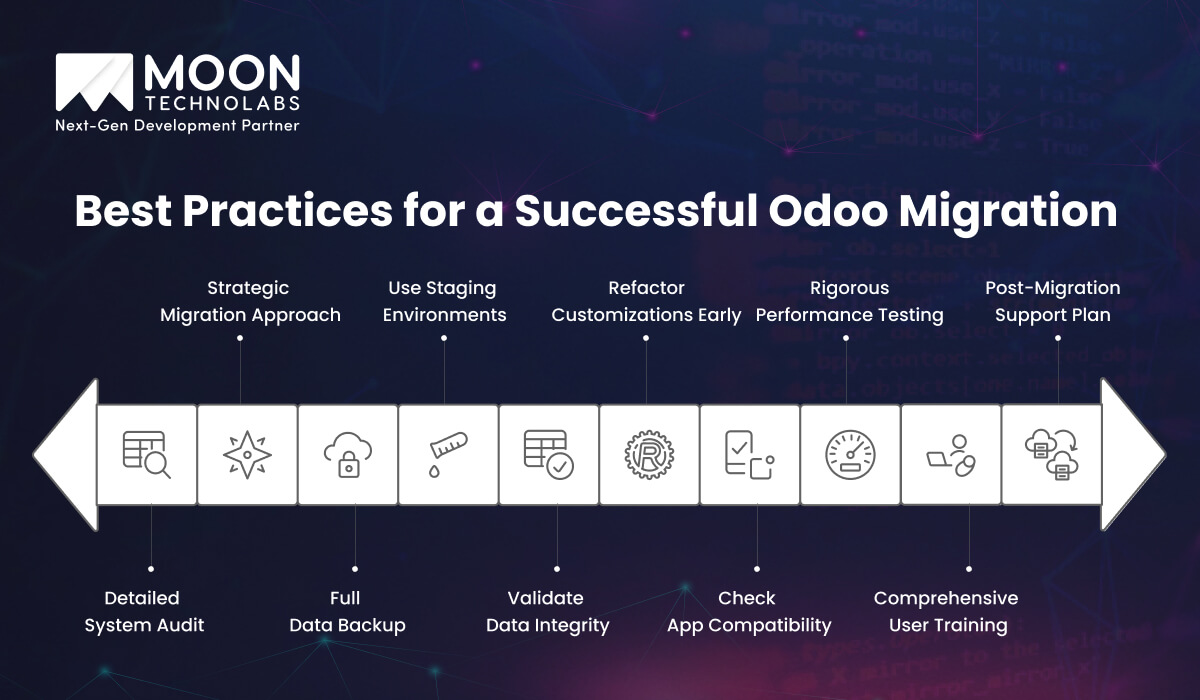
For a successful Odoo migration, you must plan well and follow the right steps. It will help avoid disruptions while offering long-term business value.
You must audit your current Odoo software version, the modules, workflows, users, integrations, and data models to get started. This will unveil the dependencies, risks, upgrade blockers, and unused features. As a result, you can scope the effort required to avoid surprises during planning and execution.
Choose a smooth transition approach that aligns with your priorities, timelines, and risk tolerance. While a direct upgrade is fast, going with a phased migration approach can reduce risk, and a reimplementation approach can support major change requirements. You must choose an approach that guarantees speed, stability, and long-term scalability.
It is important to back up your database, attachments, custom code, and configurations before proceeding with migration. A reliable backup will protect your system from data loss, unexpected migration errors, and failed scripts. Moreover, it offers quick rollback without disrupting operations.
Make sure to migrate your system to the staging environment first and test it safely. The staging environment mirrors your production environment, allowing teams to identify issues and assess fixes without affecting live users or daily business operations across departments and processes.
Validate the data across all modules once you have completed the migration process. You must compare the records, totals, and reports to determine accuracy. With this step, you can confirm financial integrity, trust in the new system, and operational continuity for all teams and stakeholders from day one.
Review and refactor the custom modules in the beginning stages. Update the code to align with the new framework to avoid last-minute failures. This practice can improve the module’s performance and reduce long-term maintenance costs associated with outdated or unsupported workflow logic.
List all third-party integrations in your existing system to confirm their compatibility with the target version. By updating your APIs, connectors, and authentication methods, you can ensure that all external systems work seamlessly after go-live, without delays, rework, downtime, or failures.
Validate the system’s real-world usage through functional and performance testing. You must test the critical flows, edge cases, and load handling to maintain a fast, stable, and reliable system under both normal and peak business conditions.
Training your users to use the latest version is important for quick adoption. Introduce your teams to the interface, workflow, and feature changes you have made. This will help them work more confidently, improve productivity, and reduce post-migration errors.
With post-migration support, you can maintain system stability. Monitor system performance, resolve issues, and optimize configurations to maintain business continuity as teams adapt to the improvements.
Odoo migration may seem complex. By partnering with Moon Technolabs, you can embark on a structured, low-risk journey. As an expert Odoo development company, we help businesses upgrade their Odoo versions, securely migrate their data, and modernize their custom modules without interrupting their operations.
Our experts start the journey with a detailed audit. We use the outcomes to create the migration strategy and test every aspect in the staging environment before going live. We handle all components of migration, from database restructuring to data validation, with precision to deliver successful outcomes.
With our Odoo migration services, we deliver performance, security, and usability improvements while maintaining business workflows throughout the migration. To enable quick adoption and confident use, we provide comprehensive user training and support after migration.
Whether you want to upgrade to a new version or rework customizations, we combine careful planning with rigorous training to ensure zero disruptions.
Odoo migration is a critical step towards enhancing business security, efficiency, and scalability. At the end of a successful migration, your data remains intact, the custom modules function properly, and daily operations continue seamlessly.
By following best practices and partnering with the right Odoo expert, you can minimize risks, enhance performance, and unlock the full potential of your Odoo platform. To establish a precision-backed migration with a proper strategy, you need a reliable partner.
Moon Technolabs, an enterprise software development company, combines deep technical expertise with a client-focused approach to deliver a successful migration solution—partner with us to upgrade your Odoo system confidently while minimizing downtime for sustainable growth.
01
02
03
04
05

Jayanti Katariya is the CEO of Moon Technolabs, a fast-growing IT solutions provider, with 18+ years of experience in the industry. Passionate about developing creative apps from a young age, he pursued an engineering degree to further this interest. Under his leadership, Moon Technolabs has helped numerous brands establish their online presence and he has also launched an invoicing software that assists businesses to streamline their financial operations.


Submitting the form below will ensure a prompt response from us.
We refine our expertise to deliver innovative business solutions.





500 N Michigan Avenue, #600, Chicago IL 60611
13500 Long Is Dr, Pflugerville, TX 78660, USA

C/105 Ganesh Meridian, S.G. Highway, Ahmedabad, GJ 380060


Ayse D.
Co-Founder France
“ I highly recommend Moon Technolabs as the quality of service is wonderful. We have hired this company to develop the product based on some complex & technical issues. We get the best quality services as compared with others in the market. Huge Thanks to Moon Technolabs as the team is always ready to give the solution all time.”

Justin G.
Founder & CEO USA
USA“ Moon Technolabs is a pioneer in the WebRTC based project as they have fixed complicated segments of the module by fulfilling different product lines by providing 24X7 customer support. We really recommended Moon Technolabs as they are able to develop products as per the module deadline and project timeline.”

Flavio S.
Founder & Managing Director Germany
“I am happy to recommend Moon Technolabs for their app development services. They successfully developed apps for me, and I am highly satisfied with the overall outcomes. The development team has swiftly addressed the issues with responsive and effective communication to understand the requirement quickly and actively resolve the back-and-forth problems that arose...”

Jay M.
Founder & CEOUSA“Moon Technolabs is the best company that provides advanced apps and websites development services in the USA and Europe. I am a newbie to develop my app with an external team. I am really happy to work with them as I am not that much mobile apps user. Here, the team and specially the CEO of Moon Technolabs helps me to let me know about the benefits of my app to generate revenue....”


Our Offices
India
C/105 Ganesh Meridian,S.G. Highway, Ahmedabad, GJ 380060USA
500 N Michigan Avenue, #600, Chicago IL 60611Contact Information


