
Jayanti Katariya
Last Updated: February 04, 2026 Total Views: 275
Table of Content


Blog Summary:
This blog gives you a detailed overview of Odoo ERP customization and its significance in redefining complex approval workflows. From types of customization & benefits to processes and challenges, it covers everything in depth. Additionally, you will also explore best practices, use cases, and costs. Keep reading the entire post to improve the decision-making process and scale your business rapidly.
Table of Content
Your company is experiencing a surge in purchase requests, leave applications, and expense approvals that require manager approval. And the waiting time is even weeks or months, right? Well, if this is the case, you are not alone. Many organizations have recently faced similar situations, resulting in delays in approvals.
This is where Odoo Customization becomes a perfect solution, enabling organizations to set role-based rules, automate multi-step approvals, and trigger actions automatically. It elevates approvals, minimizes delays, and enables your business to run smoothly and grow more efficiently.
As a result of these advantages, the market for customizing Odoo has grown significantly. Odoo’s growing market reflects its widespread adoption and expanding user base, driving a significant surge in revenue. According to the company’s CEO, Odoo’s revenue reached up to 40M€ MRR in January 2025.
In this guide, we will explain how to customize the Odoo platform and how it helps organizations improve their workflows. Let’s explore now.
Tailoring the Odoo ERP platform to a business’s specific needs and goals is called Odoo customization. Its core purpose is to better align with the specific workflows, processes, and industry requirements of any business.
Since no two companies operate in the same way or have the same requirements, this ERP platform offers powerful modules for different departments. These include CRM, accounting, HR, inventory, and more.
Let’s explore other reasons why businesses prefer to adopt it:
Meanwhile, the most important thing you need to do is customize it properly to avoid upgrade challenges, overengineering, performance issues, and more. These make the right practices and thoughtful planning quite necessary.
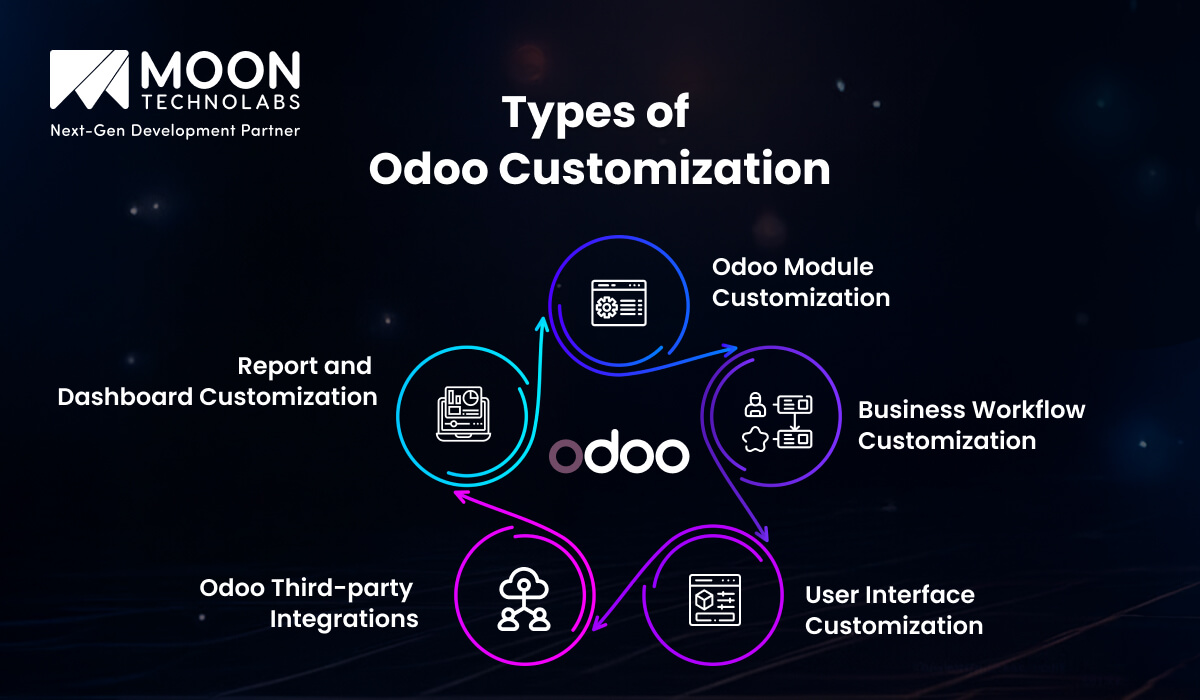
To get the most out of Odoo ERP customization, you need to select the right type for your organization. It helps you select the best approach without compromising future upgrades and system stability. Let’s explore some of its important types:
Module customization involves revamping or extending Odoo’s standard modules. These include accounting, sales, human resources, inventory, and more. It includes activities such as changing validation rules, adding new fields, creating new modules, and implementing custom business logic.
Module-level customization is well-suited for fast-growing enterprises. It ensures the ERP reflects actual operational requirements and doesn’t compel the team to adopt generic workflows.
Meanwhile, IT teams should ensure that custom modules adhere to the latest Odoo development standards. This is essential to maintain performance and upgrade compatibility.
We all know that every business has its own unique process. Odoo customization enables automation of processes across departments.
Whether it’s automating triggers between modules, configuring approval flows, implementing business rules, or defining custom states, it covers the full range.
We can consider a scenario where a finance team needs multi-level invoice approval, while manufacturing units may require automated procurement triggers based on an inventory threshold.
A well-defined workflow customization minimizes errors and manual intervention. It also ensures consistent operations across teams, which is important for both compliance and scalability.
With a proper customization of the user interface (UI), you can improve forms, menus, dashboards, etc. It helps boost your business’s productivity and reduce training time by hiding unnecessary fields, simplifying screens, designing intuitive navigation, and more.
UI customization strikes an adequate balance between usability and maintainability, making changes that don’t affect future updates or performance.
To run your business successfully, you need to use a range of software systems to make a connected digital ecosystem. You can get help with the Odoo integration for this. The best part of Odoo is its ability to integrate with CRM tools, payment gateways, BI tools, eCommerce platforms, logistics providers, and more.
These integrations are essential for several reasons, including eliminating duplication, streamlining data flow, and enabling real-time decision-making.
However, your IT team should play a crucial role in designing the integration, using standardized connectors and secure APIs. These are essential for ensuring data integrity, long-term reliability, and security.
You will not be able to get accurate insights from any ordinary Odoo report. Meanwhile, custom dashboards and reports enable you to track key metrics, including operational, KPI, and financial performance.
You can monitor all these things in real time. It includes creating a role-based dashboard, automated reporting schedules, advanced analytics, and more. An effective reporting customization enables management to gain actionable insights while ensuring data-driven decision-making across the business.
We provide custom Odoo solutions tailored to your workflows to improve efficiency, reduce costs, and increase ROI. Let’s make your investment result-oriented.
Talk to Us to Customize Odoo
Odoo customization helps your business create an ERP system that better aligns with your operational reality and long-term business objectives. Let’s explore some of these important benefits, which are as follows:
Tailored Odoo can automate business-specific workflows. By using this, businesses can eliminate manual tasks and workarounds. They can automate everything from notifications and approvals to rule-based actions and data synchronization.
Process-specific automation is crucial for reducing human error, whether it’s automating procurement based on stock levels or triggering invoicing at project milestones. It provides full consistency, which prevents teams from focusing on high-value work.
The tailored Odoo system redefines how departments interact with the ERP, reducing operational issues. It allows businesses to achieve faster processing times, improved cross-functional coordination, and reduced system redundancies.
They can gain it by aligning modules, data structures, and workflows. It reduces system friction, manual interventions, and dependency, and enhances productivity across the enterprise.
Tailoring the Odoo platform by adding new modules and features enables organizations to scale quickly. Whether you wish to expand your business into new markets, onboard users, or add product lines, Odoo environments adapt to changes without disrupting major operations.
This scalability is essential to offer a long-term ROI. And it prevents the ERP investment that requires the business to evolve.
When implementing a new ERP, you may encounter challenges, such as user resistance. Tailoring Odoo’s workflows, user interface, role-based access, and related settings improves usability. It aligns the system better with how employees work.
Whether it’s relevant dashboards, simplified screens, or intuitive navigation, they reduce training time and increase daily efficiency. Higher user adoption leads to better data process compliance, data quality, and system success.
When you customize, Odoo acts as a centralized business platform. It provides a comprehensive view and enables you to track operations by integrating third-party systems, multiple departments, custom workflows, and more.
Centralized management plays a vital role in improving visibility and data accuracy, providing leadership with real-time insights. It enables fast, informed decision-making across the service provider.
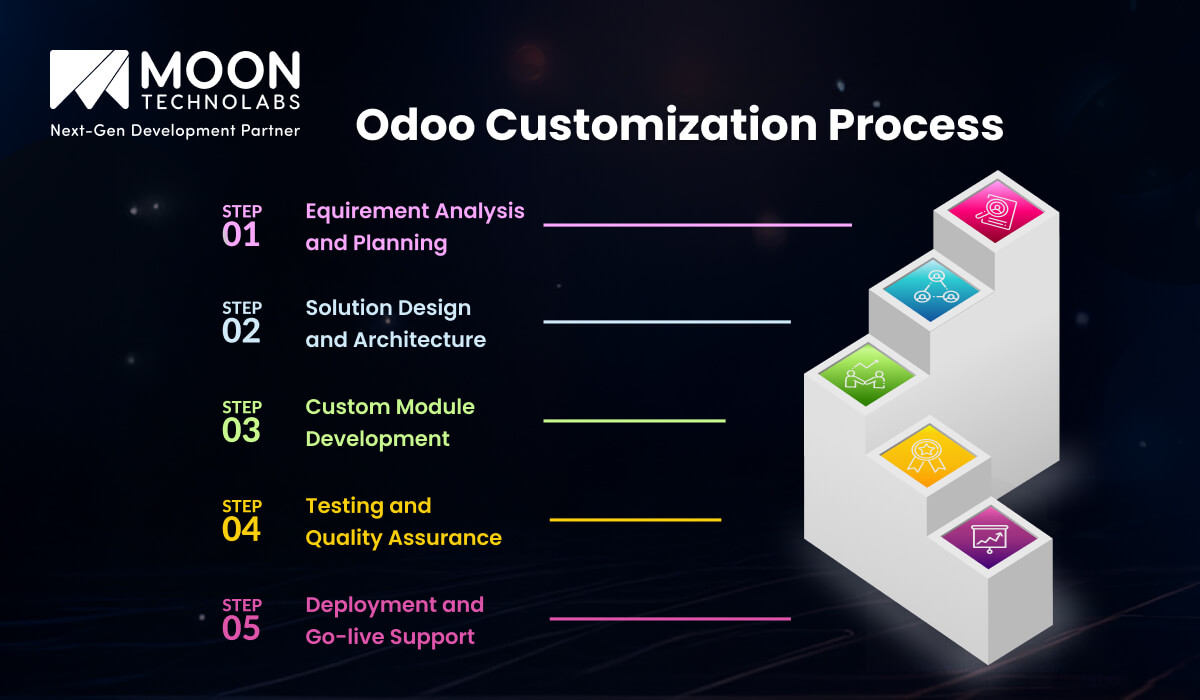
The Odoo customization process includes specific steps for defined purposes and delivers business value. Let’s explore each step one by one:
The first step is to obtain a detailed overview of business requirements. During this phase, service providers understand your existing workflow, identify gaps in standard Odoo modules, and define your customization goals.
Professionals across departments, including finance, operations, and IT coordination, work together to focus on requirements aligned with business impact. One should plan thoroughly at this stage to avoid unnecessary customization, scope creep, and future rework.
During this stage, the team designs an upgrade-friendly and scalable solution. It includes choosing the perfect customization approach, whether it’s configuration versus development.
It defines workflows, data models, integration points, and more. A robust architecture enables custom components that align better with Odoo’s framework, support future expansion, maintain performance standards, and more, without causing system instability.
This phase focuses on developing custom modules or extending existing ones using best coding standards. This phase focuses on creating user interfaces, business logic, and automated workflows tailored to the organization’s needs.
Modular, clean code is necessary to ensure maintainability, support long-term ERP stability, and minimize upgrade complexity.
Testing is essential to fully validate performance, functionality, security, and related areas. Functional testing verifies that business processes function as expected, whereas regression and integration testing verify customizations that don’t affect existing modules.
QA prevents data inconsistencies, minimizes risk, and ensures the system operates reliably in real-world scenarios.
This is the final stage of tailoring the Odoo ERP platform. It involves deploying the tailored platform in a real-world production environment and supporting users throughout go-live.
It further includes numerous activities such as user training, data migration validation, post-launch monitoring, and more. Ongoing support can enable smooth adoption, faster issue resolution, and more. These allow businesses to realize the actual value of this customization.
While Odoo customization offers numerous advantages, it also presents challenges. These challenges significantly impact timelines, system stability, and ROI. Let’s discuss some of these challenges in detail:
Scope creep is a major challenge for this customization project. It requires strict change management; otherwise, it can lead to budget overruns, extended timelines, diluted project focus, and more.
Meanwhile, it’s necessary to have well-defined requirements and implement a thorough change-approval process to ensure customization aligns with business priorities.
While Odoo’s open-source, modular architecture offers flexibility, it also introduces technical complexity. In addition, customizing interconnected modules, ensuring compatibility with future versions, managing dependencies, and related tasks require unmatched technical expertise.
Additionally, poorly designed custom code often leads to upgrade challenges, performance issues, increased maintenance costs, and more. This underscores the importance of adopting a scalable architectural approach and adhering to Odoo standards.
During an Odoo migration, legacy data presents challenges for maintaining consistency, accuracy, and historical integrity. It’s indeed challenging, especially when the data structures differ.
Meanwhile, a poor or incomplete migration disrupts operations and erodes user trust. You need to plan everything, including data mapping, validation checks, and test migration.
When you perform more customization, it creates additional issues, such as bloated systems and version upgrades. Additionally, it requires additional maintenance effort.
Additionally, over-customization reduces the system’s agility, thereby limiting long-term scalability. The most important thing you can do is to customize only when you are sure it delivers value to your business.
Let’s tailor your existing Odoo solutions to your exact workflow with our certified professionals. Our solutions minimize complexity and improve efficiency.
Discuss Your Projects
A successful customization of the Odoo platform is necessary to build a scalable, stable ERP system and to develop new features. You can make this customization more valuable for your business by implementing the right practices. We will discuss some of them below:
A clear business objective is essential to making a successful customization decision. You need to determine how each customization improves compliance, efficiency, and decision-making.
It’s a good idea to focus on changes that deliver measurable results, such as increased visibility, reduced processing time, improved customer experience, and more. This alignment makes customization strategic.
The next important step is to follow Odoo’s official development standards, which are critical to system stability. Ensure custom modules are properly named, well-structured, and loosely coupled. It helps you avoid dependency issues.
With the proper use of security rules, ORM, and API conversion, you find the possibility to integrate custom code with core modules smoothly. Standards-based development practice places great importance on a long-term perspective. It simplifies troubleshooting, minimizes bugs, and reduces upgrade risk, among other benefits.
Please note that Odoo releases necessary updates regularly, including security patches, features, and performance improvements. Please keep these updates in mind when performing customization.
It’s also advisable to plan upgrades as early as possible to prevent costly rework and ensure the ERP remains secure, future-ready, and well supported.
Documentation is pivotal for a successful Odoo ERP customization. Still, most businesses ignore it. Ensure your technical documentation includes complete workflows, module architecture, dependencies, configuration settings, and more.
Functional documentation enables businesses to get details of system behavior and processes. Proper documentation is essential for maintaining continuity, even when troubleshooting is simplified, team changes occur, onboarding is accelerated, and more.
As a business grows, the tailored Odoo ERP platform should support that growth. It should have a scalable design that enables adding new users, modules, or integrations without affecting current operations.
It should include role-based access controls, flexible data models, modular workflows, and more. You can plan effectively by considering your future scalability to secure your ERP investment.
A well-designed Odoo customization tailored to specific operational issues can address a range of needs. Following are some of the most popular use cases of this customization across a large number of industries:
The manufacturing sector leverages this customization to minimize downtime, optimize inventory, and improve production accuracy. Let’s explore some of the use cases:
Odoo customization is highly popular among retail and e-commerce businesses for its versatility. Let’s explore some of them:
It’s mandatory for any healthcare organization to maintain data security and adhere to strict compliance standards. They can achieve all these through customization of the Odoo platform.
It also helps healthcare service providers to boost operational efficiency. For this, they don’t need to compromise on patient safety. The following are some other use cases of this tailored solution:
A tailored Odoo solution has also gained significant acceptance among finance organizations for improving their financial controls. Some other common use cases of this solution are as follows:
For logistics and supply chain operations, Odoo customization delivers process automation, real-time visibility, and more. It helps businesses take their delivery accuracy to the next level. It also minimizes operational costs, thereby boosting customer satisfaction.
The following are some of the most popular and common use cases:
The Odoo implementation cost is not fixed and varies based on factors such as module complexity, business needs, level of personalization, testing effort, development hours, post-deployment support, Odoo version, and more.
Let’s understand different scenarios when the cost varies for a tailored Odoo solution:
With outstanding ERP expertise, we have an impressive track record of offering top-rated Odoo development services. We do it based on the specific needs of businesses across many industries.
We take an upgrade-friendly, security-first development approach, ensuring custom modules align with long-term business objectives and Odoo standards. We have the expertise to build future-ready, performance-driven ERP systems, from requirements analysis through to live support.
Our team has sufficient domain expertise and maintains transparent communication. We always work with a consultative mindset to help organizations improve system adoption, optimize workflows, and maximize results. We work hard to make your Odoo investment worthwhile.
You now understand the importance and benefits of Odoo customization after reviewing the guide above, right? It’s advisable to take a strategic approach, supported by the right practices, clear objectives, and expert execution.
It provides higher efficiency, automation, and scalability, without compromising system stability. Partner with a top-tier service provider like us, with extensive expertise in customizing Odoo to unlock its full potential.
01
02
03
04
05

Jayanti Katariya is the CEO of Moon Technolabs, a fast-growing IT solutions provider, with 18+ years of experience in the industry. Passionate about developing creative apps from a young age, he pursued an engineering degree to further this interest. Under his leadership, Moon Technolabs has helped numerous brands establish their online presence and he has also launched an invoicing software that assists businesses to streamline their financial operations.


Submitting the form below will ensure a prompt response from us.
We refine our expertise to deliver innovative business solutions.





500 N Michigan Avenue, #600, Chicago IL 60611
13500 Long Is Dr, Pflugerville, TX 78660, USA

C/105 Ganesh Meridian, S.G. Highway, Ahmedabad, GJ 380060


Ayse D.
Co-Founder France
“ I highly recommend Moon Technolabs as the quality of service is wonderful. We have hired this company to develop the product based on some complex & technical issues. We get the best quality services as compared with others in the market. Huge Thanks to Moon Technolabs as the team is always ready to give the solution all time.”

Justin G.
Founder & CEO USA
USA“ Moon Technolabs is a pioneer in the WebRTC based project as they have fixed complicated segments of the module by fulfilling different product lines by providing 24X7 customer support. We really recommended Moon Technolabs as they are able to develop products as per the module deadline and project timeline.”

Flavio S.
Founder & Managing Director Germany
“I am happy to recommend Moon Technolabs for their app development services. They successfully developed apps for me, and I am highly satisfied with the overall outcomes. The development team has swiftly addressed the issues with responsive and effective communication to understand the requirement quickly and actively resolve the back-and-forth problems that arose...”

Jay M.
Founder & CEOUSA“Moon Technolabs is the best company that provides advanced apps and websites development services in the USA and Europe. I am a newbie to develop my app with an external team. I am really happy to work with them as I am not that much mobile apps user. Here, the team and specially the CEO of Moon Technolabs helps me to let me know about the benefits of my app to generate revenue....”


Our Offices
India
C/105 Ganesh Meridian,S.G. Highway, Ahmedabad, GJ 380060USA
500 N Michigan Avenue, #600, Chicago IL 60611Contact Information


