
 Total Views: 385
Table of Content


Blog Summary:
This guide pulls back the curtain on the high-stakes world of custom ERP development. We will explore how to build an agile, AI-powered ERP system that adapts to your requirements in real-time. So, let’s get started on the roadmap to building a future-proof ERP that truly fits your business.
Table of Content
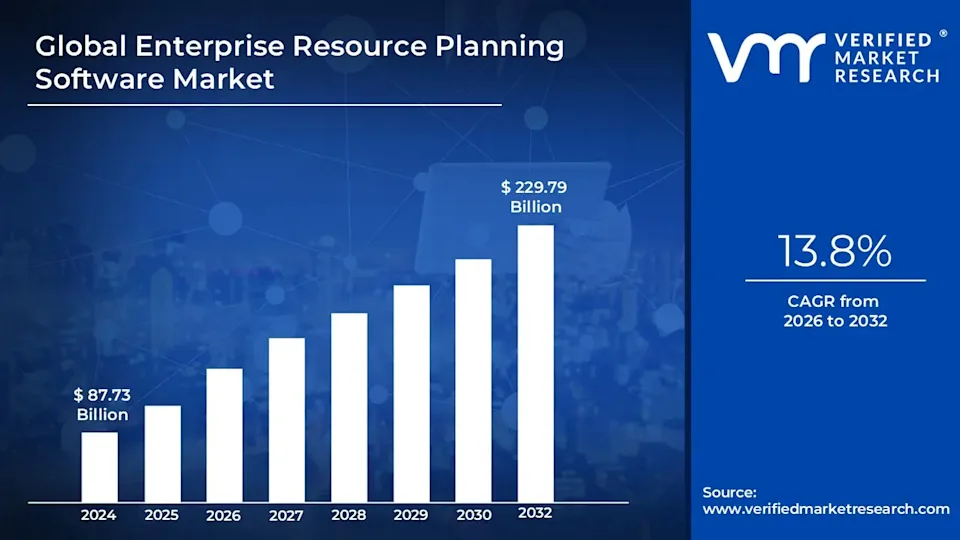
Building a custom ERP is a high-stakes investment, and the global market reflects this urgency. With the ERP software market projected to reach $230 billion by 2032, it is clear that enterprises no longer view these systems as optional back-office tools but as essential engines for growth.
For many organizations, a bespoke ERP is the difference between operational stagnation and explosive scale. However, ERP success is defined by its strategic planning, resource commitment, and a crystal-clear roadmap to ROI. Whether you are a mid-sized manufacturer or a global enterprise, the “one-size-fits-all” approach to software is a relic of the past.
Successful ERP projects are defined by factors such as module complexity, deployment locations, and data migration complexity. An unclear plan doesn’t just delay your launch date but also jeopardizes your budget and your team’s productivity.
In this guide, we break down the essential steps and timelines of ERP system development. We’ll explore how to align your business goals with your technical requirements, helping you navigate the complexities of customization and data conversion with confidence.
Enterprise resource planning (ERP) systems have operated in a static manner for years. Over time, the monolithic structures that once provided stability have become bottlenecks. Enterprises are moving away from legacy setups for several critical reasons:
Traditional ERPs were complex to install and even harder to change. Businesses are now prioritizing composability. They are looking for a modular ecosystem that lets them plug in advanced features without rebuilding their entire infrastructure.
The cost of maintaining physical servers and manual updates is becoming indefensible. Organizations are rethinking ERPs to utilize Cloud tools and platforms, which provide:
Data is only valuable if it’s actionable. Enterprises are seeking custom ERP development to integrate Artificial Intelligence (AI) and Machine Learning (ML). They are looking for a system that records what happened and predicts what will happen. The system should predict inventory shortages and identify fluctuating market trends before they hit the bottom line.
A poor user interface leads to employee burnout and high error rates. Modern enterprises realize that an ERP is only as good as the people using it. There is a massive push toward consumer-grade UX interfaces that are as intuitive as a smartphone app, reducing training time and boosting daily efficiency.
It’s a daunting decision to choose between building a custom ERP and buying a commercial off-the-shelf (COTS) solution. Usually, it comes down to three factors: Control, Cost, and Complexity.
“Bought” systems like SAP or Oracle offer a fast start, but often force you to change your business processes to fit the software. Conversely, “Built” systems are a long-term investment designed to wrap around your unique workflows.
| Feature | Custom Build [Bespoke] | Off-the-Shelf [SaaS/Licensed] |
|---|---|---|
| Upfront Cost | High (Development + Design) | Lower (Subscription fees) |
| Long-term Cost | Lower (No per-user licensing) | High (Scaling seats gets expensive) |
| Customization | Unlimited; built for your workflow | Limited to vendor configurations |
| Implementation | Slower (Requires dev lifecycle) | Faster (Plug and play) |
| Ownership | You own the IP and the data | You rent the software |
| Maintenance | In-house or partner-led updates | Managed by the software provider |
| Competitive Edge | High (Unique proprietary features) | Low (Your rivals use the same tools) |
A custom ERP is successful when it addresses specific business challenges. Every business industry has different needs. However, we have assembled the core features representing the modern enterprise architecture:
Consider modules as the building blocks of your ERP system. Instead of a single application, a modular approach lets you build specialized “hubs” for each department (Finance, HR, Inventory Management, and CRM). This ensures that each department has the specific tools it needs and they all speak the same digital language.
A centralized database is the heart of an ERP, ensuring a single source of truth for the entire company. When the sales team closes a deal, the inventory level updates instantly, and the finance department sees the projected revenue in real-time. This eliminates the data silos that lead to costly human errors and conflicting reports.
The primary goal of an ERP is to prevent people from doing routine work. Effective workflow management automates repetitive tasks such as generating invoices after a shipment is scanned or sending low-stock alerts to procurement. Define these “If/Then” triggers within the software to free up your team for high-value strategic thinking.
Data security is paramount. RBAC ensures that employees only see the information necessary for their specific job. For example, a warehouse manager needs to see stock levels but shouldn’t have access to payroll data. This feature protects sensitive information and simplifies the user interface by hiding irrelevant menus for specific roles.
Modern ERPs are moving from “descriptive” (what happened) to “predictive” (what will happen). By embedding AI, your ERP system can analyze historical data to forecast demand, detect fraudulent transactions, or suggest the most efficient shipping routes. It turns your software from a digital filing cabinet into a strategic advisor.
For businesses in manufacturing or logistics, Internet of Things (IoT) integration is a game-changer. By connecting your ERP directly to warehouse sensors, GPS trackers on trucks, or factory machinery, the system captures data automatically without human intervention. This provides a “live feed” of your physical operations directly into your software dashboard.
We combine AI, IoT, and Cloud-native architecture to develop ERP systems that are intuitive as well as powerful.
A high-performing ERP system is modular by design. This allows an enterprise to start with the essentials and scale its digital infrastructure as the company grows. Here are the foundational pillars of a modern ERP system:
This module is considered the brain of the ERP. The finance component moves beyond simple bookkeeping to provide a real-time snapshot of the company’s financial health. It automates accounts payable (AP), accounts receivable (AR), and general ledger entries. By integrating tax compliance and automated financial reporting, you can ensure your month-end close takes hours instead of weeks.
Efficiency starts with how you spend. This module streamlines the entire procure-to-pay cycle. It manages vendor relationships, tracks purchase orders, and evaluates supplier performance. It centralizes these records so that businesses can negotiate better contracts and prevent unauthorized purchases outside of agreed contracts.
This module provides granular visibility into stock levels, bin locations, and movement history. It uses features like FIFO/LIFO tracking and automated reorder points to prevent stockouts and overstocking. They are the two biggest killers of retail profit.
A built-in CRM tracks every interaction with a lead or client. Because it’s part of the ERP, a salesperson can see if a customer has unpaid invoices or if their favorite product is currently backordered, all before they pick up the phone.
The custom ERP must manage your most valuable asset: people. The HR module handles everything from onboarding and payroll to performance reviews and shift scheduling. It automates time-tracking and benefits administration. This allows HR professionals to focus on talent retention and company culture rather than paper pushing.
You Might Also Like:
The manufacturing module manages bills of materials (BOM), work orders, and production scheduling. It ensures that the shop floor has exactly what it needs to build a product, minimizing waste and maximizing machine uptime through better capacity planning.
Designing an enterprise-grade ERP is more about building a resilient foundation. If the architecture is inaccurate, the system will eventually pervert.
To ensure your project succeeds, you must address these strategic architectural layers before starting development. It’s important to get the architecture right in order to balance current performance with future scalability.
Whichever structural framework you choose determines how easily your system can adapt to change.
A Monolithic architecture is a single and unified unit. It is easier to deploy initially, but it becomes difficult to update later. A Modular ERP breaks the system into functional blocks. This allows you to update the finance module without risking a crash in the shipping module.
You Might Also Like:
While both aim for decentralization, Microservices take it further by making each small function (such as “Generate Invoice”) an independent service. SOA usually involves larger, shared components communicating via a central bus. Microservices offer the ultimate scalability but require a highly skilled DevOps development team to manage.
A cloud-native model offers the lowest overhead and the highest mobility. On the other hand, the on-premise infrastructure model is chosen by industries with extreme data sovereignty requirements. Hybrid architecture is the best of both worlds, which keeps sensitive data on-site while using the cloud for high-speed processing and mobile access.
Data is the lifeline of an ERP system. If the data is fragmented, the system becomes useless. Here are the different layers of a data architecture:
The “Customer ID” must be consistent across the sales, shipping, and billing departments. A master data strategy creates a centralized dictionary for all core entities, preventing duplicate records and conflicting reports.
Moving from an old system to a new one is the most dangerous phase of ERP development. You must decide whether to migrate everything overnight or in a phased approach, department by department.
Enterprises cannot afford five minutes of downtime, let alone five hours. Your architecture must include automated failovers and geo-redundant backups. Furthermore, data retention policies ensure you stay compliant with legal requirements for how long records must be stored.
In the era of cyber warfare and strict privacy laws, security cannot be an afterthought. Security protocols must be integrated into the code.
IAM goes beyond passwords. It uses Multi-Factor Authentication (MFA) and Single Sign-On (SSO) to verify users’ identities and grant them only the privileges necessary to do their jobs.
Data must be encrypted both at rest (in the database) and in transit (moving between servers). Simultaneously, detailed audit logs must track every change to the system, providing a “paper trail” for forensic analysis in the event of a breach.
Depending on your sector, your ERP system must be certified to specific standards. The healthcare software must be HIPAA compliant. The finance industry needs to meet SOC 2 or PCI DSS. standards. Global trade must comply with GDPR or CCPA for data privacy.
A modern ERP must incorporate advanced technologies during development. So that enterprises can ensure their investment appreciates in value over time.
Artificial Intelligence is shifting the ERP from a “system of record” to a “system of intelligence.” Machine Learning (ML) algorithms can scan millions of historical data points to identify patterns that humans miss.
A monolithic software block is hard to update. Instead, a cloud-native architecture treats the ERP as a collection of interchangeable services. If you need a better payroll tool, you simply swap that module without breaking the rest of the system. This lego-like flexibility allows businesses to pivot their operations in weeks rather than years.
IoT bridges the gap between the digital office and the physical shop floor. You can get unfiltered data by connecting machinery, vehicles, and wearable devices directly to the ERP.
It offers asset tracking of every delivery truck through GPS location. Moreover, through predictive maintenance, sensors on a factory machine can alert the ERP that a part is likely to fail. Hence, it triggers a maintenance work order automatically before a breakdown occurs.
One of the biggest bottlenecks in ERP evolution is the shortage of developers. By building Low-Code/No-Code (LCNC) capabilities into the ERP, department heads and business analysts can create custom reports or simple workflow automations themselves. This democratizes innovation and keeps the IT department from becoming a bottleneck.
While often associated with crypto, Blockchain’s true value in ERP lies in its immutable ledger. In supply chain management, Blockchain creates an unalterable record of every handoff a product undergoes. This is vital for food safety, luxury-goods authentication, and pharmaceutical tracking, where “trust” must be verified through data.
Environmental, Social, and Governance (ESG) criteria are no longer optional for large enterprises. A future-proof ERP must include tools to track carbon footprints, manage waste, and monitor labor practices. By automating ESG data collection, companies can stay compliant with new global regulations and meet investors’ growing demand for transparent sustainability reporting.
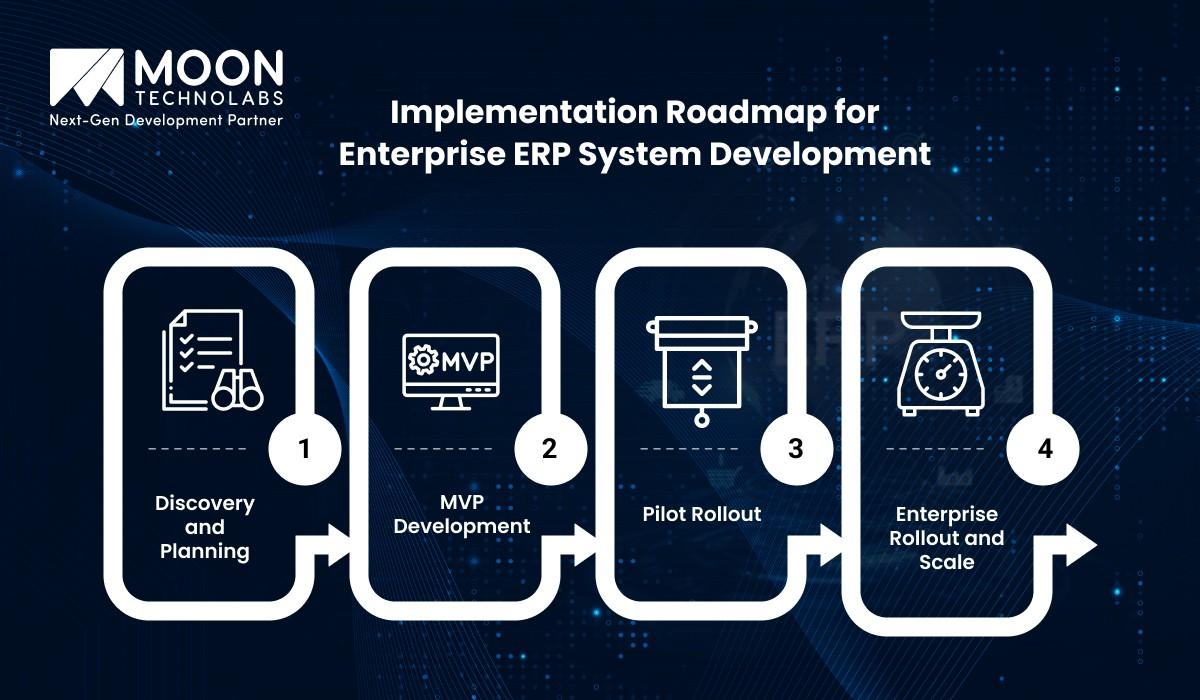
A successful ERP implementation can completely transform a company. To minimize risk and maximize ROI, we break the development lifecycle into five strategic phases.
This is the first phase to understand the “Why” of your project. This phase involves deep-dive workshops with stakeholders from finance, HR, operations, and sales departments. It consists of business process mapping, which lets you document current workflows and identify bottlenecks.
Also, gather the necessary requirements and distinguish between the features you must have and those that are nice to have. Moreover, you can choose the tech stacks, frameworks, databases, and cloud infrastructure that will support the system for the next decade.
Instead of trying to build a “perfect” system all at once, focus on the minimum viable product (MVP). The goal is to build the core engine, typically consisting of a centralized database and one or two critical modules (such as finance or inventory). This allows you to test the architecture in a real-world environment without the complexity of the full suite.
Once the MVP is stable, it’s time for a soft launch. Pick one department or a single geographical branch to act as the pilot group. Gathering direct input from the people using the software daily. Identify edge cases and integration hiccups in a controlled environment. Use the pilot phase to create manuals and video tutorials for the rest of the company.
With the lessons learned from the pilot, you move to the full-scale deployment. This is the phased transition where the entire organization migrates to the new ERP. Perform data migration securely into the new system. Help employees transition away from old habits and spreadsheets. Connect the ERP to external third-party tools, such as payment gateways or shipping APIs.
An ERP is never truly finished. Once the system is live, the focus shifts to long-term health. Monitor system performance regularly to stay fast as data volume grows. Adding advanced features like AI-driven forecasting or IoT tracking based on changing business requirements. Conduct regular security audits to meet new global standards.
Determining the total cost of ownership (TCO) for an enterprise ERP is a multifaceted process that goes far beyond the initial development phase. To build a sustainable system, organizations must balance Capital Expenditures (CapEx) with Operating Expenses (OpEx).
ERP software development cost is also influenced by the complexity of data migration from legacy systems, the number of third-party API integrations, and the depth of custom UI/UX design. Furthermore, hidden costs like change management and employee training programs often account for a significant portion of the budget. A well-planned financial roadmap ensures the ERP scales with the business.
At Moon Technolabs, we develop composable, secure, and compliant ERP systems. Partner with our agile team who prioritizes your ROI and data integrity from Day 1.
Custom ERP development is a high-stakes evolution that requires more than just technical expertise. The path to a fully integrated enterprise system can be riddled with technical complexities and integration difficulties. It requires a strategic partner who understands the terrain.
At Moon Technolabs, we provide enterprise software development services and view it as a game-changing journey toward your organization’s operational excellence. We have spent over a decade mapping out the most efficient routes to success, helping our clients avoid common pitfalls such as budget overruns and data silos. Contact us today.
01
02
03
04
05

Jayanti Katariya is the CEO of Moon Technolabs, a fast-growing IT solutions provider, with 18+ years of experience in the industry. Passionate about developing creative apps from a young age, he pursued an engineering degree to further this interest. Under his leadership, Moon Technolabs has helped numerous brands establish their online presence and he has also launched an invoicing software that assists businesses to streamline their financial operations.


Submitting the form below will ensure a prompt response from us.
We refine our expertise to deliver innovative business solutions.





500 N Michigan Avenue, #600, Chicago IL 60611
13500 Long Is Dr, Pflugerville, TX 78660, USA

C-105, Ganesh Meridian, S.G. Highway, Ahmedabad, GJ 380060


Ayse D.
Co-Founder France
“ I highly recommend Moon Technolabs as the quality of service is wonderful. We have hired this company to develop the product based on some complex & technical issues. We get the best quality services as compared with others in the market. Huge Thanks to Moon Technolabs as the team is always ready to give the solution all time.”

Justin G.
Founder & CEO USA
USA“ Moon Technolabs is a pioneer in the WebRTC based project as they have fixed complicated segments of the module by fulfilling different product lines by providing 24X7 customer support. We really recommended Moon Technolabs as they are able to develop products as per the module deadline and project timeline.”

Flavio S.
Founder & Managing Director Germany
“I am happy to recommend Moon Technolabs for their app development services. They successfully developed apps for me, and I am highly satisfied with the overall outcomes. The development team has swiftly addressed the issues with responsive and effective communication to understand the requirement quickly and actively resolve the back-and-forth problems that arose...”

Jay M.
Founder & CEOUSA“Moon Technolabs is the best company that provides advanced apps and websites development services in the USA and Europe. I am a newbie to develop my app with an external team. I am really happy to work with them as I am not that much mobile apps user. Here, the team and specially the CEO of Moon Technolabs helps me to let me know about the benefits of my app to generate revenue....”


Our Offices
India
C-105, Ganesh Meridian, S.G. Highway, Ahmedabad, GJ 380060USA
500 N Michigan Avenue, #600, Chicago IL 60611Contact Information


