


AI Orchestration: The Complete Guide for Modern Businesses

Artificial Intelligence Team
Last Updated: Oct 05, 2026 Total Views: 89
Table of Content


Blog Summary:
AI orchestration brings structure to increasingly complex AI environments by coordinating different models, tools, data sources, and human decisions within a single workflow. This guide explains how orchestration works, where enterprises can apply it, what components it requires, and how businesses can implement it without losing control over performance, security, or scalability.
Table of Content
AI adoption is moving beyond individual tools and toward connected systems that can coordinate models, agents, data, and business applications. According to Grand View Research, the global AI orchestration market was valued at $9.76 billion in 2024 and is projected to reach $58.92 billion by 2033, growing at a 22.4% CAGR from 2025 to 2033.
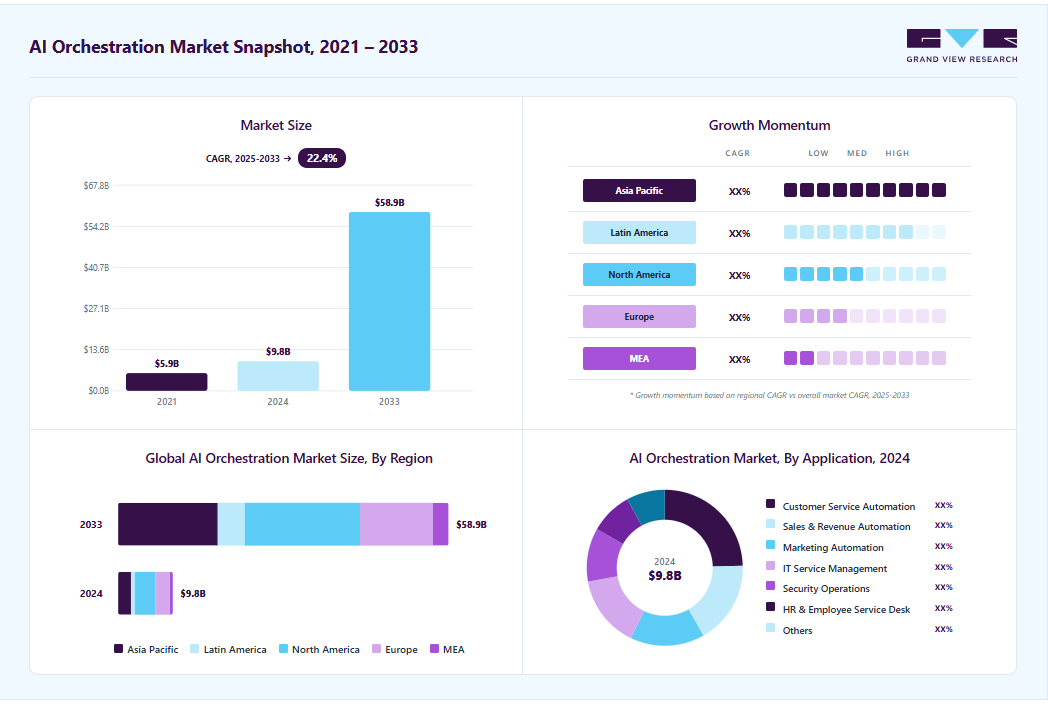
This growth reflects the increasing need to manage complex AI workflows at scale. But implementing AI orchestration involves more than connecting multiple tools—it requires the right architecture, workflow logic, integrations, security controls, and human oversight. In this guide, we’ll explore how businesses can implement AI orchestration effectively and build practical, reliable, scalable AI workflows.
What is AI Orchestration?
AI orchestration is the process of coordinating multiple AI models, tools, applications, and workflows so they can work together to complete tasks efficiently. Instead of relying on a single AI system, orchestration connects different components, manages how information moves between them, and determines which tool or model should handle each step.
For example, an AI orchestration system might use one model to understand a user’s request, another tool to retrieve data, and a third system to generate the final response.
The main goal of AI orchestration is to make complex AI workflows more automated, reliable, and scalable. It can help businesses manage tasks such as customer support, data analysis, content generation, software development, and business process automation.
By coordinating AI agents, APIs, databases, and other software, an AI orchestration platform lets organizations build intelligent workflows that can make decisions, take action, and adapt to changing requirements with less manual intervention.
Types of AI Orchestration
AI orchestration can vary based on business needs, workflow complexity, and system integration. Here are the key types of AI orchestration:
Workflow-based Orchestration
A predefined sequence connects different AI tasks, tools, and business processes. Each step passes its output to the next, creating a structured flow from start to finish. This works well for processes such as processing customer requests, reviewing documents, qualifying leads, or generating reports.
Agent-based Orchestration
AI agents are given specific goals and can determine the actions needed to achieve them. Rather than following only a fixed sequence, an agent can choose tools, gather information, evaluate results, and adjust its next step based on the situation. This makes the approach suitable for tasks that require reasoning and flexibility.
Model-based Orchestration
Different AI models can meet different requirements, rather than relying on one model for every task. A system may use a lightweight model for routine requests, a more advanced model for complex reasoning, and specialized models for tasks involving images, speech, or code. This helps balance performance, speed, and cost.
Event-driven Orchestration
AI workflows can be triggered automatically when a specific event occurs. A new customer inquiry, database update, uploaded document, or system alert can start a chain of AI-powered actions without manual intervention. This approach is particularly useful for automating real-time business processes.
Human-in-the-Loop Orchestration
Not every AI decision needs full automation. You can introduce human review at key stages that require approval, expertise, or additional judgment. For example, AI can analyze a document and flag potential issues, while a person reviews the findings before the process moves forward.
Multi-agent Orchestration
Complex tasks can be divided among multiple specialized AI agents, with each one responsible for a particular function. One agent might conduct research, another could analyze the findings, and a third could create the final output. Coordination between these agents lets them handle larger tasks collaboratively.
API and Tool-based Orchestration
AI becomes more useful when it can interact with the systems and tools surrounding it. Through APIs and integrations, an AI application can retrieve customer data, query databases, update records, send notifications, or perform actions in other software. This enables AI to move beyond generating responses and actively participate in business operations.
How Does AI Orchestration Work?
AI orchestration manages how different AI components interact, make decisions, and execute tasks within a workflow. Here’s how the process works step by step:
Step 1: Receive a Trigger or Request
The process begins when a user, application, business system, or automated event generates a request. The orchestration layer captures the input, identifies the relevant workflow, and prepares the task for processing based on predefined rules and business requirements.
Step 2: Understand and Break Down the Task
The orchestration system analyzes the request and divides complex objectives into smaller, manageable tasks. It determines dependencies, priorities, required information, and expected outcomes, creating a structured workflow that AI agents, models, tools, and applications can execute.
Step 3: Select the Right AI Model, Agent, or Tool
Based on task requirements, the orchestrator determines which AI model, agent, API, or enterprise tool should handle each activity. Selection can consider capabilities, accuracy, cost, latency, availability, and organizational policies to ensure appropriate resource utilization.
Step 4: Retrieve Data and Context
The orchestration layer gathers relevant information from databases, documents, knowledge bases, APIs, and enterprise applications. Retrieval mechanisms provide the context AI models and agents need, helping them generate responses and make decisions using current, task-specific information.
Step 5: Execute the Workflow
AI agents, models, tools, and applications perform their assigned tasks according to the workflow. The orchestration engine manages sequencing, dependencies, communication, data exchange, and handoffs between components, ensuring each activity contributes toward the overall business objective.
Step 6: Validate the Output
Before completing the workflow, the system evaluates generated results against defined rules, quality criteria, business policies, or validation mechanisms. Outputs can be checked for accuracy, completeness, consistency, security, and compliance before delivery or use.
Step 7: Take Action or Request Human Approval
Once validated, the system can automatically perform an authorized action or route the task to a human for review. Human approval can be incorporated for sensitive, high-impact, or exception-based decisions, maintaining appropriate human oversight within AI workflows.
Step 8: Monitor and Optimize
The orchestration system continuously monitors workflow performance, costs, latency, errors, model behavior, and outcomes. Organizations can use these insights to identify bottlenecks, refine workflows, improve resource allocation, and evaluate a proof of concept before broader deployment.
Create More Connected AI-Powered Business Processes
Design orchestration solutions that bring your AI tools and existing systems together for more coordinated business workflows.
Key Components of an AI Orchestration Architecture
A well-structured architecture brings together models, agents, data, APIs, and business systems to support coordinated workflows. Here are the key components:
AI Models and Large Language Models
AI models and LLMs provide the intelligence required to understand requests, generate content, analyze information, and support decisions. AI orchestration can select appropriate models based on task requirements, complexity, performance, cost, and response time.
AI Agents
AI agents perform specific tasks using models, tools, data, and defined objectives. They can reason through multiple steps, retrieve information, make decisions, and take actions. Orchestration coordinates multiple autonomous agents, manages interactions, and enables effective collaboration across complex workflows.
Data and Knowledge Layer
The data and knowledge layer provides AI systems with access to relevant organizational information. It can include databases, documents, knowledge bases, data warehouses, and vector databases. Retrieval mechanisms help models access accurate, contextual information when completing tasks.
Tools, APIs, and Enterprise Applications
Tools, APIs, and enterprise applications enable AI agents to perform actions across business systems. Through integrations, AI can retrieve records, update databases, create tickets, access CRM platforms, interact with enterprise applications, and execute tasks beyond generating responses.
Workflow and Orchestration Engine
The workflow and orchestration engine coordinates models, agents, tools, data, and business processes. It manages task sequences, routing, decisions, tool calls, approvals, and handoffs. This central layer ensures complex AI workflows execute consistently, efficiently, and according to defined processes.
Governance, Security, and Access Control
Governance and security controls ensure AI systems operate within organizational policies and regulatory requirements. This component manages authentication, authorization, data access, privacy, audit trails, and permissions, helping organizations control what AI systems can access, process, and perform.
Monitoring and Observability
It provides visibility into AI workflows, model performance, costs, latency, errors, and agent activities. Organizations can track operational metrics, identify issues, evaluate outcomes, and optimize workflows. This supports reliable, transparent, and continuously improving AI operations.
You May Also Like:
Demystifying AI Agent Architecture: A Blueprint for Enterprise Systems
AI Orchestration vs Related Technologies
AI orchestration overlaps with several modern technologies but serves a distinct role in coordinating them. Here’s how it compares with related technologies:
| Technology | Main Purpose | How It Differs from AI Orchestration |
|---|---|---|
| AI Orchestration | Coordinates AI, tools, data, and workflows | Acts as the coordination layer |
| Generative AI | Creates text, images, code, etc. | Focuses on generation, not coordination |
| LLMs | Understands and generates language | Provides language intelligence |
| AI Agents | Performs multi-step tasks autonomously | An orchestrator can manage an agent |
| Machine Learning | Makes predictions from data | Focuses on learning and prediction |
| RPA | Automates repetitive UI tasks | Focuses on rule-based software actions |
| MLOps | Manages ML model lifecycle | Focuses on deploying and monitoring models |
| API Integration | Connects systems and applications | Provides system connectivity |
| RAG | Retrieves information for AI | Provides knowledge retrieval |
Benefits of AI Orchestration
Coordinating AI models, tools, and workflows can create measurable improvements across business operations. Here are the key benefits organizations can achieve:
Streamlines Complex AI Workflows
AI orchestration connects multiple systems, AI models, agents, tools, APIs, and data sources into a coordinated workflow. It manages task flow, selects the right resources, and ensures each step runs in the correct sequence.
Improves AI Resource Utilization
AI agent orchestration helps organizations use AI models and computing resources more efficiently. By dynamically selecting models, tools, and infrastructure based on task requirements, it reduces unnecessary processing and optimizes resource use.
Enables Scalable AI Operations
As AI workloads grow, orchestration provides a structured way to manage more models, agents, users, and workflows. Organizations can scale AI operations while maintaining consistent processes and performance.
Enhances Operational Efficiency
By automating task routing, model selection, data retrieval, and other repetitive coordination activities, AI orchestration reduces manual intervention. This lets teams focus on higher-value work while AI systems handle routine operations.
Improves Governance and Control
AI orchestration provides centralized mechanisms for managing AI workflows, permissions, policies, and interactions between systems. This supports better oversight, security, compliance, and responsible AI use across an organization.
Supports Better Human-AI Collaboration
Orchestration can determine when AI should act independently and when it needs human input or approval. This creates a more effective collaboration between people and AI, particularly for complex or high-impact business processes.
Provides Greater Visibility
Centralized orchestration makes it easier to monitor AI workflows, model usage, agent performance, and task outcomes. Greater visibility helps organizations identify bottlenecks, troubleshoot problems, measure results, and continuously improve AI operations.
Enterprise Use Cases for AI Orchestration
From customer service to operations and analytics, coordinated AI workflows can support a wide range of enterprise functions. Here are some practical use cases to consider:
Customer Service and Support
AI orchestration can coordinate chatbots, AI agents, knowledge bases, CRM systems, and human support teams to deliver faster and more personalized customer service. It can automatically classify customer requests, retrieve relevant information, resolve routine issues, and escalate complex cases to the appropriate employee.
Examples:
- Automated customer query resolution
- Intelligent ticket routing and escalation
- Personalized customer responses
- Knowledge-base and document retrieval
- Agent assistance during live interactions
Sales and Marketing
AI orchestration enables organizations to connect customer data, marketing platforms, CRM systems, and AI models into coordinated sales and marketing workflows. It can support lead qualification, content generation, customer segmentation, campaign personalization, and sales follow-ups.
Examples:
- Lead scoring and qualification
- Personalized marketing campaigns
- Automated content creation
- Customer segmentation
- Sales outreach and follow-up automation
Finance and Accounting
In finance and accounting, AI orchestration can coordinate AI models with financial systems, documents, databases, and business rules. This can streamline processes such as invoice processing, financial analysis, reconciliation, reporting, and fraud monitoring while maintaining appropriate human oversight.
Examples:
- Invoice and expense processing
- Automated account reconciliation
- Financial document analysis
- Fraud and anomaly detection
- Management reporting and analysis
IT Operations
AI orchestration can bring together monitoring systems, IT service-management platforms, automation tools, and AI agents to support IT operations. It can detect incidents, analyze system alerts, identify potential causes, recommend actions, and automate selected remediation tasks.
Examples:
- IT incident detection and response
- Automated troubleshooting
- System monitoring and alert analysis
- Service-ticket classification and routing
- Infrastructure optimization
Human Resources
AI orchestration can connect HR systems, employee data, knowledge repositories, and AI services to streamline employee and HR workflows. It can assist with employee inquiries, recruitment processes, onboarding, policy information, and workforce analytics while applying appropriate access controls to sensitive information.
Examples:
- Employee self-service assistants
- Recruitment and candidate screening support
- Automated onboarding workflows
- HR policy and benefits assistance
- Workforce data analysis
Looking to Build More Connected AI Workflows?
Discuss your requirements with our team and explore an orchestration approach designed around your operational needs.
How to Implement AI Orchestration in Your Business?
Successful implementation requires the right processes, architecture, integrations, and controls. Here’s a step-by-step approach to implementing AI orchestration in your business:
Identify the Right Business Processes
Start by identifying workflows where AI can provide measurable value. Avoid attempting to automate your entire organization at once.
Look for processes that are:
- Repetitive
- Time-consuming
- Data-intensive
- Rule-based
- Dependent on multiple applications
- Frequently delayed by manual handoffs
For example, businesses might begin with customer-support ticket classification, document processing, lead qualification, invoice handling, or internal knowledge management.
Define the current process, identify its bottlenecks, and establish measurable goals before introducing AI.
Define Your AI Architecture
Once you have selected a use case, determine which systems need to participate in the workflow.
Your architecture might include:
- Large language models
- Machine-learning models
- AI agents
- Business applications
- APIs
- Databases
- Document repositories
- Workflow automation platforms
- Authentication and security systems
- Human approval steps
The orchestration layer coordinates these components.
Select the Appropriate AI Models
Different AI models have different capabilities, costs, response times, and accuracy levels.
Instead of using one model for every task, consider a model-routing strategy.
For example:
- A lightweight model can handle simple classification.
- A more capable model can process complex reasoning tasks.
- A specialized model can analyze images or documents.
- A traditional software rule can handle deterministic operations.
This approach can help businesses balance performance, cost, and reliability.
Connect Your Business Systems
AI orchestration becomes significantly valuable when AI can interact with existing business systems.
Depending on the workflow, integrations may include:
- CRM platforms
- ERP systems
- Customer-support software
- Payment systems
- Email platforms
- Databases
- Cloud storage
- Analytics platforms
- Internal knowledge bases
Use APIs and controlled integrations to allow AI systems to retrieve information and perform approved actions.
Create Workflow Logic
Next, define how information moves through the system. A simple workflow might look like:
Input → Classification → Data Retrieval → AI Processing → Validation → Action → Human Review
Define what happens when the AI succeeds, fails, receives incomplete information, or encounters an unusual request.
For example, if an AI system cannot confidently classify a customer request, the orchestration layer can automatically send the case to a human employee.
Add Security and Governance
AI orchestration adds complexity because multiple systems may access business data and applications.
Organizations should establish controls for:
- Data access
- User permissions
- API authentication
- Sensitive information
- Model access
- Audit logging
- Data retention
- Human approvals
- Compliance requirements
AI systems should receive only the access they need to perform their assigned tasks.
Businesses should also maintain logs so teams can understand which model or system produced an output and what actions followed.
Introduce Human-in-the-Loop Controls
AI orchestration does not necessarily mean removing people from the process.
For high-impact workflows, human oversight can be an important part of the architecture.
For example, an AI system might prepare a financial report, but a finance professional reviews and approves it before distribution.
Similarly, an AI system might draft a customer response while an employee handles escalated or sensitive cases.
This creates a balance between automation and human judgment.
Test Before Scaling
Before deploying an AI workflow across the organization, test it with realistic scenarios.
Measure factors such as:
- Accuracy
- Response time
- Cost per task
- Failure rate
- Escalation rate
- User satisfaction
- Security performance
Include normal cases as well as edge cases and failure scenarios. Continuous monitoring is equally important because AI systems can behave differently as models, data, applications, and business requirements change.
Regularly monitoring, optimizing, and updating workflows helps businesses maintain accuracy, efficiency, security, and scalability as their AI initiatives evolve. With a well-designed orchestration strategy, organizations can gradually expand AI across different functions while maintaining appropriate human oversight and control.
As AI orchestration becomes part of ongoing business operations, the right technical expertise can make implementation and scaling more effective. Moon Technolabs helps businesses navigate this process through AI development, system integration, workflow automation, and scalable AI solutions tailored to their specific requirements.
Conclusion
AI orchestration brings structure to complex AI environments by deciding which model, tool, data source, or human should handle each step of a workflow. When implemented around clear business processes, it can make AI systems more coordinated, reliable, and easier to scale.
Moon Technolabs helps businesses design these connected workflows through AI development services that fit their existing systems and operational requirements.
FAQs
01
What is the difference between AI orchestration and AI automation?
AI automation focuses on automating specific tasks or processes, while AI orchestration coordinates multiple AI systems, tools, and workflows to complete more complex processes.02
How does AI orchestration work with AI agents?
AI orchestration provides the structure AI agents operate within. It can assign tasks to different agents, provide access to required tools or data, coordinate their outputs, and route results to another agent or a human when necessary.03
Which business processes can benefit from AI orchestration?
Processes involving multiple steps, systems, or decisions can benefit from orchestration. Common examples include customer support, document processing, lead qualification, financial workflows, data analysis, and internal knowledge management.04
Can AI orchestration integrate with existing business systems?
Yes. AI orchestration can connect with systems such as CRMs, ERPs, databases, customer-support platforms, cloud storage, analytics tools, and other applications through APIs and controlled integrations.05
How can we measure the ROI of AI orchestration?
You can evaluate ROI using metrics such as processing time, operational costs, manual effort, error rates, task completion rates, customer satisfaction, and revenue or productivity improvements tied to the workflow.



Explore the latest insights on Artificial Intelligence, including Generative AI, Agentic AI, natural language processing, computer vision, automation, and enterprise AI solutions. This category covers industry trends, practical applications, implementation strategies, and innovations that help businesses leverage AI for smarter decision-making and digital transformation. Stay updated with evolving AI technologies that are reshaping industries worldwide.
Submitting the form below will ensure a prompt response from us.
We refine our expertise to deliver innovative business solutions.





205 N Michigan Avenue, #810, Chicago, 60601, Illinois, United States
13500 Long Is Dr, Pflugerville, TX 78660, USA

C/105 Ganesh Meridian, S.G. Highway, Ahmedabad, GJ 380060


Ayse D.
Co-Founder France
“ I highly recommend Moon Technolabs as the quality of service is wonderful. We have hired this company to develop the product based on some complex & technical issues. We get the best quality services as compared with others in the market. Huge Thanks to Moon Technolabs as the team is always ready to give the solution all time.”

Justin G.
Founder & CEO USA
USA“ Moon Technolabs is a pioneer in the WebRTC based project as they have fixed complicated segments of the module by fulfilling different product lines by providing 24X7 customer support. We really recommended Moon Technolabs as they are able to develop products as per the module deadline and project timeline.”

Flavio S.
Founder & Managing Director Germany
“I am happy to recommend Moon Technolabs for their app development services. They successfully developed apps for me, and I am highly satisfied with the overall outcomes. The development team has swiftly addressed the issues with responsive and effective communication to understand the requirement quickly and actively resolve the back-and-forth problems that arose...”

Jay M.
Founder & CEOUSA“Moon Technolabs is the best company that provides advanced apps and websites development services in the USA and Europe. I am a newbie to develop my app with an external team. I am really happy to work with them as I am not that much mobile apps user. Here, the team and specially the CEO of Moon Technolabs helps me to let me know about the benefits of my app to generate revenue....”


Our Offices
India
C/105 Ganesh Meridian,S.G. Highway, Ahmedabad, GJ 380060USA
205 N Michigan Avenue, #810, Chicago, 60601, Illinois, United StatesContact Information


