
 Total Views: 409
Table of Content


Blog Summary:
This blog provides comprehensive information on Video Conferencing App Development and how to approach it strategically. Whether it’s functions, business models, benefits of investments, necessary features, or development steps, you will be able to explore everything.
Table of Content
In today’s digital world, seamless communication is essential for businesses to ensure smooth workflows and improved productivity. Video conferences play a vital role in this. It has redefined how we collaborate, connect, and conduct business, whether in virtual classrooms, remote work, or global business meetings.
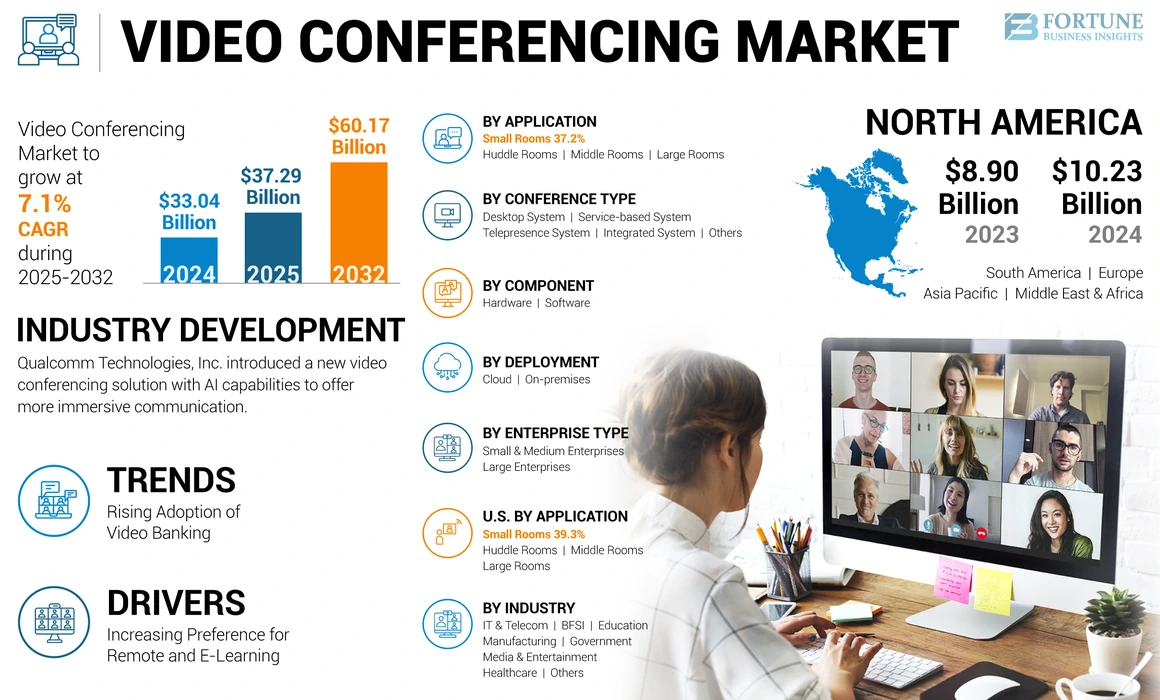
As a result, demand for video conferencing apps increased significantly, with a corresponding impact on their market size. Fortune Business Insights reports that the global video conferencing market is projected to reach approximately $60.17 billion by 2032, up from $37.29 billion in 2025.
Additionally, the worldwide surge in popularity of platforms such as Microsoft Teams, Zoom, Google Meet, and others underscores the growing demand for video conferencing solutions. Nowadays, organisations seek tailored solutions that align with their specific branding, workflows, and security requirements. And they frequently opt for video conferencing app development.
Creating video conferencing software is not straightforward; it requires careful planning and in-depth research. In this post, you will find everything you wish to know about building a video conferencing app. Let’s explore now.
Video conferencing apps are software solutions that enable users in different locations to connect seamlessly. Whether it’s video, audio, or data communication, the app offers a full range of capabilities.
An innovative video conferencing app offers a range of capabilities, including virtual meetings, online collaboration, customer support interactions, remote learning, telemedicine, and more. It harnesses the following important technologies:
These technologies enable video conferencing apps to deliver low-latency, high-quality communication regardless of network conditions. This capability makes the app a must-have for businesses seeking operational continuity, seamless collaboration, and scalable communication in today’s remote digital ecosystem.
Selecting the right business model is pivotal to the long-term success of your video conferencing application. Let’s find out some of the most widely accepted and used business models you can go through to opt for the right one:
If you are looking for a predictable, common revenue model, choose a subscription-based business model. In this model, users pay an annual or monthly recurring fee to access premium app features. It boasts various important features:
This business model gained widespread acceptance, especially among educational institutions and enterprises, for its consistent, scalable revenue stream. It offers tiered pricing plans according to team size and usage.
In a freemium model, users have access only to basic or free features. Meanwhile, advanced features and functionalities are available only for those who pay for them. The free plan includes limited participants, meeting time, storage, and other resources. Users can upgrade their plans based on their needs.
This model minimizes adoption friction and helps businesses, especially startups, build a large, engaged user base quickly and early. With increasing usage, the app converts active users into customers by unlocking robust features.
Some video conferencing platforms generate revenue through branded meeting rooms, in-app advertising, sponsored virtual events, and more. In this case, ads generally appear in the free version of the app, including during live streams and webinars. Although this model allows users to access services at no cost, you must implement it properly to avoid disrupting the user experience.
Whether it’s SDK licensing or white-label solutions, these offerings enable businesses to integrate video conferencing capabilities into their apps while maintaining their brand identity. You are required to pay usage-based charges or licensing fees to access SDKs, APIs, infrastructure, etc. This model is particularly lucrative across sectors such as e-learning, telemedicine, customer support, and fintech.
In this model, video conferencing service providers collaborate with hardware manufacturers to offer integrated solutions. These mainly include conference room systems, smart displays, microphones, cameras, and more.
In this model, revenue is generated through bundled subscriptions, hardware sales, partnership commissions, and more. This business model is well-suited to enterprise-grade deployments across offices, large corporations, hybrid work environments, and boardrooms.
Many of these apps increase revenue by bundling video conferencing with complementary services, including team chat, file sharing, project management, CRM tools, cloud storage, and more. You will be able to build a unified ecosystem that increases revenue based on user count, customer retention, and other factors.
Video conferencing apps primarily rely on networking protocols, real-time media processing, and cloud infrastructure. These provide a smooth communication between participants. Let’s understand in-depth how this app works:
The first step is data capture, which involves the app accessing the user’s device features, such as the camera, microphone, and screen. It’s all about capturing both audio and video in real time, thereby converting them into a complete digital signal.
The app supports compressing raw media using codecs such as VP9, VP8, Opus, and H.264. This compression reduces the file size without compromising quality. It ensures app functions across various network conditions and devices.
After proper encoding, the compressed media data is transmitted over the internet using common real-time communication protocols such as WebRTC. The app provides a server-based or secure peer-to-peer connection, which depends on the architecture and marketing size.
Whether it’s TURN, STUN, or ICE help, video conferencing technology often overcomes various network barriers, such as NATs and firewalls. Adaptive bitrate streaming can adjust video quality based on available bandwidth. It also reduces call drops, jitter, and lag during live sessions.
The encoded data gets decoded at the receiving end. The data is decoded back into video and audio streams. The app synchronizes these streams primarily to ensure smooth, accurate playback. Whether it’s noise suppression, advanced buffering, or echo cancellation techniques, these work better to improve call quality.
After this, the decoded media is then rendered based on the user’s speakers and device screens. It enables interactive, real-time communication that closely mirrors face-to-face conversations.
You Might Also Like:
Investing in video conferencing app development is essential for businesses as virtual collaboration, remote work, and digital-first services grow.
There is a rapidly increasing demand for video conferencing solutions across education, healthcare, IT, eCommerce, and finance. Benefits of meeting this demand include improved adaptability to hybrid workplaces, greater competitive positioning, and future-proofing your business communications.
With video conferencing apps, you unlock a range of monetisation options, including freemium upgrades, subscriptions, white-label solutions, SDK licensing, enterprise contracts, and more. Organizations can generate recurring revenue through add-ons.
These mainly include advanced analytics, cloud storage, premium security features, and others. Due to this flexibility, video conferencing app development has become an ROI-driven investment, with long-term revenue potential.
Developing a tailored video conferencing app tailored to your specific needs gives you full control over your UI/UX, branding, feature set, and more. You can align your app with your workflow, brand identity, user expectations, and more.
Additionally, customization enables smooth integration with internal systems, including ERP, CRM, patient management systems, learning platforms, and more. It offers a complete, unified, and consistent user experience.
A well-developed video conferencing app can scale effortlessly with user demand. Whether it’s a microservices architecture, cloud-based infrastructure, or load-balancing mechanisms, these enable apps to support a large number of concurrent users without performance issues. Scalability ensures the platform evolves with business growth, increased usage, and new markets.
Video conferencing apps have immense potential to boost real-time collaboration by enabling screen sharing, instant meetings, team communication, and file exchange across locations. Additionally, several key features help save time, reduce travel costs, and support informed decision-making. These features primarily include meeting summaries, call recording, and integrations with productivity tools.
For most enterprises, security and data privacy are the top concerns. With a tailored video conferencing app, you will have better control over data storage, encryption standards, compliance requirements, access permissions, and more.
Organizations can easily implement role-based access controls, end-to-end encryption, security authentication methods, and more. These are essential to secure sensitive communications.
Communication requirements vary by industry. Healthcare apps require HIPAA-compliant video consultations.
On the other hand, education platforms require features such as attendance tracking and virtual classrooms. Businesses opt for custom video conferencing app development to build industry-specific features that align with operational, regulatory, and user requirements.
Having your own video conferencing app reduces your reliance on third-party tools, providing a significant competitive edge. It allows you to innovate quickly and adapt features based on user feedback. Besides, you will be able to deliver a unique experience that competitors who still rely on generic tools can’t deliver.
We develop a powerful video conference app designed for seamless team communication and secure client meetings, tailored to modern business needs.
Developing a video conferencing app is critical for businesses, as it offers numerous benefits, including improved communication and collaboration, cost savings, and more. The following is a detailed explanation of some of the top benefits:
With a video conferencing app, you can access face-to-face, real-time communication from any location. It offers features such as low-latency audio, HD video, instant messaging, screen sharing, and more.
It enables teams to interact more effectively, as if they were in physical meetings. The app enables seamless communication by supporting hybrid work models, removing geographical barriers, improving engagement in virtual meetings, enhancing client interactions, and more.
Custom video conferencing apps reduce overall expenditures for accommodation, travel, physical meeting infrastructure, and more. And allows organizations to conduct interviews, meetings, consultations virtually, onboarding sessions, minimize overhead costs, and more.
Besides, having your own video conferencing app minimizes long-term subscription fees that you pay to any third-party providers. It helps businesses optimize their overall infrastructure costs based on scalability requirements and actual usage.
Video conferencing apps have significant potential to enhance collaboration by combining productivity and communication tools on a single platform. The app includes features such as file exchange, real-time screen sharing, meeting recordings, and more.
These help teams work more efficiently. They can share insights, review discussions, and make informed decisions. It improves accountability and productivity across remote workforces and departments.
You Might Also Like:
How to Build a Live Streaming App Development Plan in 5 Stages
Features are key to the quality, usability, and success of any video conferencing app. We will discuss some of the top video conferencing features you can consider implementing in your app:
| Features | Description |
|---|---|
| HD Audio and Video | It offers quality audio and video with minimal latency under fluctuating network conditions. |
| Easy to Use | The app includes a simple meeting join process, an intuitive UI, and numerous accessibility features. |
| Multi-device Compatibility | It ensures smooth performance across web, tablets, desktops, and mobile devices. |
| Screen Sharing | Users will be able to share any specific apps, full screens, make presentations, browser tabs, and more. |
| Real Time Chat | It offers secure file exchange and fast in-meeting messaging to support information sharing and real-time collaboration. |
Developing a video conferencing app requires proper planning and a strategic approach. The entire process consists of multiple steps that are as follows:
The entire development process starts with idea validation and a thorough requirement analysis. This step focuses primarily on identifying the app’s use cases, target audience, and key objectives across education, enterprise, and healthcare.
Market research is necessary to analyze pricing models, competitors, features, gaps, and more. This step also aims to define technical requirements, such as scalability expectations, supported platforms, security standards, compliance requirements, and more. Clear documentation reduces overall development risk and helps ensure alignment between technical execution and business objectives.
It’s undeniable that UX is indispensable for any video conferencing app. At this phase, designers craft intuitive workflows, prototypes, wireframes, etc. These simplify the entire process of meeting scheduling, interaction, joining, etc.
During this phase, designers focus on responsive layouts, accessibility, and ease of navigation across devices. A well-designed interface minimizes learning curves and maximizes user engagement and adoption during the live session.
Front-end development is about crafting components that appear directly to users. These components mainly include controls, video layouts, dashboards, chat interfaces, and more.
Developers build these components using frameworks such as Flutter, React, Angular, and others. On the other hand, backend development can handle key functionalities such as session management, user authentication, security, and data storage. Developers use frameworks such as Python, Node.js, and Java, among others, while ensuring seamless performance under higher user loads.
Real-time communication is critical for any video conferencing app. In this approach, developers integrate SDKs and APIs, including Agora, WebRTC, Vonage, Twilio, and others, to enable video, audio, and screen sharing.
This phase mainly includes managing network traversal, configuring signalling servers, optimizing bandwidth usage, implementing encryption, and more. A proper API integration offers quality streams, low latency, and stable connections.
Thorough testing is necessary to provide a reliable app. QA teams often conduct a variety of tests, including security, performance, and cross-device testing. These are essential to discover bottlenecks and bugs.
Stress testing is necessary to ensure the app can handle higher traffic, while optimization focuses on minimizing latency, improving video quality, and enhancing load times. Security audits are essential to ensure the safety of communication channels and user data.
After successful testing and optimization, the app is deployed to production on cloud platforms such as Google Cloud and AWS. The development team handles tasks such as app store submissions, server configuration, and monitoring tools to ensure smooth operations.
We guide you from initial concept to a market-ready video app, ensuring user-focused features and strong security for real-world success.
An average development cost of a video conferencing app ranges from $20,000 to $150,000+. It depends on the type and features of your app. Let’s explore the complete details.
| Type of App +Features | Cost |
|---|---|
| MVP with basic features like chat features, video calling, etc. | $20,000 to $30,000 |
| Mid-level App with features like recording, screen sharing, third-party API integrations, etc. | $25,000 to $60,000 |
| Advanced enterprise-grade solution with features like compliance requirements, scalability, AI features, and more. | $70,000 to $100,000+ |
Many factors directly affect the overall cost of developing a video conferencing app. These mainly include security standards, UI/UX design, ongoing maintenance, cloud infrastructure, and more.
Moon Technology specializes in creating advanced, secure, and stable video conferencing apps that deliver outstanding performance. Our developers create tailored solutions to match your specific business requirements. We have unmatched expertise in leveraging real-time communication technologies, including WebRTC and robust video APIs.
Our team can deliver tailored solutions with intuitive UX, enhanced audio and video quality, enterprise-grade security, and more. We work with an end-to-end development approach that covers idea validation, UI/UX design, development, testing, and implementation. In addition, we focus on compliance, security, and performance optimization to build reliable video conferencing platforms that support evolving communication needs and business growth.
You now have all the required details to build a video conferencing app. Now, it’s time to proceed to develop your own app. You need to decide on the top architecture, features, robust infrastructure, and other key components to implement when developing your app.
Don’t forget to define the app’s actual purpose. Additionally, you need to understand your target audience, market conditions, and core business requirements. These help you make an informed decision—partner with us to develop impeccable solutions.
01
02
03
04
05

Jayanti Katariya is the CEO of Moon Technolabs, a fast-growing IT solutions provider, with 18+ years of experience in the industry. Passionate about developing creative apps from a young age, he pursued an engineering degree to further this interest. Under his leadership, Moon Technolabs has helped numerous brands establish their online presence and he has also launched an invoicing software that assists businesses to streamline their financial operations.


Submitting the form below will ensure a prompt response from us.
We refine our expertise to deliver innovative business solutions.





500 N Michigan Avenue, #600, Chicago IL 60611
13500 Long Is Dr, Pflugerville, TX 78660, USA

C-105, Ganesh Meridian, S.G. Highway, Ahmedabad, GJ 380060


 France
“ I highly recommend Moon Technolabs as the quality of service is wonderful. We have hired this company to develop the product based on some complex & technical issues. We get the best quality services as compared with others in the market. Huge Thanks to Moon Technolabs as the team is always ready to give the solution all time.”

 USA
USA“ Moon Technolabs is a pioneer in the WebRTC based project as they have fixed complicated segments of the module by fulfilling different product lines by providing 24X7 customer support. We really recommended Moon Technolabs as they are able to develop products as per the module deadline and project timeline.”

 Germany
“I am happy to recommend Moon Technolabs for their app development services. They successfully developed apps for me, and I am highly satisfied with the overall outcomes. The development team has swiftly addressed the issues with responsive and effective communication to understand the requirement quickly and actively resolve the back-and-forth problems that arose...”
 USA
USA“Moon Technolabs is the best company that provides advanced apps and websites development services in the USA and Europe. I am a newbie to develop my app with an external team. I am really happy to work with them as I am not that much mobile apps user. Here, the team and specially the CEO of Moon Technolabs helps me to let me know about the benefits of my app to generate revenue....”


