


MCP Vs CLI: Choosing the Right Approach for AI Development

Artificial Intelligence Team
Last Updated: Sep 17, 2026 Total Views: 85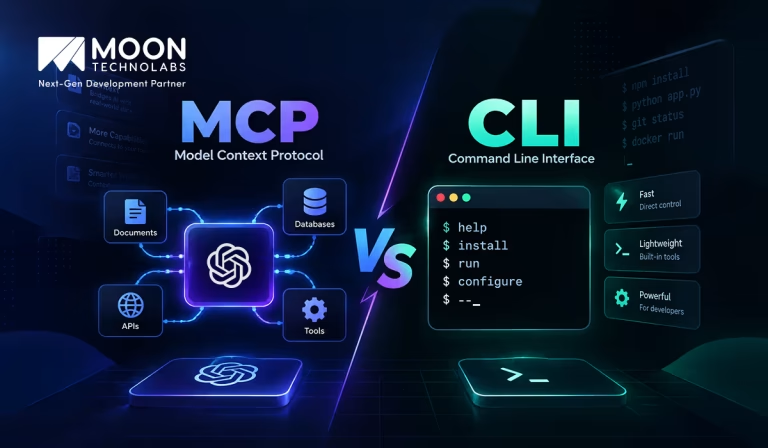
Table of Content


Blog Summary:
MCP and CLI offer different ways to connect AI systems with tools and external services. While CLI provides direct, command-based control, MCP enables standardized communication between AI models and tools. This MCP vs CLI comparison explores their features, benefits, flexibility, and use cases, helping developers understand when to use each approach for efficient, scalable, and practical AI development workflows.
Table of Content
As AI development evolves, developers have more ways than ever to connect AI systems to tools, data, and external services. Two approaches that often come up are Model Context Protocol (MCP) and the Command-Line Interface (CLI). While both can help AI agents interact with software and perform tasks, they serve very different purposes.
So, which one should you choose for your AI development workflow? Understanding MCP vs CLI can help you decide based on what you’re building, how you need to access your tools, and how much flexibility and scalability you require. In this blog, we’ll break down the key differences between MCP and CLI, explore their features and use cases, and help you determine which approach makes the most sense for your project.
What is MCP (Model Context Protocol)?
Model Context Protocol (MCP) is an open standard that lets AI applications connect to external tools, data sources, and services in a structured way. It helps AI models access the information and capabilities they need without requiring a separate custom integration for every tool.
MCP acts as a bridge between AI agents and external systems such as databases, APIs, files, and developer tools. This makes it easier to build AI-powered applications that can understand context, access relevant information, and perform tasks more effectively.
Features of MCP
Here are the key features of MCP for you to review, highlighting how it seamlessly connects artificial intelligence models to your external data sources:
Standardized AI Tool Integration
By establishing a common protocol, MCP simplifies how AI models plug into a wide array of external systems. It allows different tools to communicate with AI systems using a consistent structure, reducing custom development and making integrations easier to build, maintain, and replace.
Seamless Access to External Data
MCP enables AI applications to securely access external data sources such as databases, APIs, files, applications, and online services. This lets AI models retrieve relevant, real-time information and use external context to generate more accurate, useful responses.
Enhanced AI Agent Capabilities
MCP significantly broadens the functional boundaries of AI agents by giving them direct access to external utilities, data sources, and applications. Agents can retrieve information, execute actions, process data, and complete multi-step workflows, enabling AI systems to perform practical real-world tasks.
Secure and Scalable Communication
MCP establishes a reliable communication pipeline that links AI applications with external utilities and services. It supports controlled access to resources and helps keep interactions secure. Its standardized architecture also makes it easier to scale systems by adding new tools, services, and data sources.
Let’s Build Your Next-Gen AI Project Together
Partner with our industry professionals to streamline your architecture and bring your groundbreaking technical ideas to life effortlessly.
What is CLI (Command Line Interface)?
A Command Line Interface (CLI) is a text-based way to interact with a computer or software by entering commands instead of using graphical menus. Developers commonly use CLI tools to manage files, run code, install packages, execute tests, and deploy applications.
CLIs are fast, flexible, and easy to automate, making them an important part of modern development workflows. When combined with AI agents and MCP, CLI tools can help AI systems perform real-world development tasks through structured commands.
Features of CLI
Here are the key features of the command line interface, providing you with a quick and detailed look at its powerful text-based system navigation capabilities:
Direct Command Execution
CLI allows users to interact directly with an operating system or application by entering text-based commands. It provides quick, precise control and lets users perform tasks efficiently without navigating multiple graphical menus or interfaces.
Automation and Scripting
CLI supports automation by letting you combine multiple commands into scripts. These scripts can automate repetitive tasks, reducing manual effort, saving time, improving consistency, and supporting activities such as backups, testing, deployment, and file management.
Developer Productivity
CLI improves developer productivity by providing quick access to development tools and workflows. Developers can create projects, manage source code, install dependencies, run applications, execute tests, and troubleshoot problems efficiently without switching between different graphical applications.
System and Tool Management
CLI provides powerful commands to manage files, processes, users, software, configurations, and system resources. It lets developers and administrators install tools, configure services, monitor performance, troubleshoot problems, and maintain systems efficiently through a single terminal.
CLI Vs MCP: The Quick Comparison (Table)
Here is a detailed side-by-side comparison for MCP vs CLI, giving you a comprehensive look at their distinct functionalities and core system operations:
| Aspect | MCP | CLI |
|---|---|---|
| Primary Design | Standardized protocol for connecting AI models to tools, data, and services | Command-line interface designed for direct human or scripted interaction |
| Tool Discovery | Built-in, machine-readable tool/resource discovery | Usually requires documentation, –help, or prior knowledge of commands |
| Token Overhead | Higher — tool schemas and context can consume MCP tokens | Lower — commands and arguments can be very compact |
| Security & Auth | Can provide structured authentication, permissions, and controlled tool access | Depends heavily on the CLI and the surrounding environment |
| Execution Style | AI calls structured tools through a protocol | AI or user executes shell commands directly |
| Best For | Agentic workflows, dynamic tools, structured integrations | Automation, scripting, DevOps, quick one-off tasks |
You May Also Like:
Difference Between MCP and CLI
Here is a detailed breakdown highlighting the difference between MCP and CLI, giving you a clear look at how these distinct technologies operate and serve users:
Purpose
The MCP provides a standardized way for AI applications to connect with external tools, services, APIs, databases, files, and other resources. Its primary goal is to give AI agents the access they need to understand information and perform tasks.
A CLI provides a direct, text-based way to interact with software and operating systems. Developers can use commands to perform specific operations such as running applications, managing repositories, installing packages, executing tests, and deploying code.
How It Works
MCP works as a communication layer between an AI application and external capabilities. An AI agent can discover available tools, provide the required inputs, receive structured results, and use those results to decide what to do next.
CLI works through commands provided by a developer, script, or automation system. The relevant application processes the command, performs the requested operation, and returns an output, status, or error that can be used for further action.
Interaction Model
The interaction model is a major difference between the two technologies. MCP is designed around AI-to-tool communication, allowing an AI agent to interact with external capabilities based on context and task requirements.
CLI follows a more command-to-application model, where a user or script explicitly specifies what to execute. This makes CLI highly predictable and useful when developers need precise control over individual operations.
AI Integration
MCP is specifically designed to support AI applications and agents. It gives them a structured way to discover tools and resources, understand what those tools can do, and use them as part of a larger task.
CLI tools were generally developed before the rise of modern AI agents and are not inherently AI-aware. However, they can still become part of AI workflows when an agent has a safe, appropriate way to execute commands and interpret results.
Tool and Resource Access
Through MCP, an AI agent can potentially access a wide range of resources, including databases, APIs, files, applications, and specialized tools. This allows one AI application to work with multiple external systems through a common interaction model.
CLI access depends on the specific command-line application. A Git CLI provides version-control operations, a package-manager CLI handles dependencies, and a deployment CLI can manage application infrastructure.
Automation and Workflow
MCP is useful for AI-driven workflow automation, where the next action can depend on the previous result. An agent might inspect a project, run a test, analyze the error, modify a file, and run the test again without requiring a developer to direct every step manually.
CLI is widely used for script-based automation. Developers can combine commands in shell scripts, CI/CD pipelines, build systems, and scheduled processes to create repeatable and predictable workflows.
Decision-Making
MCP does not make decisions on its own. Instead, it gives the AI agent access to the tools and information it needs to make decisions. The agent determines which capability is relevant, what inputs to provide, and how the result should influence the next step.
CLI generally follows explicit instructions. A command-line tool performs the operation specified by the user or script rather than deciding independently what to do next.
Developer Experience
For AI developers, MCP can simplify integrations by providing a standardized approach to connecting AI applications with external capabilities. Instead of building a different connection for every tool, developers can use a common protocol.
The CLI gives developers direct control and immediate feedback. It is familiar across programming environments and can be used interactively or incorporated into scripts, making it particularly useful for development and system administration.
Security and Permissions
MCP can help create controlled AI environments by defining which tools, resources, or operations an agent can access. This matters when AI agents can modify files, access databases, execute commands, or interact with production systems.
CLI security generally depends on the permissions and credentials available to the user or process running the command. Operating-system permissions, authentication mechanisms, environment variables, API keys, and application-level access controls all influence what a CLI process can do.
Scalability and Flexibility
MCP can scale AI applications by letting them connect to different tools and services through a consistent interaction model. New capabilities can be added without requiring the AI application to understand every underlying implementation in detail.
CLI offers flexibility through scripting and composability. Developers can combine commands from different tools, redirect outputs, pass results between processes, and build customized workflows. However, each CLI may have its own syntax and output format.
Execution
MCP primarily focuses on access and communication rather than performing every operation itself. It enables an AI application to communicate with the external capability responsible for carrying out the task.
CLI is directly involved in execution. When you run a command, the underlying program performs the requested operation and returns the result. This makes CLI particularly useful as an execution mechanism within automated workflows.
Use Cases
MCP is commonly used for AI assistants, coding agents, intelligent automation, database interactions, API access, file management, research tools, and multi-tool AI workflows.
CLI is commonly used for software development, version control, testing, package management, application builds, deployment, server administration, monitoring, and CI/CD automation.
MCP Vs CLI: How Do They Work Together?
As AI agents become more capable, they need reliable ways to interact with software and development tools. MCP and CLI play different but complementary roles.
A CLI lets developers execute commands for tasks such as testing, deployment, repository management, and builds. MCP provides AI agents with a structured way to discover and use these capabilities.
Connecting AI Agents with CLI Tools
MCP can bridge AI agents and existing CLI tools. Instead of rebuilding every developer tool for AI, teams can expose useful operations through MCP.
For example, an AI agent could:
- Inspect a project
- Run tests
- Analyze errors
- Modify files
- Run tests again
- Prepare changes for deployment
The CLI runs the commands, while MCP provides the interface that lets the AI agent access them.
Automating Development Workflows
Combining MCP and CLI makes multi-step development workflows easier to automate.
A typical workflow might involve pulling code, installing dependencies, running tests, building the application, and deploying it. An AI agent can coordinate these steps, examine the results, and respond when something fails.
This creates a simple division of responsibilities:
AI Agent → MCP → CLI/Tools → Development Environment
The agent handles reasoning and planning, MCP connects it to the required capabilities, and CLI tools execute the actual operations.
Improving AI-Powered Task Execution
The biggest benefit is that AI agents can move beyond providing suggestions and actively complete development tasks.
Instead of simply telling a developer to run a test, an agent can potentially run it, inspect the output, identify the problem, make a change, and test again.
This creates a continuous workflow:
Understand → Execute → Observe → Modify → Execute Again
Ready to Enhance Your AI Development Workflow?
Connect with our experts today to discover how the right tools can supercharge your projects and drive seamless innovation.
MCP Vs CLI: What is Best for Your Business?
Choosing between MCP and CLI depends on your business requirements, technical environment, and how you want users or AI systems to interact with your tools. MCP is designed for standardized AI-to-tool communication, while CLI focuses on direct command-based interaction.
When to Consider MCP?
Consider MCP when your business wants to connect AI assistants or agents with multiple external tools, applications, databases, and data sources. MCP is particularly useful when AI needs to retrieve information or perform actions across different systems through a standardized integration approach.
- You want to build AI-powered workflows.
- Multiple tools or data sources need to connect with AI.
- You need standardized and reusable integrations.
- AI agents need to perform actions or access external information.
- Your system is expected to scale as you add tools and services.
When to Consider CLI?
A CLI is a good choice when developers, administrators, or technical users need direct, efficient control over applications and systems. It is especially useful for automation, scripting, system administration, software development, and repetitive technical operations.
- Users need direct command-based system access.
- You need to automate tasks through scripts.
- Developers frequently work with terminal-based tools.
- You need lightweight and fast system operations.
- Your workflows involve servers, deployments, or system management.
When to Use MCP and CLI Together?
MCP and CLI can complement each other rather than compete. A business can use CLI tools for direct system operations, while MCP lets AI agents access and control those capabilities in a standardized way.
For example, a CLI tool could manage deployments, while an MCP server exposes that functionality to an AI agent. The AI can then understand a user’s request, access the appropriate tool, and execute the required operation through the existing CLI infrastructure.
Using both can provide developer control, automation, AI integration, flexibility, and scalability within the same technology environment.
Conclusion
The choice between MCP and CLI ultimately depends on how your AI application interacts with external tools. CLI works well for quick, predictable command execution, while MCP suits AI agents that need to discover and interact with multiple tools through a consistent interface.
For production AI applications, factors such as scalability, integration complexity, and future tool requirements should guide the decision.
As AI systems become more connected and capable, choosing the right approach can simplify development and create a more adaptable architecture. This is where AI development services can help businesses build solutions around the technologies that best fit their goals.
FAQs
01
Is MCP basically an API?
MCP is similar to an API because both enable communication between software components. However, MCP is specifically designed for AI applications and provides a standardized way for AI models to discover and interact with tools, resources, and external services.02
Can CLI replace MCP?
No. CLI and MCP serve different purposes. CLI lets users or programs run commands directly through a terminal, while MCP provides a standardized communication layer between AI applications and external tools or data sources. They can also work together.03
Is Context7 a CLI or MCP tool?
Context7 is primarily an MCP server/tool that provides AI coding assistants with up-to-date documentation and relevant library information. It can integrate with MCP-compatible AI tools, helping models access current documentation instead of relying only on their training knowledge.04
Which language is best for building an MCP server?
There is no single best language. TypeScript/JavaScript and Python are popular choices because they have strong MCP ecosystem support and are relatively easy to develop with. The best choice depends on your existing skills, project requirements, and preferred technology stack.05
How much does it cost to run an MCP server?
The cost depends on how you deploy the MCP server and what services it uses. A locally hosted server can often be run at no additional infrastructure cost, while cloud-hosted servers may incur hosting, database, API, bandwidth, and AI-model usage charges.



Explore the latest insights on Artificial Intelligence, including Generative AI, Agentic AI, natural language processing, computer vision, automation, and enterprise AI solutions. This category covers industry trends, practical applications, implementation strategies, and innovations that help businesses leverage AI for smarter decision-making and digital transformation. Stay updated with evolving AI technologies that are reshaping industries worldwide.
Submitting the form below will ensure a prompt response from us.
We refine our expertise to deliver innovative business solutions.





205 N Michigan Avenue, #810, Chicago, 60601, Illinois, United States
13500 Long Is Dr, Pflugerville, TX 78660, USA

C/105 Ganesh Meridian, S.G. Highway, Ahmedabad, GJ 380060


Ayse D.
Co-Founder France
“ I highly recommend Moon Technolabs as the quality of service is wonderful. We have hired this company to develop the product based on some complex & technical issues. We get the best quality services as compared with others in the market. Huge Thanks to Moon Technolabs as the team is always ready to give the solution all time.”

Justin G.
Founder & CEO USA
USA“ Moon Technolabs is a pioneer in the WebRTC based project as they have fixed complicated segments of the module by fulfilling different product lines by providing 24X7 customer support. We really recommended Moon Technolabs as they are able to develop products as per the module deadline and project timeline.”

Flavio S.
Founder & Managing Director Germany
“I am happy to recommend Moon Technolabs for their app development services. They successfully developed apps for me, and I am highly satisfied with the overall outcomes. The development team has swiftly addressed the issues with responsive and effective communication to understand the requirement quickly and actively resolve the back-and-forth problems that arose...”

Jay M.
Founder & CEOUSA“Moon Technolabs is the best company that provides advanced apps and websites development services in the USA and Europe. I am a newbie to develop my app with an external team. I am really happy to work with them as I am not that much mobile apps user. Here, the team and specially the CEO of Moon Technolabs helps me to let me know about the benefits of my app to generate revenue....”


Our Offices
India
C/105 Ganesh Meridian,S.G. Highway, Ahmedabad, GJ 380060USA
205 N Michigan Avenue, #810, Chicago, 60601, Illinois, United StatesContact Information


