


LangChain vs LangGraph: Which Framework Should You Choose?

Artificial Intelligence Team
Last Updated: Aug 24, 2026 Total Views: 97
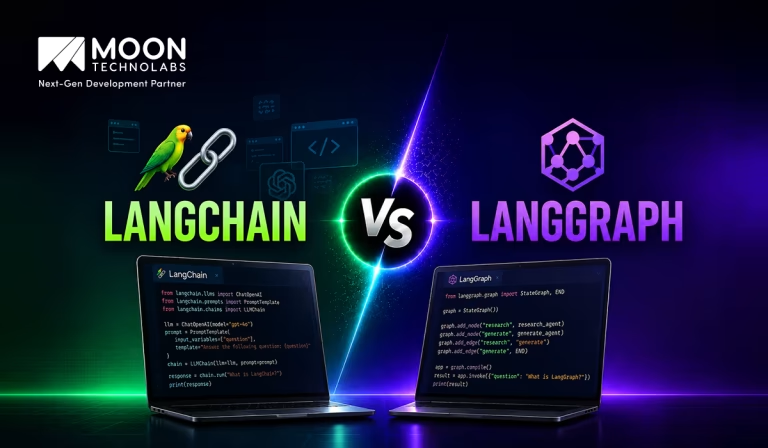
Table of Content


Blog Summary:
Not sure whether LangChain or LangGraph is the better fit for your AI project? This blog breaks down how the two differ in execution flow, architecture, state management, and workflow flexibility. See why LangChain works well for linear LLM applications, while LangGraph is designed for branching, stateful, and more complex agent workflows, and learn which framework makes sense for your specific use case.
Table of Content
Building an AI application is no longer just about connecting an LLM to a prompt; it often involves tools, memory, decision-making, and workflows that must work together reliably. As these applications become more complex, choosing the right framework becomes essential for designing and managing these components effectively. LangChain and LangGraph are two popular frameworks that take different approaches to build LLM-powered applications and AI agents; they differ in how they structure and execute workflows.
The visual below gives you a quick look at the LangChain vs LangGraph difference: LangChain typically follows a more linear, chain-based flow, while LangGraph enables connected, branching workflows via individual nodes.
What is LangChain?
LangChain is an open-source framework for building applications around large language models (LLMs). Instead of using an LLM as a standalone chatbot, LangChain helps developers integrate it with external data, tools, APIs, databases, and application logic.
For example, a company can use LangChain to build a chatbot that reads internal PDFs, searches a database, calls an API, and then uses an LLM to generate a useful answer. It can also manage multi-step linear workflows in which the AI must decide which action to take next.
The main value of LangChain lies in its orchestration. It provides reusable components for prompts, model calls, retrieval, tool usage, memory, and AI agents, making it easier to turn an LLM into a functional application rather than just a text-generation interface.
Key Features of LangChain
LangChain is a framework for developing applications powered by LLMs. It provides reusable components that simplify interactions with models, data sources, external tools, and application workflows. Let’s take a closer look at the key features that make LangChain useful for building LLM-powered applications:
Model I/O and Standard Interfaces
Standardized interfaces make it easier to interact with different language models using a consistent structure. Developers can create reusable prompts, send inputs to models, and process outputs efficiently. This reduces model-specific coding and makes applications easier to modify, maintain, and scale.
Sequential Pipelines
Multiple tasks can be connected into an organized sequence, in which the output of one step becomes the input to the next. This approach is useful for workflows such as retrieving information, analyzing content, transforming data, and generating a final response.
Document Loaders
Information can be imported from various sources, including PDFs, text files, websites, databases, and other data repositories. Once loaded, documents can be processed, divided into smaller sections, and prepared for tasks such as answering questions, summarizing, and retrieving information.
Vector Store Integration
Integration with vector stores enables applications to perform semantic searches across large collections of information. Documents can be converted into numerical embeddings and retrieved based on their meaning. This capability is especially important for building applications that support RAG across different business scenarios.
Autonomous Agents
AI agents can dynamically select appropriate tools and actions based on a task’s requirements. They can interact with search engines, APIs, databases, calculators, and other services. This allows applications to perform complex, multi-step tasks with less direct human intervention.
Conversation Memory
Memory enables applications to retain relevant information from earlier interactions and use it during future responses. This helps chatbots and virtual assistants maintain conversational context, understand follow-up questions, and provide more consistent, personalized, and meaningful interactions with users.
Your AI Project Deserves The Right Technology
Skip the guesswork and work with experienced AI developers who can help you select and implement the ideal framework.
What is LangGraph?
LangGraph is a framework for designing AI agents as structured AI workflows rather than simple prompt-and-response systems. You define different steps, such as searching, reasoning, or asking for human input, and connect them based on how the application should behave.
What makes LangGraph interesting is its ability to handle cycles and changing decisions. An AI agent can try a tool, inspect the result, decide it needs another attempt, and continue until a condition is met. The workflow can also pause and resume without losing its state.
In practice, LangGraph is useful when an AI application needs control, persistence, and predictable execution. It is particularly suited to agents that perform multiple actions, interact with external systems, or require human approval before taking important steps.
Key Features of LangGraph
LangGraph is a framework designed for building stateful, controllable, and complex AI workflows. It represents workflows as graphs of interconnected nodes, allowing developers to manage execution, state, decisions, and collaboration between AI agents. Now, let’s take a closer look at the capabilities that make LangGraph effective for managing complex AI workflows:
Cyclical Graphs & Looping
Workflows can include loops and repeated execution rather than following only a fixed sequence. A production AI agent can perform a task, evaluate the result, and return to an earlier step when improvements are required. This is useful for iterative reasoning, validation, and refinement.
Explicit State Management
A shared state can be defined and updated throughout the workflow. Each node can access relevant information and modify the state when necessary. This provides better control over application behavior and makes complex workflows easier to manage, monitor, and debug.
Persistence and Checkpointing
Workflow states can be saved at different stages using checkpoints. This allows long-running processes to be paused and resumed without starting from the beginning. It also helps applications recover from interruptions while preserving important information and previous workflow progress.
Streaming Support
Results can be delivered to users while the workflow is still running, rather than waiting for the entire process to finish. This is especially useful when multiple model calls or tools are involved, improving responsiveness and giving users a more interactive experience.
Conditional Routing
Workflows can dynamically follow different paths based on conditions or intermediate results. For example, a system can determine whether the available information is sufficient or whether another retrieval step is required. This makes workflows flexible and adaptable to changing situations.
Multi-agent Collaboration
Multiple AI agents can work together, with each agent handling a specific role or responsibility. For example, one agent can conduct research, another can analyze the findings, and a third can review the output, making complex systems easier to organize and manage.
LangChain vs LangGraph: Key Differences
Understanding LangGraph vs LangChain starts with their different approaches to AI workflows. Here’s a comparison chart highlighting the key differences between LangChain and LangGraph:
| Aspect | LangChain | LangGraph |
|---|---|---|
| Workflow Architecture | Chain-based and mostly sequential workflows. | Graph-based workflows using nodes and edges. |
| State Management | Managed through inputs, outputs, memory, and components. | Built-in state management shared across workflow nodes. |
| Branching & Decision-Making | Supports basic conditional logic and routing. | Supports complex branching, routing, and dynamic decisions. |
| Loops & Error Handling | Loops and retries require additional implementation. | Supports loops, retries, interruptions, and recovery. |
| Multi-Agent Orchestration | Provides agents and tools for agent-based applications. | Well suited for multi-agent coordination. |
| Ease of Development | Easier to learn and faster to develop. | More complex to learn but provides greater control. |
| Scalability & Production Readiness | Good for simple to moderately complex LLM applications. | Better suited for complex, stateful, long-running production workflows. |
You Might Also Like:
12 AI Agent Use Cases with Real ROI: Enterprise Examples Across Industries
LangChain vs LangGraph Use Cases
Here are the key use cases of LangChain and LangGraph to help you understand where each framework fits best:
LangChain Use Cases
Company Knowledge Assistants
LangChain can power AI assistants that answer employee questions using internal documents, knowledge bases, and company policies. With retrieval and LLM integrations, employees can quickly find relevant information through natural-language conversations.
Graph & SQL Database Q&A
LangChain can connect language models with SQL and graph databases, allowing users to ask questions in natural language. The application can translate questions into database queries and return useful, easy-to-understand answers.
Custom Memory Modules
For conversational applications, LangChain can be used to manage chat history and create custom memory solutions. This helps assistants maintain context and deliver more personalized responses across interactions.
Multi-Tool Execution
LangChain is useful for agents that need to work with multiple tools, APIs, databases, and external services. For example, an AI assistant can search the web, retrieve information from a database, and call an API to complete a task.
LangGraph Use Cases
Long-Running Research Assistants
LangGraph is well suited for research agents that need to perform multiple steps, maintain state, and revisit information. These workflows can continue for longer periods while tracking previous actions and results.
Human-in-the-Loop Workflows
It makes it easier to include human approval or intervention within an AI workflow. For example, an agent can prepare a response or action and pause until a human reviews and approves it.
Customer Support Automation
LangGraph can power customer support agents that maintain conversation state, use multiple tools, and follow structured workflows. If an issue cannot be resolved automatically, the agent can escalate it to a human while preserving the relevant conversation context.
When Should You Use LangChain?
LangChain is a great choice when you want to build LLM-powered applications quickly without having to manage highly complex workflow states. The following features show how LangChain simplifies the development of LLM-powered applications:
Simple LLM Applications
Use LangChain for straightforward applications that connect an LLM with prompts, tools, or external data. It provides ready-to-use components that make it easy to build and integrate common LLM functionality.
RAG Applications
LangChain is well-suited for RAG applications, as it helps you connect language models to documents, vector databases, retrievers, and other data sources, enabling the model to generate responses based on your own information.
Rapid Prototyping
If your goal is to experiment with an AI application quickly, LangChain provides reusable components and integrations that reduce development time. It is particularly useful for testing ideas and building an initial proof of concept.
Sequential Workflows
Use LangChain when your application follows a relatively straightforward sequence of steps; for example, retrieving information, processing it with an LLM, and then generating a final response.
When Should You Use LangGraph?
LangGraph is designed for more complex, stateful, and agentic applications where you need greater control over how different steps interact. To understand what makes LangGraph useful, let’s look at some of its core features:
Complex AI Agent Workflows
Use LangGraph when your AI agent needs to perform multiple tasks, use different tools, make decisions, and coordinate several stages of execution.
Stateful and Long-running Processes
LangGraph is useful when an application needs to maintain state across multiple steps or interactions. This makes it a strong choice for long-running agents and workflows that need to pause, resume, or preserve context.
Multi-agent Applications
When multiple AI agents need to collaborate, delegate tasks, or communicate with one another, LangGraph provides a structured way to define and manage those interactions.
Workflows With Loops and Branching
LangGraph is particularly useful when workflows cannot be represented as a simple sequence. If your application needs conditional branches, repeated steps, retries, or loops, LangGraph gives you more control over the workflow structure.
Human-in-the-Loop Applications
Use LangGraph when humans need to review, approve, modify, or intervene in an AI workflow. It can help pause execution, preserve the workflow state, and continue processing after human input.
LangChain vs LangGraph: Which One is Better?
Choosing between LangChain or LangGraph ultimately comes down to your application’s complexity and scalability requirements. LangChain is well suited for straightforward LLM applications, while LangGraph is a stronger choice for complex, stateful, and multi-step AI agent workflows.
Choose LangChain When
You want to build an LLM application quickly with a straightforward workflow.
It works well for:
- Chatbots and conversational apps
- RAG and document Q&A
- Text generation and summarization
- Simple AI agents
- Applications connecting LLMs with tools and APIs
Best for: rapid development, simple workflows, and easy integration.
Choose LangGraph When
Choose LangGraph when your application requires more control over how agents operate and maintain state.
It is well suited for:
- Multi-agent systems
- Complex workflows with branching and loops
- Long-running agents
- Persistent memory and state
- Human-in-the-loop workflows
- Advanced decision-making
Best for: complex, stateful, and highly controlled AI workflows.
Consider Future Scalability
Don’t just consider your current requirements. If you expect your application to grow into a more complex agentic system, LangGraph may provide a stronger foundation.
However, for simple applications, LangChain can be easier and faster to implement.
Build Smarter Solutions With The Right AI Framework
Confused between LangChain and LangGraph? Let our experts help you choose, build, and scale the right solution for success today.
Can LangChain and LangGraph Work Together?
Yes, LangChain and LangGraph can work together seamlessly. LangChain provides the core components for building an AI application, including LLM integrations, prompts, tools, and retrieval systems. LangGraph adds workflow orchestration, allowing developers to manage state, decisions, and multi-step agent processes.
By combining both, developers can build more powerful and reliable AI applications. For example, LangChain can handle tasks such as calling an LLM or retrieving information, while LangGraph controls how these tasks are executed and connected. Together, they are useful for building chatbots, research assistants, customer-support agents, and other complex AI workflows.
Final Verdict
There’s no outright winner between LangChain and LangGraph; the right choice comes down to what you’re building. LangChain works well for straightforward LLM applications involving prompts, retrieval, tool calling, and simple chains. At the same time, LangGraph is a better fit when your AI needs persistent state, decision-making, loops, error handling, or complex multi-step workflows.
Put simply, choose LangChain for simpler applications, and LangGraph when your application starts to behave like a true agent with its own workflow.
As businesses move from AI experiments to production-ready systems, working with an experienced AI development services provider can help you choose the right architecture and build an agent that is reliable, scalable, and aligned with your goals.
FAQs
01
Does LangGraph replace LangChain?
No. LangGraph and LangChain serve different purposes and can be used together. LangChain provides building blocks such as models, tools, retrievers, and agents, while LangGraph is designed for building more complex, stateful, and long-running agent workflows. You can use the LangGraph platform with LangChain components, but you don't need LangChain for every LangGraph application.02
Is LangGraph free to use?
Yes. LangGraph is available as an open-source framework that you can install and run yourself. However, services you connect to, such as model providers, databases, or LangSmith features, may have their own costs.03
What are the key differences between LangChain, LangGraph, and Deep Agents?
LangChain provides building blocks for LLM applications, LangGraph manages complex and stateful agent workflows, and Deep Agents offers a higher-level framework for building sophisticated agents with planning, tools, and memory.04
Can I use LangGraph in TypeScript?
Yes. LangGraph has a JavaScript/TypeScript implementation, so you can build and run LangGraph applications using TypeScript as well as Python.05
Which chat models are supported by LangChain?
LangChain supports chat models from many major providers, including OpenAI, Anthropic, Google, AWS, Azure, Cohere, Mistral, and others. The exact models available depend on the provider integrations and their current APIs. LangChain's standardized chat-model interface makes it possible to switch between supported providers with relatively little application-level code.



Explore the latest insights on Artificial Intelligence, including Generative AI, Agentic AI, natural language processing, computer vision, automation, and enterprise AI solutions. This category covers industry trends, practical applications, implementation strategies, and innovations that help businesses leverage AI for smarter decision-making and digital transformation. Stay updated with evolving AI technologies that are reshaping industries worldwide.
Submitting the form below will ensure a prompt response from us.
We refine our expertise to deliver innovative business solutions.





205 N Michigan Avenue, #810, Chicago, 60601, Illinois, United States
13500 Long Is Dr, Pflugerville, TX 78660, USA

C/105 Ganesh Meridian, S.G. Highway, Ahmedabad, GJ 380060


Ayse D.
Co-Founder France
“ I highly recommend Moon Technolabs as the quality of service is wonderful. We have hired this company to develop the product based on some complex & technical issues. We get the best quality services as compared with others in the market. Huge Thanks to Moon Technolabs as the team is always ready to give the solution all time.”

Justin G.
Founder & CEO USA
USA“ Moon Technolabs is a pioneer in the WebRTC based project as they have fixed complicated segments of the module by fulfilling different product lines by providing 24X7 customer support. We really recommended Moon Technolabs as they are able to develop products as per the module deadline and project timeline.”

Flavio S.
Founder & Managing Director Germany
“I am happy to recommend Moon Technolabs for their app development services. They successfully developed apps for me, and I am highly satisfied with the overall outcomes. The development team has swiftly addressed the issues with responsive and effective communication to understand the requirement quickly and actively resolve the back-and-forth problems that arose...”

Jay M.
Founder & CEOUSA“Moon Technolabs is the best company that provides advanced apps and websites development services in the USA and Europe. I am a newbie to develop my app with an external team. I am really happy to work with them as I am not that much mobile apps user. Here, the team and specially the CEO of Moon Technolabs helps me to let me know about the benefits of my app to generate revenue....”


Our Offices
India
C/105 Ganesh Meridian,S.G. Highway, Ahmedabad, GJ 380060USA
205 N Michigan Avenue, #810, Chicago, 60601, Illinois, United StatesContact Information


