


Enterprise Application Integration: A Complete Guide to Connecting Business Systems

Mobile App Development Team
Last Updated: Aug 27, 2026 Total Views: 86
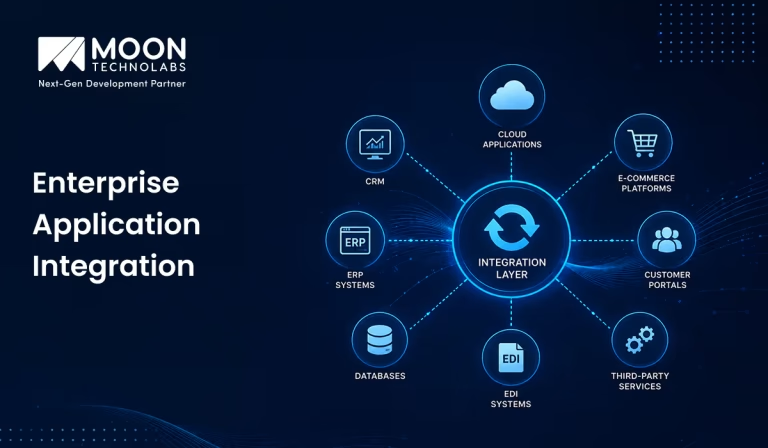
Table of Content


Blog Summary:
Enterprise application integration helps organizations bring disconnected applications into a coordinated ecosystem, making it easier to share information and automate processes across departments. A well-designed EAI strategy can improve operational visibility, reduce duplication, and help businesses get more value from their existing technology. This guide breaks down the practical side of EAI, from choosing the right integration model to handling security, data consistency, scalability, and maintenance.
Table of Content
Businesses rarely run on a single application. ERP, CRM, accounting, HR, cloud, and legacy systems often operate in isolation, making it difficult to maintain consistent data and connected processes. Enterprise Application Integration (EAI) bridges these gaps by enabling different systems to exchange data and operate as part of a single connected ecosystem.
In this guide, we’ll look at how EAI connects business systems, the integration methods and benefits involved, key challenges, costs, and how to approach an integration project effectively.
What is Enterprise Application Integration?
EAI is a technology approach for connecting an organization’s software applications so they can exchange data and operate as a single, coordinated system. For example, an order placed on an e-commerce platform can automatically update the inventory, billing, and shipping systems.
EAI typically uses integration methods such as APIs, middleware, message queues, and data transformation to move information between applications. This allows systems built on different platforms or technologies to communicate without requiring every application to be completely redesigned.
By integrating applications, organizations can create smoother end-to-end workflows and maintain consistent data across departments. This reduces manual work and data duplication while making business processes faster, more reliable, and easier to manage.
How Does Enterprise Application Integration Work?
Enterprise application integration creates a connected ecosystem by linking applications, coordinating data flows, and streamlining processes across departments. Here is how it works:
API Management
API management enables applications to communicate securely through APIs. It helps businesses create, publish, monitor, and control APIs while managing authentication, access, and usage. This allows systems such as customer relationship management, enterprise resource planning, payment, and e-commerce platforms to exchange data efficiently and reliably.
Integration Platform as a Service (iPaaS)
iPaaS provides cloud-based tools for connecting applications, databases, and services. It simplifies integration through workflows, customer data transformation, monitoring, and automation. Businesses can connect cloud and on-premises systems without building every integration from scratch, reducing development time and improving operational efficiency.
Middleware
It acts as a bridge between different applications and systems. It enables communication even when platforms use different technologies or data formats. Middleware can handle data transformation, message routing, implement robust authentication, and workflow orchestration, helping applications exchange information smoothly and reliably.
Pre-built Connectors
Pre-built connectors provide ready-made integrations for commonly used applications and services. They allow businesses to connect platforms such as CRMs, ERP systems, databases, and cloud applications without developing custom integrations. This reduces implementation time, simplifies maintenance, and makes integration easier for organizations.
Event-driven Integration
It allows applications to respond automatically when specific events occur. For example, placing an order can trigger inventory updates, payment processing, and shipping. This approach enables near-real-time communication, improves responsiveness, and helps businesses automate processes without continuously checking systems for changes.
Turn Complex Systems Into Connected Workflows
Eliminate silos, simplify business processes, and create seamless connectivity that helps your teams move faster and your operations run smarter.
Common Enterprise Application Integration Approaches
EAI connects different applications, systems, and databases so they can communicate and share data efficiently. Common approaches include:
Point-to-Point Integration
This approach directly connects one application to another. It is simple and suitable for small environments, but becomes difficult to manage as the number of applications increases.
| Pros and Cons |
|---|
|
Hub-and-Spoke Integration
In this model, applications communicate through a central hub. The hub receives, processes, transforms, and routes data to the required applications.
| Pros and Cons |
|---|
|
Enterprise Service Bus (ESB)
An ESB is a middleware layer that connects applications and services. It supports message routing, data transformation, protocol conversion, and service orchestration.
| Pros and Cons |
|---|
|
API-led Integration
API-led integration uses APIs to provide standardized access to applications, data, and services. It is widely used in modern applications, cloud environments, and microservices.
| Pros and Cons |
|---|
|
Cloud-based Integration
Cloud-based integration connects cloud applications, on-premises systems, and data sources via integration platforms as a service (iPaaS) solutions.
| Pros and Cons |
|---|
|
Benefits of Enterprise Application Integration
Enterprise application integration brings siloed systems together, allowing data and processes to move smoothly across applications without disrupting existing workflows. Here are the key advantages organizations can achieve through a connected application environment:
Improved Data Accessibility and Accuracy
EAI provides seamless access to data across different business applications and departments. By integrating systems, organizations can ensure that information is synchronized and updated consistently. This reduces duplicate data entry, minimizes errors, and helps employees access accurate and reliable information when they need it.
Streamlined Business Processes
Integration connects different stages of business operations, allowing information to move smoothly between systems. For example, data entered into a sales application can automatically flow to inventory, billing, and customer service systems. This eliminates unnecessary manual steps, speeds up processes, and improves overall operational efficiency.
Reduced Data Silos
Data silos occur when information is stored separately within individual departments or applications. EAI breaks down these silos by connecting systems and enabling data sharing across the organization. As a result, employees gain a more complete view of business information and can collaborate more effectively.
Workflow Automation
EAI supports the automation of repetitive tasks and workflows. Data can automatically trigger actions in connected applications, reducing the need for manual intervention. This saves time, lowers the risk of human error, and allows employees to focus on more strategic and valuable activities.
Scalability and Flexibility
An integrated application environment makes it easier for organizations to introduce new applications, services, and technologies. Businesses can expand their operations without completely replacing existing systems. This flexibility allows organizations to adapt more quickly to changing market requirements and business needs.
Better Customer Experience
EAI helps organizations deliver faster, more consistent service by making customer information available across relevant systems. Employees can access up-to-date information on orders, accounts, service requests, and interactions, enabling them to respond to customers more efficiently and deliver a more personalized experience.
Cost Efficiency and ROI
By reducing manual work, managing duplicate data, and eliminating inefficient processes, EAI can lower operational costs. Automation also improves employee productivity and reduces the resources required to maintain disconnected systems. Over time, these improvements can increase operational efficiency and deliver a stronger return on investment.
Real-world Example: Using EAI for Order Fulfillment Automation
Connecting order management, inventory, payment, and shipping systems creates a coordinated fulfillment flow, reducing manual handoffs and keeping order data synchronized from purchase to delivery. Here is how it works:
Order Capture and Processing
When a customer places an order online, the order details are automatically sent to the order management system. The system then validates the order and assigns an order number, reducing manual data entry and errors.
Inventory System Integration
The order system communicates with the inventory system to check product availability. If items are available, they are automatically reserved or deducted from stock. This helps prevent overselling and keeps inventory information accurate.
Payment and ERP Synchronization
The payment gateway processes the customer’s payment and sends the payment status to the order and accounting systems. The ERP system also receives transaction details for invoicing and financial records, keeping business data synchronized.
Shipping and Customer Notifications
Once payment and inventory are confirmed, order details are sent to the warehouse or shipping system. After dispatch, tracking information is shared with the customer through email or SMS.
You Might Also Like:
Enterprise Application Integration Tools and Technologies
Different integration tools and technologies support application connectivity, data exchange, workflow orchestration, and system interoperability across complex enterprise environments. Here are the key tools and technologies:
API Management Platforms
They help organizations create, publish, secure, monitor, and manage application programming interfaces. They provide features such as authentication, access control, traffic management, analytics, and API versioning. They are widely used to connect internal applications, partners, mobile apps, and external services.
iPaaS Solutions
Integration Platform as a Service (iPaaS) provides cloud-based tools for connecting applications and data sources. With pre-built connectors, templates, and monitoring features, iPaaS simplifies integrations between cloud and on-premises systems. It is particularly useful for hybrid and multi-cloud environments.
Enterprise Service Bus (ESB)
ESB provides a centralized layer for communication between enterprise applications. It supports message routing, data transformation, protocol conversion, and service orchestration. ESBs help reduce the complexity of point-to-point connections and remain useful for integrating legacy systems.
Message Queues and Event Streaming
Message queues enable applications to exchange information asynchronously, allowing systems to process messages when ready. Event-streaming technologies support continuous, near-real-time data flows. They are commonly used for real-time analytics, transaction processing, monitoring, and event-driven applications.
ETL and Data Integration Tools
ETL (Extract, Transform, Load) tools move and transform data between systems. They are used to consolidate information into data warehouses, analytics platforms, and other target systems. Modern tools may also support ELT, data synchronization, data quality, and real-time data pipelines.
Workflow Automation Platforms
Workflow automation platforms connect applications and automate repetitive business processes. They can trigger actions such as approvals, notifications, record updates, and account creation based on predefined events or rules. This reduces manual work and improves process efficiency.
Common Enterprise Application Integration Challenges
As applications, data formats, and workflows vary across enterprise environments, integration can introduce technical and operational hurdles that require careful planning and coordination. Here are the common challenges:
Legacy System Compatibility
Many organizations still use older systems that may not support modern technologies or APIs. Integrating them with new applications can require custom connectors, adapters, or middleware.
Data Format and Quality Issues
Different applications may use different data formats and structures. Inconsistent, incomplete, or duplicate data can cause errors, making data transformation and validation essential.
Security and Compliance Concerns
Integration increases the movement of sensitive data between systems. Organizations must use proper authentication, encryption, access controls, and monitoring to maintain security and meet compliance requirements.
Integration Complexity
Connecting multiple applications, databases, and services can make integration difficult to design and maintain. Standardized APIs and integration platforms can help reduce this complexity.
Scalability and Performance
As data volumes and transaction loads increase, integration systems may experience slowdowns or failures. Solutions must be designed to scale and maintain reliable performance.
Lack of Technical Expertise
Enterprise integration requires specialized knowledge of APIs, cloud platforms, databases, security, and middleware. A lack of skilled professionals can increase development time and maintenance costs.
Enterprise Application Integration Best Practices
A well-planned integration approach aligns systems, data, workflows, and security requirements to support reliable connections while minimizing disruption across the enterprise. Here are the best practices:
Assess Your Integration Requirements
Before starting an integration project, identify which systems need to communicate, what data needs to be exchanged, and how often it should be synchronized. Understanding business objectives, system dependencies, and technical limitations helps organizations choose the right solution and avoid unnecessary complexity.
Choose the Right Integration Architecture
Select an architecture that matches the organization’s requirements and future growth. Common approaches include point-to-point integration, middleware, Enterprise Service Bus (ESB), API-led integration, and event-driven architecture. The chosen approach should provide scalability, flexibility, reliability, and easy maintenance.
Standardize APIs and Data Formats
Use consistent API standards, naming conventions, and data formats such as JSON or XML. Standardization makes it easier for different applications to communicate and reduces data inconsistencies. Well-designed APIs should also be properly documented and versioned.
Prioritize Security and Access Control
Security should be considered throughout the integration process. Use encryption, strong authentication, authorization, and least-privilege access to protect sensitive information. Regularly review permissions and monitor integrations for suspicious activity or security vulnerabilities.
Document Integration Processes
Maintain clear, up-to-date documentation for APIs, data mappings, workflows, system dependencies, and error-handling procedures. Good documentation makes troubleshooting easier, supports system maintenance, and helps new team members understand the integration environment.
Monitor Integration Performance
Continuous monitoring helps identify failures, delays, and performance issues. Track metrics such as response time, transaction volume, error rates, and system availability. Alerts and centralized logging can help technical teams detect and resolve problems quickly.
Continuously Optimize and Scale
Integration requirements can change as businesses grow. Regularly review integrations to improve performance, remove unnecessary connections, update outdated technologies, and support new applications. Designing for scalability ensures that the integration environment can handle increasing data volumes and business demands.
How Much Does Enterprise Application Integration Cost?
Enterprise application integration can be affordable when the project is planned around the business’s actual needs. A basic EAI solution may start from around $10,000–$150,000, while more customized integrations can cost more depending on the number of systems and features required.
The main factors affecting cost include the number of applications, APIs, data migration, security requirements, customization, and testing. Choosing a scalable integration approach can help businesses avoid unnecessary expenses while still achieving reliable system connectivity.
For small and mid-sized businesses, starting with essential integrations and expanding gradually can keep the investment manageable. With the right technology and development partner, cost-effective enterprise application integration can be achieved without compromising quality or scalability.
Ready to Simplify Your Enterprise Integration?
Connect your business applications seamlessly, eliminate data silos, and build smarter workflows with tailored integration solutions.
How Does Moon Technolabs Help With Enterprise Application Integration?
At Moon Technolabs, we help businesses connect ERP, CRM, cloud platforms, APIs, databases, and third-party applications so information can move between systems without repetitive manual work. We first assess the existing technology stack and identify the most practical integration approach for the business.
Our enterprise application integration services are tailored to specific workflows rather than relying on a one-size-fits-all setup. We integrate APIs, legacy platforms, databases, and cloud applications to keep data synchronized and business processes running smoothly across your technology ecosystem.
We also consider scalability, security, error handling, and future system changes during implementation. This helps businesses reduce integration bottlenecks, maintain consistent data across applications, and add new systems more easily as their technology needs grow.
Conclusion
Enterprise application integration helps businesses connect different systems, streamline data flow, reduce manual work, and improve overall efficiency. A well-planned integration strategy also makes it easier to manage growing technology needs and maintain consistent information across applications.
By choosing the right integration approach and technologies, businesses can build a connected, scalable ecosystem that improves day-to-day operations while supporting future growth.
FAQs
01
How long does enterprise application integration take?
EAI projects typically take a few weeks to several months, depending on system complexity, integration scope, data volume, and customization requirements.02
What is the difference between EAI and API integration?
EAI connects multiple enterprise systems and workflows, while API integration focuses on enabling communication between applications through APIs. EAI can include APIs as one part of a broader integration strategy.03
Can EAI connect legacy systems with cloud applications?
Yes. EAI can connect legacy systems to modern cloud applications via APIs, middleware, adapters, and other integration technologies, enabling seamless data exchange without fully replacing existing infrastructure.04
How much does enterprise application integration cost?
Costs vary based on the number of systems, integration complexity, customization, data volume, and implementation approach. Small projects may cost less, while complex enterprise integrations can require significantly larger investments.05
How can businesses choose the right EAI architecture?
Businesses should evaluate system requirements, scalability, security, data volume, existing infrastructure, and future growth. The right architecture should support reliable integration while remaining flexible, maintainable, and cost-effective.



The Mobile App Development Team at Moon Technolabs shares expertise gained from building mobile applications across diverse industries and platforms. From user experience and app architecture to emerging mobile technologies, the team provides valuable insights, best practices, and practical perspectives to help businesses succeed in the evolving mobile landscape.
Submitting the form below will ensure a prompt response from us.
We refine our expertise to deliver innovative business solutions.





205 N Michigan Avenue, #810, Chicago, 60601, Illinois, United States
13500 Long Is Dr, Pflugerville, TX 78660, USA

C/105 Ganesh Meridian, S.G. Highway, Ahmedabad, GJ 380060


Ayse D.
Co-Founder France
“ I highly recommend Moon Technolabs as the quality of service is wonderful. We have hired this company to develop the product based on some complex & technical issues. We get the best quality services as compared with others in the market. Huge Thanks to Moon Technolabs as the team is always ready to give the solution all time.”

Justin G.
Founder & CEO USA
USA“ Moon Technolabs is a pioneer in the WebRTC based project as they have fixed complicated segments of the module by fulfilling different product lines by providing 24X7 customer support. We really recommended Moon Technolabs as they are able to develop products as per the module deadline and project timeline.”

Flavio S.
Founder & Managing Director Germany
“I am happy to recommend Moon Technolabs for their app development services. They successfully developed apps for me, and I am highly satisfied with the overall outcomes. The development team has swiftly addressed the issues with responsive and effective communication to understand the requirement quickly and actively resolve the back-and-forth problems that arose...”

Jay M.
Founder & CEOUSA“Moon Technolabs is the best company that provides advanced apps and websites development services in the USA and Europe. I am a newbie to develop my app with an external team. I am really happy to work with them as I am not that much mobile apps user. Here, the team and specially the CEO of Moon Technolabs helps me to let me know about the benefits of my app to generate revenue....”


Our Offices
India
C/105 Ganesh Meridian,S.G. Highway, Ahmedabad, GJ 380060USA
205 N Michigan Avenue, #810, Chicago, 60601, Illinois, United StatesContact Information


