
 Total Views: 184
Table of Content


Blog Summary:
This blog explores Django Migrations, covering their types and core components, as well as the factors that influence migration workflows. It also covers the key benefits and best practices for managing migrations. Lastly, it explains how businesses can implement scalable, automated, and reliable Django migrations in modern development environments.
Table of Content
Behind every well-structured Django application lies a database that evolves constantly through new fields, updated models, and optimized relationships. But managing these changes manually becomes messy, risky, and time-consuming. This is where Django Migrations steps in as a powerful, built-in solution.
Django migrations allow developers to track, apply, and reverse database schema changes in a controlled and predictable way. Whether you’re working solo or collaborating in a large team, migrations ensure your database stays perfectly in sync with your code.
In this guide, we’ll break down what Django migrations are, how they work, their types, benefits, core components, and best practices. It will help you manage database changes confidently and efficiently.
Django migrations are the mechanism for propagating changes made to the models into the database schema. Let’s understand some of its key concepts:
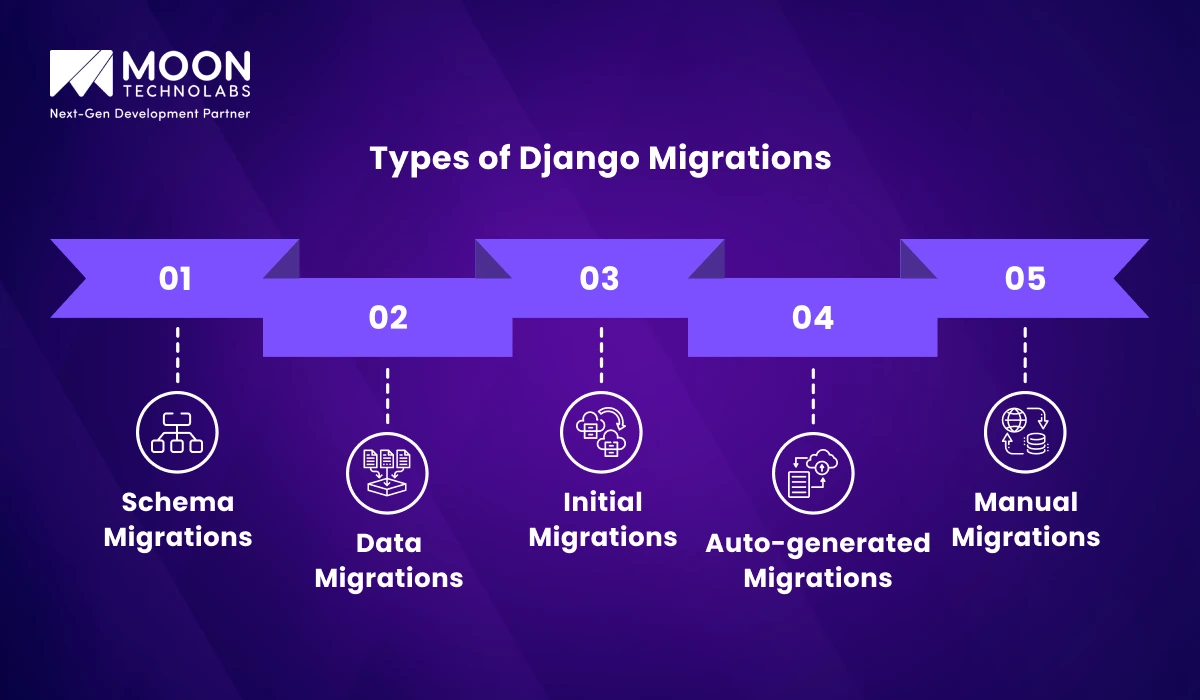
Django supports different types of migrations to handle both structural changes in the database and transformations of existing data. Understanding these migration types helps developers manage schema updates and data consistency more effectively.
The primary purpose of schema migrations is to make structural changes to the database. These are modifications to your models that alter the actual database tables.
Examples include adding a new field to a model, deleting a model, changing a field’s maximum length, and renaming a field. Moreover, the creation is auto-generated by running the makemigrations command after changing your models.py file.
The purpose of data migrations is to modify data within database tables rather than change the table structure itself. Examples include populating a new field with initial values, migrating data from two old fields into one new field, or cleaning up existing data based on a new business rule.
These are always Manual Migrations. You have to write custom Python code using Django’s RunPython operation inside a migration file to perform the data manipulation.
This is a special type of auto-generated schema migration. It’s the very first migration file created for a Django application. It contains instructions to create the initial database tables for all models defined in the application at application creation.
In this type, migrations are created automatically by Django when it detects changes to your models.py file. It triggers when running the command python manage.py makemigrations
These are the migrations where you manually edit an existing migration file or create a new one from scratch to handle complex or custom operations. They are essential for Data Migrations and for Schema Migrations that involve complex changes that Django’s auto-generator can’t handle directly.
Through the migration system in Django, you can modify the database schema over time in a controlled and predictable way.
Django automatically translates changes you make to your models into database schema changes via migration files. This automation means you don’t have to write and execute complex SQL manually, for example, add a new column or change a field’s type. This significantly reduces the risk of human error compared with manual SQL updates.
Migration files are regular Python files stored in your project’s version control system alongside your code. This is crucial because your database schema is versioned with the code that depends on it. You can see the entire history of schema changes, inspect who made them, and when.
When a developer changes a model, they run a command to create a new migration file. They commit this file and push it. Other developers simply pull the changes and run manage.py migrate. This ensures that everyone’s local database is automatically updated to the correct state, eliminating the “it works on my machine” problem caused by schema mismatches.
Since migrations are tested locally and in staging environments, applying them to production is straightforward and predictable. It requires a single command – manage.py migrate. This standardized procedure significantly reduces the risk of catastrophic schema changes during deployment, resulting in less downtime.
Each migration knows how to apply its changes (forward) and undo them (rollback). If a problem arises after a deployment, you can quickly revert the database to a previous stable state by rolling back the latest migrations. This provides an immediate safety net.
Migrations ensure that your development, testing, staging, and production environments share the same database schema for any given version of your application’s codebase. This consistency is vital for reliable testing and deployment.
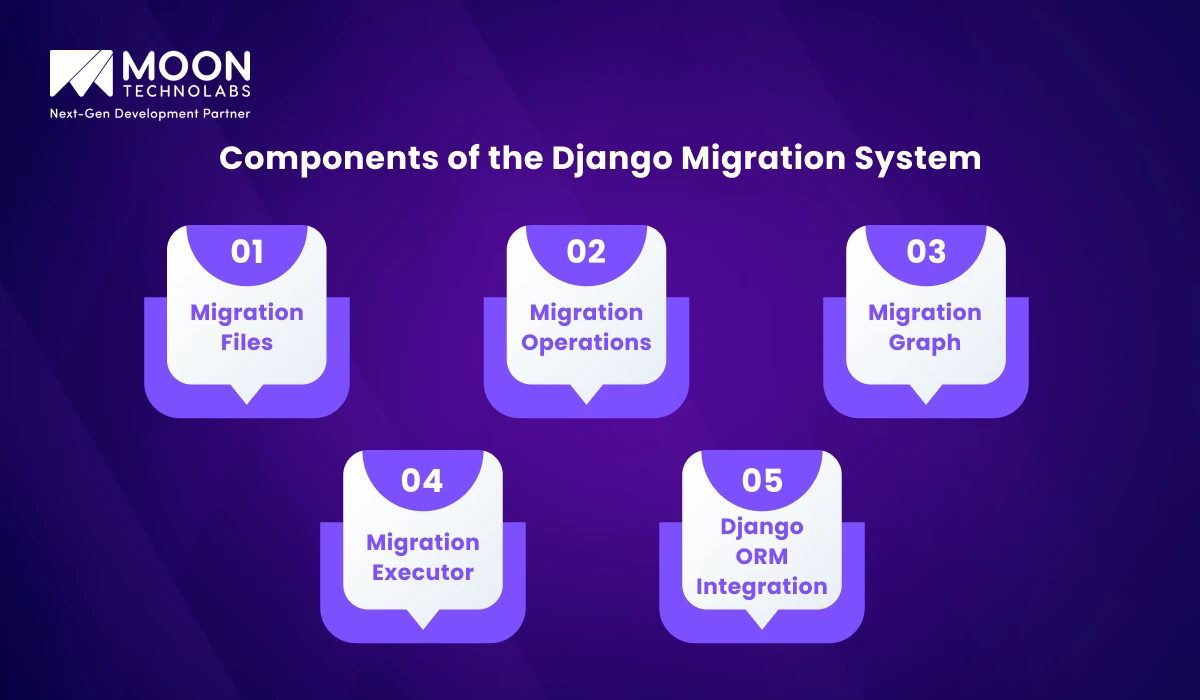
The Django migration system manages database schema changes efficiently and declaratively. Let’s check its core components below:
These are regular Python files created by makemigrations. They declaratively store changes to your models as a list of Migration Operations (e.g., CreateModel, AddField). They also list dependencies on other migrations, establishing an order.
These are abstract classes that represent specific database schema modifications, such as adding a field or renaming a model. They contain the logic for applying and reversing the change.
A Directed Acyclic Graph (DAG) built by Django that maps all migration files and their dependencies. This graph determines the correct order in which migrations must be applied to reach a specific state, ensuring consistency.
This component traverses the Migration Graph and executes the Migration Operations in the specified order. It interacts directly with the database via the SchemaEditor to apply or unapply the SQL.
The migration system is deeply integrated with the ORM. Changes in your models.py are automatically detected by makemigrations, which generates the necessary migration file. The Executor uses historical models to correctly apply operations, even when a model’s current definition has changed.
You Might Also Like:
Several key factors significantly impact the efficiency and reliability of your Django migration workflow:
Larger projects with many models, complex relationships, and large tables often lead to longer application migration times. Complex operations, such as adding a non-nullable field to a large table, can result in extended database locking. It requires specialized techniques like concurrent index creation or zero-downtime migrations.
High frequency of model changes leads to a proliferation of migration files. It is manageable but increases the risk of conflicts and requires more diligent maintenance. It also occasionally requires squashing migrations to maintain a cleaner history.
Maintaining consistent migration states across development, staging, and production environments is crucial. The workflow must ensure that the migration applied in staging is identical to the one applied in production, preventing discrepancies.
When multiple developers create migrations simultaneously in different feature branches, merge conflicts are common. These conflicts usually arise from migration file dependencies, necessitating careful manual resolution or strategic branch rebasing.
An automated CI/CD pipeline requires a robust migration strategy. It typically involves running tests against pending migrations and ensuring that the database application step is atomic and fast, ideally minimizing downtime.
Different database engines (PostgreSQL, MySQL, SQLite) handle schema operations differently. For instance, some operations are transactional on PostgreSQL but not on MySQL. The migration workflow must account for these subtle differences to ensure cross-database compatibility if required.
From zero-downtime schema changes to safe data migrations, our Django experts ensure smooth upgrades without breaking production or losing data.
Managing Django migrations effectively is essential for maintaining database stability and application performance. By following these proven approaches, developers can minimize risks, ensure smooth deployments, and maintain long-term scalability.
Small, incremental migrations are easier to track, review, and debug. When changes pile up, migrations become harder to understand and maintain. Frequent migrations also reduce the chance of conflicts when multiple developers work on the same app.
Once a migration is committed and applied to any environment, treat it as immutable. Editing old migrations can break production databases, introduce inconsistencies, or cause errors when deploying across environments.
Schema changes (like adding fields or tables) and data updates (like modifying values) should be handled in separate migrations. This prevents long-running operations, keeps deployments safe, and makes debugging significantly easier.
Django sometimes generates unnecessary or unexpected operations. Reviewing migrations ensures that only required changes are included—avoiding surprises such as renamed fields being interpreted as dropped and re-added fields.
When multiple branches introduce migrations, merge conflicts or mismatched dependency chains can happen. Establish a clear branching strategy and ensure migrations are created and merged in a predictable, consistent order.
Apply and unapply migrations locally to confirm they run smoothly. This helps identify missing dependencies, performance issues, or misconfigured operations before they reach staging or production.
RunPython functions execute Python code during migration. They must be:
Improper use can significantly slow deployments or cause rollback issues.
Large schema migrations, like adding constraints or altering columns, can lock tables. Running them during peak traffic can impact performance or even cause downtime. Schedule such changes during low-usage windows.
Over time, a project accumulates hundreds of migrations. Django allows “squashing” multiple old migrations into a single optimized file. This speeds up setup for new developers, reduces clutter, and improves build times.
Treat migrations as first-class code. This prevents hidden issues from slipping into production. Reviewing them ensures there are no unintended schema changes, correct dependency chains, and safe data-migration logic.
You Might Also Like:
Moon Technolabs offers expert Django development and optimization services designed to keep your applications scalable, stable, and future-ready. Our team builds robust architectures with well-structured migration workflows that ensure smooth schema evolution without disrupting performance. We also specialize in migrating legacy databases to Django while maintaining data integrity and minimizing downtime.
With CI/CD integration, your migrations are automated, tested, and deployed reliably across all environments. Beyond implementation, we provide ongoing support and maintenance to keep your Django ecosystem healthy, efficient, and aligned with your long-term business goals. Whether you’re scaling a startup or modernizing enterprise systems, Moon Technolabs ensures seamless Django migration management.
Partner with Moon Technolabs to plan, execute, and maintain production-grade Django migrations with zero disruption and long-term scalability in mind.
It becomes much simpler to manage database changes once you understand the structure of Django migrations. The typical workflow is straightforward: update your models, run makemigrations to generate migration files, and then use migrate to apply them. This applies to the entire project or to a specific app. When issues arise, you now know how to review migration history and roll back changes safely.
01
02
03
04
05

Jayanti Katariya is the CEO of Moon Technolabs, a fast-growing IT solutions provider, with 18+ years of experience in the industry. Passionate about developing creative apps from a young age, he pursued an engineering degree to further this interest. Under his leadership, Moon Technolabs has helped numerous brands establish their online presence and he has also launched an invoicing software that assists businesses to streamline their financial operations.


Submitting the form below will ensure a prompt response from us.
We refine our expertise to deliver innovative business solutions.





500 N Michigan Avenue, #600, Chicago IL 60611
13500 Long Is Dr, Pflugerville, TX 78660, USA

C-105, Ganesh Meridian, S.G. Highway, Ahmedabad, GJ 380060


 France
“ I highly recommend Moon Technolabs as the quality of service is wonderful. We have hired this company to develop the product based on some complex & technical issues. We get the best quality services as compared with others in the market. Huge Thanks to Moon Technolabs as the team is always ready to give the solution all time.”

 USA
USA“ Moon Technolabs is a pioneer in the WebRTC based project as they have fixed complicated segments of the module by fulfilling different product lines by providing 24X7 customer support. We really recommended Moon Technolabs as they are able to develop products as per the module deadline and project timeline.”

 Germany
“I am happy to recommend Moon Technolabs for their app development services. They successfully developed apps for me, and I am highly satisfied with the overall outcomes. The development team has swiftly addressed the issues with responsive and effective communication to understand the requirement quickly and actively resolve the back-and-forth problems that arose...”
 USA
USA“Moon Technolabs is the best company that provides advanced apps and websites development services in the USA and Europe. I am a newbie to develop my app with an external team. I am really happy to work with them as I am not that much mobile apps user. Here, the team and specially the CEO of Moon Technolabs helps me to let me know about the benefits of my app to generate revenue....”


