
 Total Views: 87
Table of Content


Blog Summary:
This guide outlines popular Call Center Scheduling Software and explains its importance in workforce management. It also provides you with a comprehensive selection guide, best practices for implementation to maximize value, and more. Keep reading to learn how to select the right software for your business.
Table of Content
Call centers today face multiple challenges, including long customer wait times, missed calls, sudden call surges, and agent burnout. Workforce managers face many challenges when balancing staffing levels amid last-minute absences, call volumes, and performance targets. Even a small scheduling gap can cause bugs and increase operational costs.
But call center scheduling software emerged as the right solution for effective workforce management. It minimizes these issues through shift planning, automated forecasting, and real-time adjustments. With this software, you can have a centralized view of agent skills, availability, and workload. It brings the possibility of data-driven decisions.
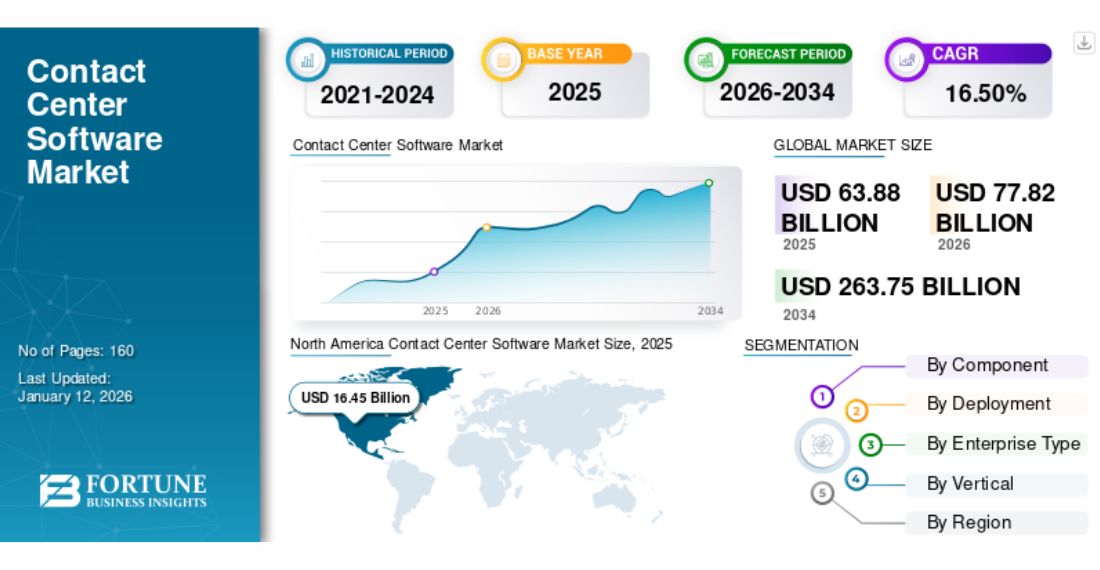
Due to the software’s significant benefits, its adoption rate increased, as did its market size. Fortune Business Insights reports that the global call center scheduling software market was valued at $63.88 billion in 2025 and is projected to grow at a CAGR of 16.50% from 2026 to 2034.
In this post, we will discuss this software further and its importance to the call center business. Let’s explore now.
Call centers have recently struggled to manage multichannel support, unpredictable call spikes, strict Service Level Agreements (SLAs), and hybrid teams. In these scenarios, relying exclusively on manual shifts or spreadsheets will no longer work. Even large call centers miss service levels because they cannot accurately convert forecasts into schedules.
They can do it better with call center scheduling software. It effectively integrates forecasting, shrinkage, agent availability, and compliance into a highly structured system. It prevents call centers from overstaffing during slow hours and from understaffing during busy hours.
Additionally, it minimizes agent burnout. The fact can’t be denied that poor scheduling causes unnecessary overtime, attrition, and uneven shifts.
It clearly reflects the importance of smart scheduling, which directly impacts operational cost, customer experience, and employee retention. Without it, workforce management is reactive rather than strategic—underscoring why modern call center solutions are no longer optional.
Let’s explore some of the top call center scheduling software tools you can consider to choose the right one:
As a cloud omnichannel platform, RingCentral Contact Center combines messaging, voice, and customer engagement tools in a single hub. It has unmatched potential for call handling. In addition, it boasts advanced workforce management (WFM) and smart scheduling features.
Integrating with AI workforce tools enables shift planning, automated forecasting, real-time adherence monitoring, and more. It helps managers match staffing to customer demand and minimize long wait times.
It also boasts powerful analytics and integration with RingCentral’s extensive services, making it a perfect fit for organizations that already use RingCentral telephony.
Features:
As part of a broader suite, Assembled AI focuses on workforce management, with an emphasis on forecasting and AI-driven scheduling. It’s well-suited to modern cloud contact centers, which allow teams to automate shift assignments based on skill requirements, projected contact volumes, and individual agent preferences.
Assembled AI can track even real-time agent adherence for scheduling and adjust fast when service levels shift. It includes reporting dashboards and an intuitive web interface, which makes it convenient for supervisors to keep teams efficient and organized. It maximizes performance with a couple of manual processes.
Features:
As a flexible, cloud-based call center software, CloudTalk offers analytics, scheduling, call routing, and performance tracking. This tool makes it convenient to manage agent schedules alongside customer engagement metrics, allowing supervisors to align staffing levels with busy periods across voice and other important channels.
CloudTalk is the best solution for businesses of all sizes. In addition to supporting real-time availability tracking, it minimizes idle agent time and integrates scheduling with robust productivity tools to improve operations.
Features:
Although it’s not a complete call center scheduling system, Deputy is widely used for workforce scheduling. The credit goes to its powerful shift planning, labor compliance features, and time-tracking. It offers auto-scheduling that accounts mainly for overtime rules, leave requests, agency availability, and labor costs.
With Deputy, supervisors can quickly create optimized schedules, manage shift trades, and track attendance in real time. The software offers a clean UI and versatility, making it a robust choice for centers that require flexible scheduling, even without a contact center platform.
Features:
Assembled is an advanced workforce management platform for distributed contact center teams. It provides adherence tracking, multi-channel agent scheduling, shift swap capabilities, and performance reporting. Call centers can use deep analytics and cloud-native scheduling tools to predict future staffing needs based on historical patterns.
Besides, Assembled’s collaboration tools can enhance team communication. It lets agents visualize their swap shifts, schedules, and time-off requests without supervisor overhead.
Features:
As a top-rated communication and VoIP platform, Nextiva offers scheduling and workforce insights, making it a useful tool for contact centers. Its scheduling tools allow managers to organize agent shifts across multiple locations, coordinate workloads, and handle intraday adjustments based on call volume trends.
Nextiva also includes important features such as recognition programs and gamification to improve morale and agent engagement. It’s a perfect solution for call centers that want unified communication and scheduling in a single system.
Features:
Talkdesk is a cloud-native contact center platform that integrates seamlessly with omnichannel engagement and robust workforce management tools. It’s packed with scheduling and forecasting modules that allow supervisors to optimize staffing based on agent skills, historical data, and preferred shift patterns.
Talkdesk leverages AI models to generate schedule templates and accurate forecasts, helping call centers maintain service levels while controlling labor costs. It includes a real-time dashboard that provides complete visibility into queues, agent adherence, and performance, enabling operations leaders to respond quickly to changing conditions.
Features:
As a part of the Zoho ecosystem, Zoho Voice offers cloud telephony with scheduling support tailored specifically for voice-centric contact centers. Meanwhile, Zoho Voice’s primary focus is telecom services.
It comes with basic scheduling tools and agent availability tracking that enable managers to align dips and spikes in call activity with a complete staffing plan. It’s easy to integrate with various tools, such as Zoho Analytics, Zoho Desk, and Zoho CRM. This makes it appealing to SMEs seeking unified call handling, scheduling, and analytics.
Features:
Humanity is better known as a dedicated workforce scheduling and management software. Many call centers use it for its robust, flexible scheduling engine. For Humanity, supervisors find it convenient to create weekly or monthly schedules based on agent availability, skills, business demand, and labor laws.
With a drag-and-drop interface, it simplifies even complex shift planning. Meanwhile, its mobile apps let agents request swaps, check timetables, and submit time-off requests on the go. The platform also includes overtime alerts, compliance tracking, and labor cost optimization. It’s highly important for centers that deal with tight budgets.
Features:
Shiftboard supports complex workforce scheduling. It’s a perfect option for highly or even larger dynamic contact centers. It can handle skill-based shift assignments, multi-location staffing, and rotating schedules conveniently.
With this tool, managers can automate recurring shifts, adjust agent rosters, and track audiences in real time.
Shiftboard offers detailed reporting on duty gaps, schedule adherence, and forecast accuracy. It comes with a flexible rules engine that supports nuanced rules such as union regulations, seniority preferences, and minimum staffing thresholds.
Features:
Injixo is a workforce management solution designed exclusively for call centers. It includes the ability to predict and optimize scheduling. The call center scheduling tool can be easily integrated with many leading call center platforms, including Talkdesk and Genesys.
Its scheduling tools better predict contact volume trends, accommodate intraday changes, develop performance-aligned rosters, and more. Injixo offers actionable reports that track shrinkage, adherence, and other key KPIs, helping supervisors improve scheduling efficiency and service quality.
Features:
Workforce.com is another popular call-scheduling software used across many industries, not just call centers. It’s a comprehensive workforce management platform that combines shift forecasting, planning, advanced analytics, and attendance tracking in a single, centralized system.
Workforce.com supports several channel operations that allow managers to balance workloads across chat, voice, and messaging queues by aligning staff with real-time demand signals. The software includes mobile apps for agents that help them request changes, view schedules, and access workforce dashboards.
Features:
We develop top-tier scheduling software tailored to your call center’s unique requirements. Let’s automate your shifts and enhance your forecasting accuracy.
Build Your App Now
Choosing the right call center scheduling or monitoring software requires extensive research and consideration of several important factors. Let’s discuss some of these factors in detail:
When it comes to forecasting, it’s one of the important functions of modern scheduling software. It reflects the use of historical data to predict future call volumes and staffing requirements. A good forecast also reflects your ability to correct the number of agents at the right time, irrespective of burnout or overstaffing.
You need to look for the following important things:
Analytics are equally important for forecasting. You need to ensure your selected software helps you analyze several performance metrics, such as service levels, average handle time (AHT), occupancy rates, shrinkage, etc. These insights are useful for optimizing schedules rather than just creating them.
The most important thing you need to keep in mind is that scheduling is not only a managerial task but also a good option for agents seeking flexibility. You need to know that those of empowered agents are highly productive, engaged, and more likely to stick around.
You need to be aware of various features that support agent empowerment. Some of them are as follows:
A system that allows agents to manage their schedules minimizes administrative work and also builds trust. It also reduces internal communication about both availability and shifts.
It’s crucial to recognize that even the right schedule is futile without real-time adherence. This feature is pivotal and lets you analyze whether agents adhere to their planned activities throughout the day.
An effective real-time adherence tools provide the following important things:
Real-time adherence improves the customer experience and enables teams to respond quickly to unexpected call surges.
You need to know that a call center relies on many third-party software tools to operate successfully. So, you need to ensure your potential software is easy to integrate with existing systems:
It’s a good option to focus on using the software that supports both native connections and APIs.
Additionally, scalability is crucial. If something works well for 20 agents, it may not work well for 200 or more agents. Therefore, you should always select a solution that scales with your business, whether you’re adding new teams, handling multi-location operations, or managing remote workers.
Your selection criteria for contact center software should not be based solely on features; it should also be easy to use. If it has a higher learning curve, it leads to frustrated agents, low adoption, and more support tickets. It should include the following most important usability factors:
Whether an agent, scheduler, or supervisor, everyone should be able to navigate the entire system with less training.
As far as price is concerned, it’s indeed a vital factor. But value remains of great relevance. Pricing models for such software often vary based on factors such as per-feature tiers, per-agent pricing, and enterprise licensing.
So, before you select any software, you need to always calculate your potential ROI based on the following important factors:
You need to always check costs against your expectations for gain, rather than only against competitor pricing.
We build a custom call center scheduling software tailored to match your KPIs and workflows. Let’s automate forecasting and optimize staffing.
Talk to Our Developers
If you wish to harness the full potential of scheduling software, you need to implement best practices to align processes and performance. Let’s explore some of the top practices as follows:
Accurate demand prediction is the backbone for effective scheduling. Relying only on guesses leads to repercussions such as agent burnout, overstaffed shifts, inconsistent service levels, and more.
Instead, you need to use several factors, such as seasonal patterns, historical call volume, and campaign cycles, to make an accurate prediction. Apart from this, various performance metrics will also help you in this:
Top Practices You Can Include:
With accurate forecasting, you can get the same number of staff when you need them the most. It boosts your service levels while giving you full control over labor costs.
You can make your scheduling software more robust by combining it with operational excellence. It helps you optimize your workflow to gain actual performance outcomes.
You can use the following steps to do optimization properly:
The operational focus refines service quality and ensures smooth call center performance.
You need to know that a schedule is more than just a plan. It’s, in fact, a great part of the overall work experience as well. You will witness more engagement when your agents feel respected and involved.
So, how to empower agents? You can do it in the following ways:
Always keep in mind that an empowered agent adheres to a perfect schedule and contributes effectively to a positive workplace culture.
Integrating various third-party tools and technologies with call center scheduling software is a great way to improve its functionality. You need to integrate it with systems such as workforce management tools, automatic call distributors (ACD), HR/payroll systems, and CRM platforms to maintain data consistency and minimize any manual work.
Apart from this, you need to also do the following important things:
Integration and ongoing maintenance are necessary to keep your scheduling system stay relevant and deliver value continuously.
We have years of experience in building custom call center scheduling software aligned with your business objectives, KPIs, and workflow. Our call center scheduling software developers build top-rated, scalable solutions that match your shift policies, staffing models, and service-level objectives.
We integrate the following features into contact center scheduling software to make it more purposeful:
We leverage cutting-edge technologies, including Python, React, Node.js, AWS, and cloud-native architectures, to build contact center scheduling software. We deliver high-end solutions that improve security, performance, and seamless integration with ACD, CRM, HRMS, and payroll systems.
We use an agile development approach to create contact center scheduling software. Our team ensures its outstanding performance with continuous testing and post-launch support. We are committed to delivering a future-proof scheduling platform that increases workforce efficiency, agent satisfaction, and minimizes labor costs.
So, by now, it’s clear that contact center scheduling software is not only a planning tool but also pivotal for workforce management. When developing such software, you need to better align it with your operational complexity. All you need to do is use it strategically.
Whether you want to select a ready-made solution or build your own, you need professional assistance to do it better. Partner with us to select or build the right solution that aligns with your core business objective.
01
02
03
04
05

Jayanti Katariya is the CEO of Moon Technolabs, a fast-growing IT solutions provider, with 18+ years of experience in the industry. Passionate about developing creative apps from a young age, he pursued an engineering degree to further this interest. Under his leadership, Moon Technolabs has helped numerous brands establish their online presence and he has also launched an invoicing software that assists businesses to streamline their financial operations.


Submitting the form below will ensure a prompt response from us.
We refine our expertise to deliver innovative business solutions.





500 N Michigan Avenue, #600, Chicago IL 60611
13500 Long Is Dr, Pflugerville, TX 78660, USA

C-105, Ganesh Meridian, S.G. Highway, Ahmedabad, GJ 380060


Ayse D.
Co-Founder France
“ I highly recommend Moon Technolabs as the quality of service is wonderful. We have hired this company to develop the product based on some complex & technical issues. We get the best quality services as compared with others in the market. Huge Thanks to Moon Technolabs as the team is always ready to give the solution all time.”

Justin G.
Founder & CEO USA
USA“ Moon Technolabs is a pioneer in the WebRTC based project as they have fixed complicated segments of the module by fulfilling different product lines by providing 24X7 customer support. We really recommended Moon Technolabs as they are able to develop products as per the module deadline and project timeline.”

Flavio S.
Founder & Managing Director Germany
“I am happy to recommend Moon Technolabs for their app development services. They successfully developed apps for me, and I am highly satisfied with the overall outcomes. The development team has swiftly addressed the issues with responsive and effective communication to understand the requirement quickly and actively resolve the back-and-forth problems that arose...”

Jay M.
Founder & CEOUSA“Moon Technolabs is the best company that provides advanced apps and websites development services in the USA and Europe. I am a newbie to develop my app with an external team. I am really happy to work with them as I am not that much mobile apps user. Here, the team and specially the CEO of Moon Technolabs helps me to let me know about the benefits of my app to generate revenue....”


Our Offices
India
C-105, Ganesh Meridian, S.G. Highway, Ahmedabad, GJ 380060USA
500 N Michigan Avenue, #600, Chicago IL 60611Contact Information


