
Jayanti Katariya
Last Updated: December 31, 2025 Total Views: 720
Table of Content


Blog Summary:
A concise guide to finding the best SIP softphone, covering top-rated apps, essential VoIP features, security factors, different platforms compatibility, and much more. It helps users compare leading options, understand what truly matters in call quality and reliability, and confidently choose the ideal softphone for efficient communication across any device.
Table of Content
Looking for a smarter, cheaper way to make calls over the internet? You’re not alone. As remote work, online meetings, and cloud-based communications continue to rise, SIP softphones have quickly become a go-to solution for businesses and individuals alike. With the global VoIP market growing at USD 44.9 billion in 2023 and expected to grow at a CAGR of 12.9% from 2024 to 2030, it’s clear that more and more people are making the switch to internet-based calling.

But with so many options out there, how do you choose the Best SIP Softphone for your needs? From crystal-clear voice quality to ease of use, there’s a lot to consider.
In this guide, we’ll explore the top SIP softphone apps, highlight key features to look for, and share tips on choosing the right one for you. By the end, you’ll be ready to make calls with confidence, whether it’s for business or personal use.
A SIP Softphone is a software application that allows users to make VoIP calls over the internet using the Session Initiation Protocol (SIP). It works on devices such as computers, smartphones, and tablets, offering voice, video, and messaging capabilities without the need for physical phone lines. This makes SIP Softphones a cost-effective and flexible solution, especially when integrated with services from a VoIP provider for enhanced communication.
To find the Best SIP Softphone, businesses often work with a custom software development company to create tailored solutions that meet their needs. Features such as call encryption and multi-device support can be integrated to ensure seamless performance. With reliable VoIP service providers, it ensures clear, high-quality calls and smooth service, making SIP Softphones an ideal choice for businesses looking to optimize communication.
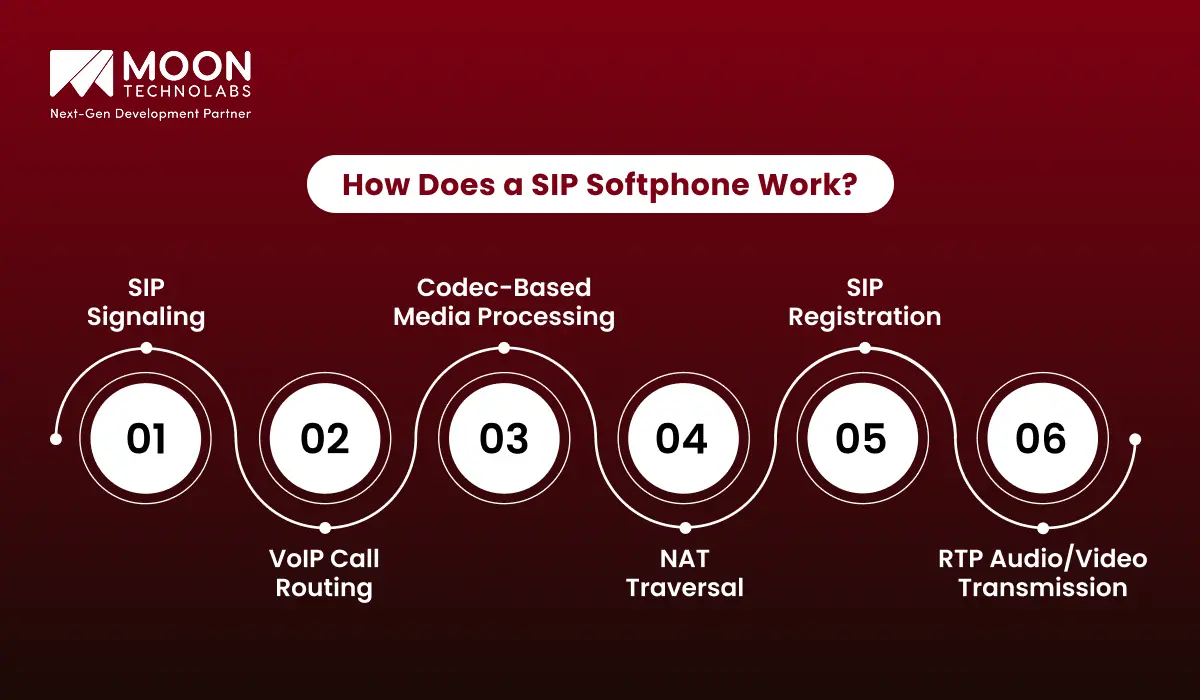
A SIP softphone is a software application that enables voice and video communication over IP networks using the Session Initiation Protocol (SIP). It works on devices like smartphones, PCs, and tablets to make calls, send messages, and share multimedia content.
Here’s a simplified breakdown of how it works:
SIP handles the call management features like setup and termination, sending messages like:
SIP softphones use VoIP to route calls through SIP servers, such as proxies or registrars. When a call is made, SIP determines how it’s routed, either directly to another VoIP softphone or through a gateway.
SIP softphones use audio/video codecs (e.g., G.711 for audio, H.264 for video) to compress and decompress media streams, optimizing bandwidth and ensuring quality. Codecs are negotiated during the call setup to choose the best match for quality and efficiency.
SIP softphones face challenges with NAT (Network Address Translation), which can hide device IPs. Techniques like STUN, TURN, and ICE help SIP softphones find each other and maintain stable connections, even behind routers and firewalls.
To place or receive calls, a SIP softphone must register with a SIP server using a REGISTER message. This allows the server to authenticate the user and direct incoming calls.
Once a call is connected, RTP (Real-Time Protocol) carries the audio or video data between devices. It ensures real-time delivery, even using jitter buffers to smooth out network delays.
You Might Also Like:
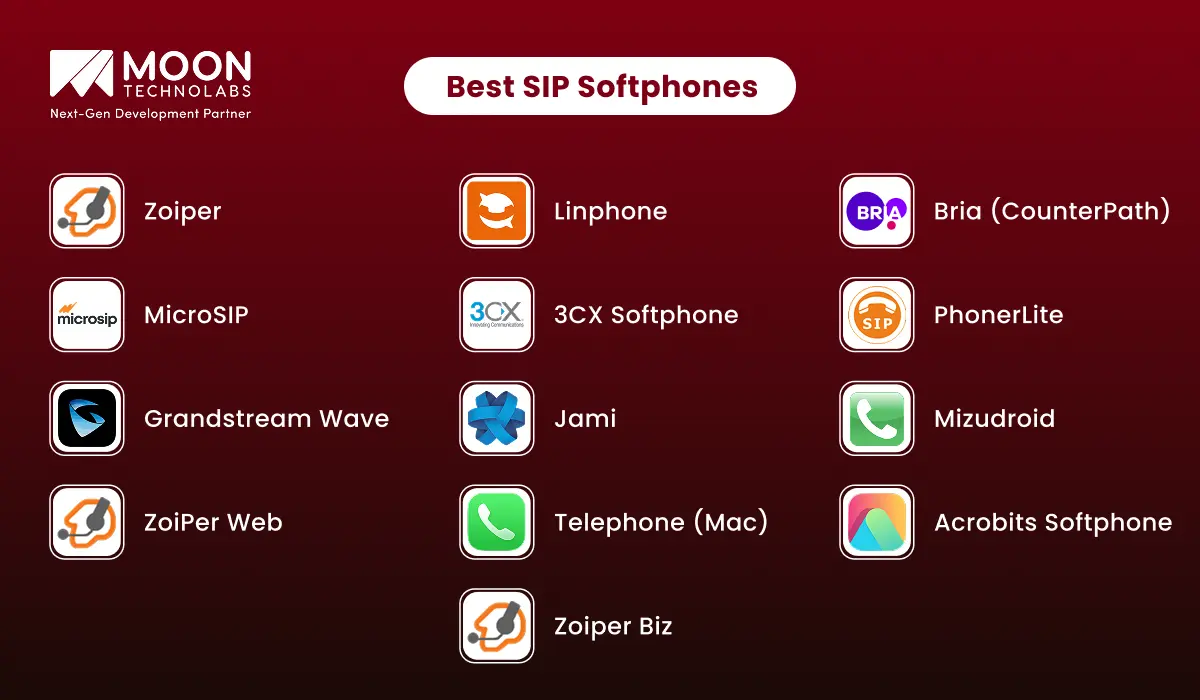
Review a curated list of the best SIP softphones to choose the one that ensures seamless communication across any platform.
A versatile SIP softphone that supports voice, video, and messaging with high security. Ideal for both personal and business use, it integrates easily with most PBX systems and provides strong encryption for secure calls.
An open-source SIP softphone with HD audio and video calling, designed for privacy-conscious users. It’s highly customizable, secure, and ideal for those who need a flexible, free VoIP solution.
A robust business solution, Bria offers HD voice and video calls, instant messaging, and seamless integration with PBX systems. It’s ideal for enterprises needing a reliable, multi-platform SIP softphone with advanced features.
A lightweight, open-source SIP softphone that delivers high-quality voice calls with minimal system resources. Perfect for small businesses or users who need a simple, no-frills VoIP solution.
A full-featured softphone for businesses, offering voice, video calls, chat, voicemail, and easy integration with 3CX PBX systems. It’s perfect for teams needing a unified communication tool with strong security.
A simple SIP softphone that provides excellent call quality and supports popular codecs like G.711 and G.729. It’s ideal for users who need a basic but reliable VoIP calling solution without the complexity.
A mobile SIP app offering HD voice and video calls, instant messaging, and multi-account support. It’s an excellent choice for professionals who need a feature-rich, on-the-go softphone for both personal and business use.
A decentralized, open-source SIP softphone that offers secure, peer-to-peer communication without the need for central servers. It’s perfect for users who prioritize privacy and want full control over their communications.
A powerful Android SIP softphone with HD voice/video calls, contact integration, call forwarding, and more. It’s a reliable choice for mobile users needing a feature-packed, user-friendly VoIP solution.
A web-based SIP client that allows voice and video calls directly from your browser, making it ideal for users who need a cloud-based, easy-to-access VoIP solution without software installation.
A minimalist SIP softphone for Mac users, providing simple and high-quality voice calling with a user-friendly interface. It’s perfect for those looking for a no-frills, intuitive VoIP solution on macOS.
A flexible and customizable SIP softphone for iOS and Android, offering HD voice/video calls, secure communication, and cloud PBX integration. It’s an excellent choice for businesses seeking a professional mobile solution.
A business-focused SIP softphone with advanced security, call recording, and multi-account support. Zoiper Biz is designed to meet the needs of professionals who require reliable, secure communication for business environments.
To stay connected with high-quality voice and video calls over the internet, using a reliable SIP softphone app on your mobile device can offer both flexibility and cost savings. Here are some of the best SIP softphone apps for iPhone and Android.
Zoiper Lite is one of the most popular and reliable SIP softphone apps for mobile devices. It offers a simple interface that supports both SIP and IAX protocols, making it ideal for users who need a basic, easy-to-use VoIP app.
Key Features:
Bria Mobile, developed by CounterPath, is a robust and feature-rich SIP softphone app. Known for its high call quality and comprehensive feature set, it’s perfect for business professionals and companies seeking a reliable VoIP solution.
Key Features:
Linphone is a free, open-source SIP client that’s available on both iOS and Android. It’s an excellent choice for those who prefer an open-source solution, offering complete control over their SIP configuration and settings.
Key Features:
Grandstream Wave is a mobile SIP app designed for easy and reliable VoIP communication. It’s a versatile app with a comprehensive feature set, making it ideal for both personal and business use.
Key Features:
Acrobits Softphone is a premium SIP application with a sleek, modern design. Known for its high call quality and stable performance, Acrobits is a great choice for users who prioritize both functionality and design.
Key Features:
The 3CX Mobile App is an ideal choice for users of the 3CX PBX system. It integrates seamlessly with the 3CX platform, providing a range of communication features for business environments.
Key Features:
To help you choose the right SIP softphone for your needs, it’s essential to know what features set these apps apart. Here are the key features to consider when evaluating SIP softphones:
SIP softphones support HD voice and video, ensuring superior sound and visual clarity. Whether you’re on a voice call or video conference, enjoy professional-grade communication with minimal lag and distortion.
With call forwarding and call transfer, you can redirect incoming calls to another device or colleague, ensuring you never miss important calls, even if you’re unavailable. These features help enhance flexibility and continuity in communication, especially for remote teams or businesses with flexible working hours.
SIP softphones allow for multi-device synchronization, so you can switch between devices (desktop, laptop, tablet, or smartphone) without losing track of ongoing conversations. Whether you’re at the office or on the go, your communication stays seamless across all devices.
Security is a top priority. SIP softphones use end-to-end encryption to protect voice and video calls from eavesdropping. Advanced security features also include firewall compatibility and authentication mechanisms to ensure a safe communication environment.
Get voicemail when unavailable and benefit from call recording for important conversations. These features are perfect for businesses that need to maintain records for compliance, training, or quality assurance.
With presence indicators, you can check colleagues’ or contacts’ real-time availability before initiating a call. The chat support feature enables instant messaging, allowing quick text exchanges alongside voice or video conversations.
Most SIP softphones support integration with custom SIP accounts, enabling users to connect to different SIP service providers or PBX systems. This customization ensures the softphone fits your specific business or personal communication needs.
| Pros and Cons |
|---|
|
Choosing the right Session Initiation Protocol softphone service is crucial for seamless communication, whether for personal or business use. To make an informed decision, here are the key factors to consider:
Start by identifying the essential features you need. If you’re a business user, you might need advanced features such as call forwarding, voicemail, call recording, and conference calling. For personal use, you may need basic VoIP softphone apps with good voice quality. Additionally, look for features like:
Ensure the VoIP service includes all the tools necessary to enhance your communication experience.
Your SIP softphone service should be compatible with the devices and operating systems you use. This is particularly important if you frequently switch between devices. Check compatibility with:
The more platforms the service supports, the more flexibility you’ll have in using it across devices.
Security is critical for voice and data communications. Look for SIP services that offer robust security measures to protect your conversations and personal data, including:
This ensures that your communication remains private and compliant with any necessary regulations.
Pricing can vary widely among SIP providers. Consider which pricing model works best for your budget and usage. Common models include:
Compare the costs and features of different plans to find one that best suits your needs without overspending.
Reliable support is essential if you encounter technical issues. Ensure the service provides:
Good support can save you significant time and frustration, especially if you rely on the service for business communication.
When choosing a SIP softphone, it’s important to consider whether the service is tailored for business or personal use. Business-focused services typically offer more advanced features, such as:
On the other hand, personal-use services tend to be more affordable and offer simpler features, making them ideal for individuals who need basic calling and messaging.
Got a concept? We’ve got the expertise! Let’s talk about turning your SIP app into something amazing your users will enjoy.
Choosing the best SIP softphone is crucial for ensuring seamless communication, whether you’re running a business, managing remote teams, or simply looking for a more affordable way to make calls. With a range of apps available, it’s important to prioritize features such as call quality, security, ease of use, and seamless integration. By carefully evaluating your needs and testing different options, you can find the right SIP softphone for your requirements.
If you’re considering custom features or need specialized integration, working with a VoIP software development company could be a game-changer. They can help tailor a solution to your exact specifications, ensuring a more personalized experience. No matter your needs, the best SIP softphone can transform how you communicate, bringing you one step closer to more efficient, cost-effective conversations.
01
02
03
04
05

Jayanti Katariya is the CEO of Moon Technolabs, a fast-growing IT solutions provider, with 18+ years of experience in the industry. Passionate about developing creative apps from a young age, he pursued an engineering degree to further this interest. Under his leadership, Moon Technolabs has helped numerous brands establish their online presence and he has also launched an invoicing software that assists businesses to streamline their financial operations.


Submitting the form below will ensure a prompt response from us.
We refine our expertise to deliver innovative business solutions.





205 N Michigan Avenue, #810, Chicago, 60601, Illinois, United States
13500 Long Is Dr, Pflugerville, TX 78660, USA

C/105 Ganesh Meridian, S.G. Highway, Ahmedabad, GJ 380060


Ayse D.
Co-Founder France
“ I highly recommend Moon Technolabs as the quality of service is wonderful. We have hired this company to develop the product based on some complex & technical issues. We get the best quality services as compared with others in the market. Huge Thanks to Moon Technolabs as the team is always ready to give the solution all time.”

Justin G.
Founder & CEO USA
USA“ Moon Technolabs is a pioneer in the WebRTC based project as they have fixed complicated segments of the module by fulfilling different product lines by providing 24X7 customer support. We really recommended Moon Technolabs as they are able to develop products as per the module deadline and project timeline.”

Flavio S.
Founder & Managing Director Germany
“I am happy to recommend Moon Technolabs for their app development services. They successfully developed apps for me, and I am highly satisfied with the overall outcomes. The development team has swiftly addressed the issues with responsive and effective communication to understand the requirement quickly and actively resolve the back-and-forth problems that arose...”

Jay M.
Founder & CEOUSA“Moon Technolabs is the best company that provides advanced apps and websites development services in the USA and Europe. I am a newbie to develop my app with an external team. I am really happy to work with them as I am not that much mobile apps user. Here, the team and specially the CEO of Moon Technolabs helps me to let me know about the benefits of my app to generate revenue....”


Our Offices
India
C/105 Ganesh Meridian,S.G. Highway, Ahmedabad, GJ 380060USA
205 N Michigan Avenue, #810, Chicago, 60601, Illinois, United StatesContact Information


