
 Total Views: 473
Table of Content


Blog Summary:
This blog outlines the key Benefits of Cloud Migration for businesses to consider. Apart from that, it also explains different types of cloud migration strategies, the challenges associated with cloud migration, and best practices to implement. Let’s get going in-depth to know more about cloud migration.
Table of Content
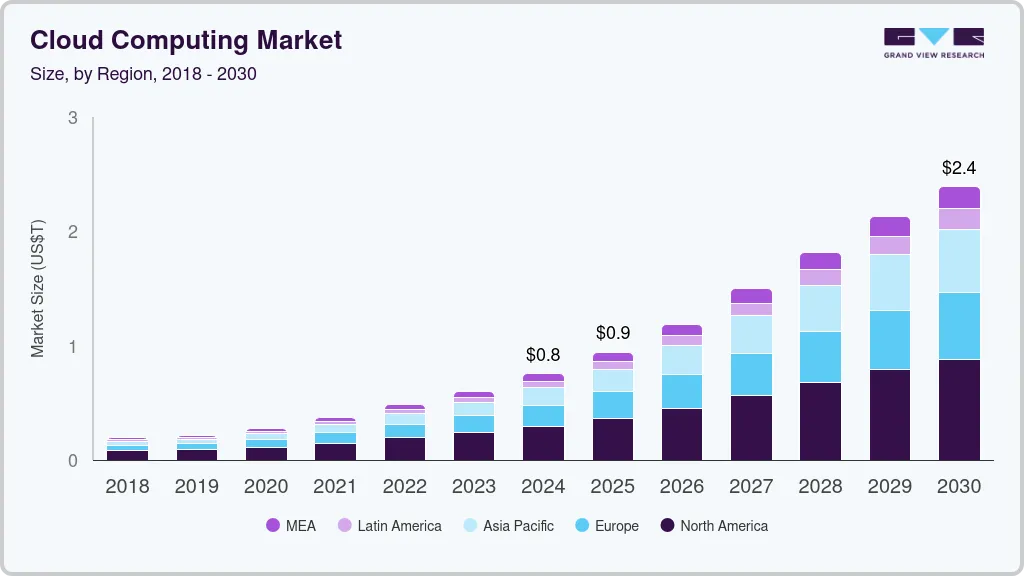
In today’s hyper-competitive digital era, businesses should not rely solely on their on-premises infrastructure. The proof is in the cloud report:
This huge shift to cloud computing has become a fundamental engine that drives success for modern businesses. But the cloud migration journey is often misunderstood as a technical relocation. However, it’s a strategic overhaul that provides limitless agility, scalability, and cost efficiency.
Many businesses hesitate due to myths, but the reality is that a well-executed cloud migration plan goes a long way. It dramatically transforms slow, rigid business operations into fast, resilient ones. Do you want to stop managing servers? This definitive guide will pinpoint the crucial aspects to reveal the true benefits of cloud migration.
Cloud migration involves moving digital assets, such as data, applications, IT workloads, or an entire It infrastructure, from an organization’s on-premises data center to the cloud. This is a strategic process that enables businesses to maximize the benefits of the cloud.
It includes enhanced scalability, elastic resource provisioning, improved security, and a move from capital expenditure (CapEx) to operational expenditure (OpEx). It’s an important step in digital transformation that ensures agility and modernizes the core IT landscape.
You Might Also Like:
Enhance Security and Save Cost of Your App with Cloud Data Migration
The rapid shift of businesses to the cloud is driven by cost optimization, unparalleled agility, and advanced capabilities. Also, the cloud allows businesses to scale resources up or down on demand instantly. Hence, it prevents downtime during traffic spikes and avoids the cost of idle capacity. This is critical for agility, which helps companies reduce time-to-market for new products.
Furthermore, cloud providers offer enhanced security and disaster recovery. This exceeds what individual companies can manage in-house. They also provide immediate access to cutting-edge technologies like AI and Machine Learning tools.
Key Statistics to look into:
The cloud has become a fundamental platform for any business, enabling modern digital transformation.
Migrating to the cloud is a strategic decision that requires choosing the right approach to maximize benefits and minimize disruption. The industry generally falls into three core strategies, plus the flexible option of a Hybrid deployment. Selecting the correct method depends entirely on your application’s architecture, business drivers, and long-term goals.
This is considered the fastest and simplest migration method. It involves moving an application and its associated data exactly as they are, without changing the code or architecture, from the on-premises environment to the cloud.
Best For: Simple applications, systems with short-term retirement plans, or organizations prioritizing a fast, low-cost exit from their data center. It provides quick financial benefits but limited cloud-native optimization.
This approach is a middle ground where the application’s core architecture remains the same, but you make non-code-changing optimizations to leverage cloud features. Moving an on-premises database server to a managed database service or shifting a server to a containerized service.
Best For: Applications that need better performance or lower operational overhead without the cost and time of a full rewrite. It offers better optimization than pure Lift-and-Shift.
Refactoring is the most extensive and resource-intensive method, involving significant modifications or a complete rewrite of the application code to utilize cloud-native features fully.
Best For: Mission-critical applications where long-term agility, performance, and cost efficiency are paramount. This maximizes the long-term ROI of the cloud but requires the most development effort upfront.
Rather than an approach for a single application, this defines the overall operating environment. A hybrid migration involves moving some workloads to the public cloud while retaining other critical workloads on-premises (or in a private cloud). A dedicated connection or VPN links the two environments.
Best For: Companies with strict regulatory or data residency requirements, or those who need to maintain legacy systems while gradually adopting the cloud for new services. It provides maximum flexibility and risk management.
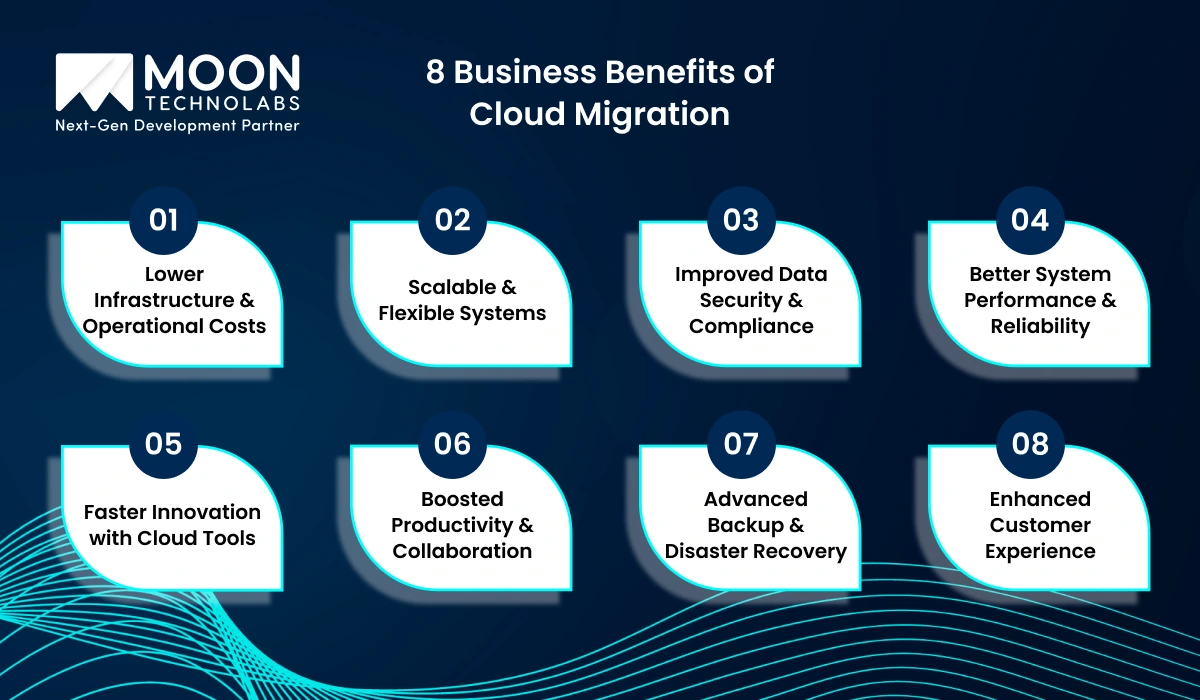
Migrating to the cloud presents ample benefits for an enterprise. Here are some of the key advantages that make a drastic change to the business when moved to the cloud.
Migrating to the cloud eliminates the need for expensive on-premise hardware, routine maintenance, and manual upgrades. Businesses can shift to a predictable, pay-as-you-go pricing model that drastically lowers IT spending while maximizing resource utilization.
Cloud platforms allow organizations to scale resources up or down instantly based on demand. This flexibility ensures consistent performance during traffic spikes, seasonal workloads, or rapid business expansion without additional hardware investment.
Modern cloud providers offer enterprise-grade security features, including encryption, IAM, DDoS protection, monitoring, and automated compliance updates. This strengthens your overall security posture while helping your business meet industry-specific regulatory requirements.
With load balancing, global data centers, and auto-healing infrastructure, cloud environments deliver faster performance and exceptional uptime. This ensures your applications run smoothly with minimal disruptions or downtime.
Cloud migration unlocks access to advanced tools such as serverless computing, AI/ML APIs, automated workflows, and containerization. These cloud-native technologies empower faster development cycles, rapid experimentation, and quicker time-to-market.
Cloud-based workflows enable real-time collaboration, remote access to data, and centralized management tools. Teams can work more efficiently from anywhere, improving overall productivity and operational efficiency.
Automated cloud backups, multi-region data replication, and reliable disaster recovery mechanisms ensure your critical data and applications remain safe. Even in unexpected failures, your systems can be restored quickly with minimal business impact.
Cloud-powered applications deliver faster response times, personalized services, and consistent performance, resulting in higher customer satisfaction. The agility that cloud computing provides helps businesses respond to customer needs quickly and efficiently.
Hire cloud migration developers to shift your systems to a high-performance, cost-efficient cloud environment.
Cloud migration is a strategic move that empowers industries to operate faster, smarter, and more cost-effectively. It scales operations in real time, improves security, and enhances the customer experience. Hence, businesses across sectors are migrating to the cloud to remain competitive. Here’s how different industries utilize cloud migration to transform and modernize their workflows.
Retailers and e-commerce platforms rely heavily on high availability, quick scaling, and personalized user experiences. Cloud migration helps them:
By moving to the cloud, retailers create seamless digital experiences while reducing downtime and ensuring fast, consistent performance across channels.
Cloud migration is reshaping the healthcare landscape by enabling secure, data-driven care delivery. With the cloud, healthcare organizations can:
This shift helps providers improve patient outcomes while gaining the flexibility to adopt advanced technologies like AI diagnostics and IoT health devices.
Cloud migration enables financial institutions to be more agile. Also, it strengthens compliance and security. The top benefits are:
Cloud-driven financial ecosystems help banks reduce operational risks, modernize legacy systems, and deliver seamless digital experiences to customers.
Manufacturers use cloud technology to streamline operations, optimize production, and enable smart automation. Cloud migration supports them through:
With cloud integration, manufacturers adopt Industry 4.0 and accelerate digital transformation across the entire production cycle.
EdTech platforms thrive on scalability, accessibility, and real-time content delivery—making cloud migration essential. The cloud helps EdTech companies:
Cloud-powered EdTech ensures reliable performance for students and educators worldwide while reducing infrastructure complexity and costs.
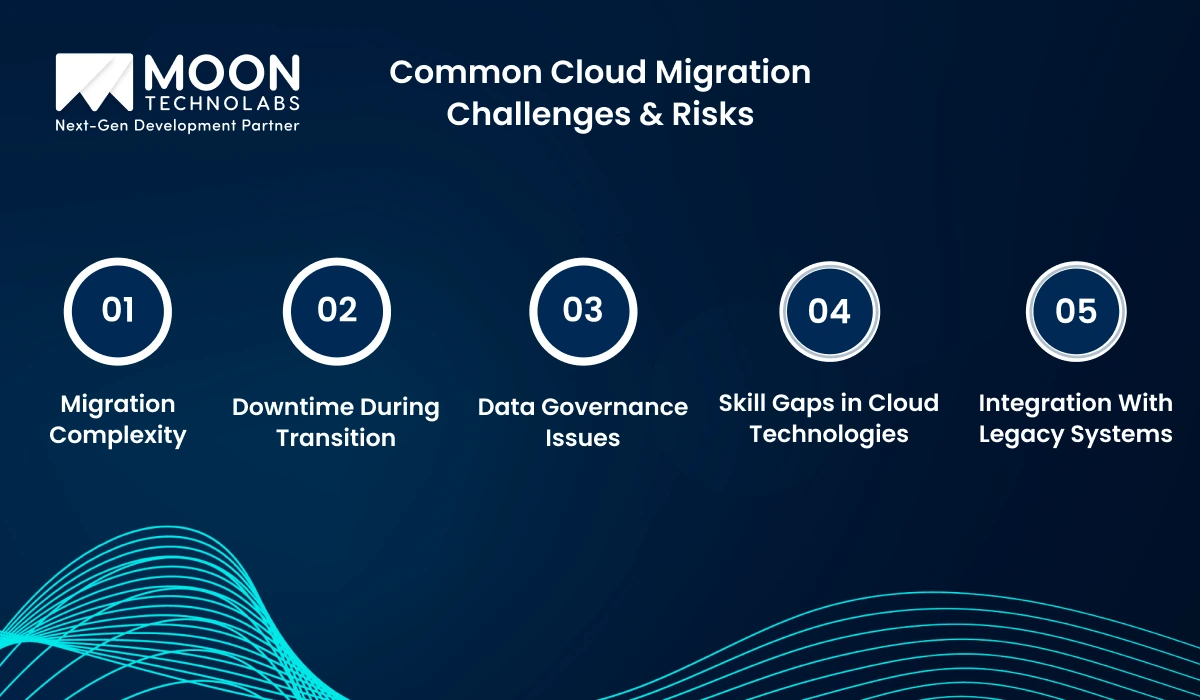
Cloud migration undoubtedly offers significant advantages, but it also comes with a bundle of challenges. Organizations often face technical, operational, and strategic hurdles that must be addressed to ensure a smooth and secure transition. Let’s understand these challenges to plan more effectively and avoid costly setbacks.
Moving applications, databases, and workloads to the cloud is rarely a plug-and-play process.
However, cloud architectures differ fundamentally from on-premise infrastructures, which means businesses must:
Even a well-planned migration may require periods of reduced performance or full outages.
This challenge becomes critical for businesses that operate 24/7 or rely on real-time operations. Key reasons for downtime during migration include:
Migrating to the cloud involves reshaping how organizations store, access, and protect data. Common data governance challenges include:
Cloud migration requires specialized expertise that many in-house IT teams may lack. Skill-related challenges typically involve:
Not all legacy systems are cloud-ready, and some may not support integration. This creates several barriers:
You Might Also Like:
For a successful cloud migration, it is also necessary to follow best practices to ensure a smooth transition. This way, your business can be protected against common failures and ultimately realize the full benefits of cloud migration.
This is a discovery phase, which is basically the bedrock of your entire cloud migration strategy. Here, it is important to catalog all the applications, data stores, servers, and network configurations.
Also, you must identify which applications rely on others, as this is critical to prevent downtime later. Another step is to understand the current CPU, memory, and storage utilization.
You also need to determine the suitability of the migration. Here, you can categorize applications based on the 6 Rs of Cloud Migration, i.e., Rehost, Replatform, Refactor, Repurchase, Retire, and Retain. This helps to form the basis of your cloud migration strategy.
Setting clear goals is mandatory when migrating to the cloud. It involves defining financial and technical objectives. Moreover, you need to define success metrics (KPIs) before the migration to measure the project’s success objectively.
Do not aim to work on everything at once when migrating to the cloud. Pick up a phased approach to minimize potential risks and refine processes with each iteration. It’s necessary to run a pilot program as a proof-of-concept (POC). It helps to validate your architecture, toolset, security controls, and operational procedures in a low-stakes environment.
You can also implement a wave strategy. Here, you need to group apps into “waves” or logical batches based on dependencies, complexity, and business priority. You need to move the lowest-risk applications first, then progress to more complex workloads.
Lastly, establish a Rollback Plan. Before each wave, define the exact conditions that would trigger a rollback to the on-premise environment and the procedures for executing it swiftly.
The cloud provider manages cloud security, and you are responsible for protecting security within the cloud. Thus, it operates on a shared responsibility model, which requires a proactive, cloud-native approach.
You need to adopt an Identity and Access Management (IAM) Solution and implement the principle of least privilege. Ensure users and applications only have the minimum permissions necessary to perform their tasks.
Moreover, use encryption for data both at rest (storage) and in transit (network). Define clear data sovereignty and retention policies to meet regulatory requirements like GDPR or HIPAA. Also, use native cloud security tools and Infrastructure as Code (IaC) to enforce security policies and configurations, ensuring continuous compliance from day one.
After the cloud migration, the first step is to monitor usage to identify overprovisioned instances and downsize them. Commit to reserved instances (RIs) or savings plans for predictable, long-running workloads to secure significant discounts.
You also need to implement automated rules to shut down non-production resources outside business hours to prevent unnecessary spending. Once it is stable, begin refactoring monolithic applications into microservices or leveraging serverless technologies to increase scalability further and reduce operational overhead.
Modernize your architecture with cloud app development that enhances performance post-migration.
Cloud isn’t a cure-all strategy for SMEs, but it does present valuable opportunities for innovation. Moreover, your business will lag somewhere or the other if you fail to take advantage of them for sure. Our cloud migration services ensure a smooth move to the cloud without any bottlenecks or data inconsistencies. Get in touch with us to start your cloud migration.
01
02
03
04
05

Jayanti Katariya is the CEO of Moon Technolabs, a fast-growing IT solutions provider, with 18+ years of experience in the industry. Passionate about developing creative apps from a young age, he pursued an engineering degree to further this interest. Under his leadership, Moon Technolabs has helped numerous brands establish their online presence and he has also launched an invoicing software that assists businesses to streamline their financial operations.


Submitting the form below will ensure a prompt response from us.
We refine our expertise to deliver innovative business solutions.





500 N Michigan Avenue, #600, Chicago IL 60611
13500 Long Is Dr, Pflugerville, TX 78660, USA

C-105, Ganesh Meridian, S.G. Highway, Ahmedabad, GJ 380060


 France
“ I highly recommend Moon Technolabs as the quality of service is wonderful. We have hired this company to develop the product based on some complex & technical issues. We get the best quality services as compared with others in the market. Huge Thanks to Moon Technolabs as the team is always ready to give the solution all time.”

 USA
USA“ Moon Technolabs is a pioneer in the WebRTC based project as they have fixed complicated segments of the module by fulfilling different product lines by providing 24X7 customer support. We really recommended Moon Technolabs as they are able to develop products as per the module deadline and project timeline.”

 Germany
“I am happy to recommend Moon Technolabs for their app development services. They successfully developed apps for me, and I am highly satisfied with the overall outcomes. The development team has swiftly addressed the issues with responsive and effective communication to understand the requirement quickly and actively resolve the back-and-forth problems that arose...”
 USA
USA“Moon Technolabs is the best company that provides advanced apps and websites development services in the USA and Europe. I am a newbie to develop my app with an external team. I am really happy to work with them as I am not that much mobile apps user. Here, the team and specially the CEO of Moon Technolabs helps me to let me know about the benefits of my app to generate revenue....”


