
 Total Views: 92
Table of Content


Blog Summary:
This blog provides comprehensive information on 3CX Pricing and its importance to organizations. It includes key details such as features, advantages, hidden costs, a selection guide, and more. Keep reading the post to select the right plan for your organization.
Table of Content
Imagine you are the CEO of a fast-growing mid-sized company. Your team works from multiple locations, and your clients are situated worldwide. Your phone bills keep surging while the quality is mediocre. And you suddenly realize it’s time to move beyond your existing PBX and adopt a future-proof, unified communication platform.
3CX is a robust solution to this situation. It helps you keep your phone bill within budget and promises higher-quality plus smoother communication. It encourages organizations to migrate from their existing systems to VoIP solutions such as 3CX.
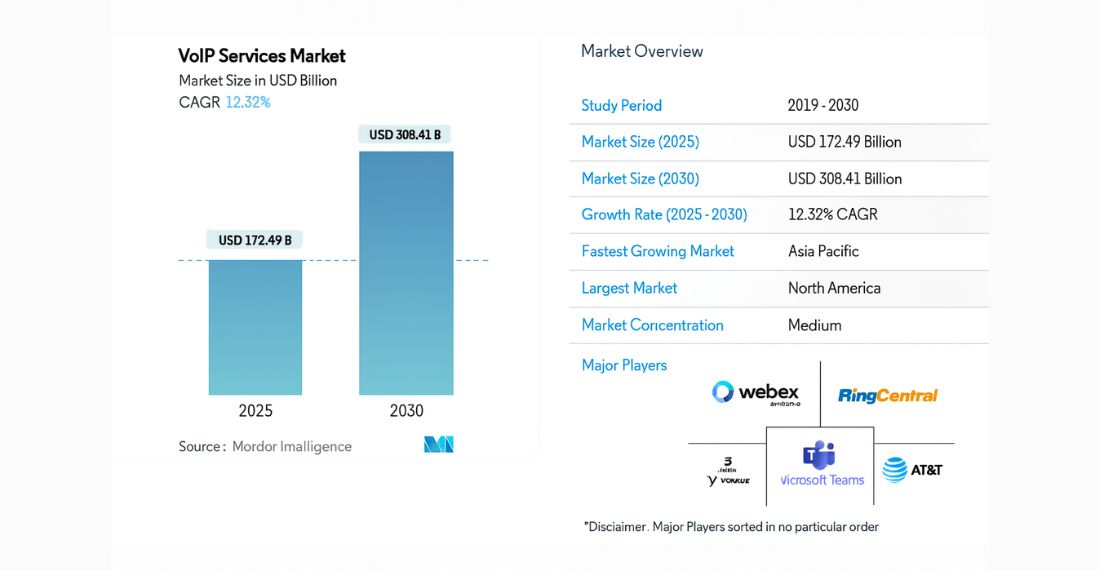
This increased the market share of VoIP solutions. Mordor Intelligence predicts that the VoIP market size will reach $308.41 billion by 2030, up from $172.49 billion in 2025.
Meanwhile, you must select the right 3CX Pricing Plan for your organization to maximize its advantages. In this post, we provide complete information about 3CX pricing. Let’s explore.
3CX pricing is the complete cost structure for any 3CX phone system. It’s appropriate for businesses of different sizes, looking for VoIP communication solutions. 3CX pricing is completely different from the old PBX system, as it uses a subscription-based pricing model while also giving businesses the flexibility to explore 3CX Alternatives if they need different communication setups.
In 3CX, the pricing depends mainly on the number of calls made rather than the number of users. This makes it cost-efficient and thus good for businesses irrespective of their budget.
It offers pricing plans such as Free, Professional, and Enterprise. Each plan comes with additional features such as video conferencing, call queues, advanced contact center tools, CRM integrations, and more. Apart from this, 3CX also offers hosting options, allowing businesses to choose between 3CX-hosted or self-hosted deployments based on their budget and needs.
3CX is suitable for businesses seeking scalable, flexible, and cost-effective communication systems, whether they are startups or large enterprises. Let’s go through a detailed overview of the types of businesses that can benefit from 3CX.
You need to always keep in mind that SMBs are always in need of cost-efficient enterprise-grade communications tools. 3CX meets their needs, offering key features such as automated attendants, call routing, video conferencing, live chat, CRM integrations, and more.
All of these are possible at predictable pricing. With 3CX, you can keep costs under control even as your team grows. It’s good for businesses seeking professional communication capabilities even without a large in-house IT team.
3CX is the best option for call centers and their support teams, as they require robust, reliable customer interaction tools. It includes features such as skills-based routing, call queues, call whispering, supervisor monitoring, wallboards, SLA tracking, and more.
These make it a powerful alternative to traditional call center software. It’s useful for managers to keep an eye on agent performance, optimize workflows, and more, with its real-time reporting and built-in analytics. 3CX is also a good option for outbound teams since it supports CRM-triggered calls and predictive dialing.
3CX is the right choice for enterprises that require higher security, infrastructure ownership, data control, and more. This is the right option for companies with robust compliance policies and operating in many industries, such as healthcare, finance, government, and others. It allows the IT team to have full control over data flow, servers, custom integration, firewalls, and more.
Remote teams require full-proof communication tools that function smoothly across different networks and devices. Whether it’s mobile apps, web clients, chat features, or video meetings, 3CX offers a range of features that ensure remote collaboration runs smoothly and effortlessly. Employees can work from any location using a unified communication platform.
3CX is a primary choice for tech-savvy businesses desiring to tailor every important aspect of their phone system. It supports SIP trunk providers based on the organization’s choice, as well as custom integrations, open-source standards, and API-based automation. These are perfect for businesses that are looking for a PBX. They can expand, modify, and integrate into existing IT systems.
We help you redefine your communication system. Our experts handle setup, optimization, and migration smoothly and in a planned way.
Talk to An Experts
Opting for 3CX is a go-to communication platform for businesses seeking robust messaging, calling, and collaboration. Let’s have a detailed look at some of the most promising advantages:
As we already mentioned, 3CX is highly cost-efficient compared to PBX systems. So, cost-efficiency is one of its core advantages. The most interesting part of this platform is that it charges you only for your active calls, not by the number of employees.
Businesses find it convenient to use their existing SIP trunks, which bring their own hardware and avoid proprietary vendor lock-in. It minimizes the overall communication costs even without compromising features. As the team grows, the savings become even more sustainable over time.
With 3CX, businesses have full autonomy through cloud and self-hosting options. They will be able to run 3CX on their private cloud, on their own servers, with preferred hosting providers, and more.
You Might Also Like:
Top VoIP Service Providers: Features, Benefits, and Pricing Explained
This is indeed a major advantage for companies seeking high security, strict data control, and compliance with multiple industry regulations. 3CX helps IT teams manage everything, even without relying on third-party vendors, including system customization, backups, firewalls, and security protocols.
Another advantage of 3CX is its ability to work smoothly across different operating systems and devices. It ensures a smooth, outstanding experience everywhere, whether your employees prefer macOS, Windows, or Android.
Since the mobile apps support messaging, VoIP calling, call management, video conferencing, and presence updates, these are convenient for hybrid and remote workers to stay in touch. WebRTC support doesn’t require any meetings or video calls, further simplifying overall communication.
3CX includes essential communication tools in a single platform, eliminating the need for multiple apps and minimizing workflow friction. The following are some of the top unified communication features:
Businesses can use 3CX to centralize communication in a single environment, enhance agent productivity, boost collaboration, minimize dependencies, and more with a range of paid software tools.
3CX can integrate with a number of top-rated CRMs and business tools. These include mainly Zoho, Salesforce, HubSpot, Freshdesk, Microsoft 365, Pipedrive, and more. These integrations help automate tasks such as ticket creation, call logging, performance tracking, customer lookup, and more.
It provides more personalized customer interactions and smooth workflows. Developers find it convenient to build custom integrations using 3CX APIs, making the entire system quite adaptable to niche business requirements.
Businesses find it convenient to build highly automated, model-based call scenarios without writing complex code. They can create IVRs, call menus, customer callbacks, auto-routing rules, payment flows, surveys, and more. This customization allows callers to reach the desired department quickly, enhancing customer satisfaction and minimizing agents’ operational load.
Many features make 3CX perfect for businesses seeking to simplify communication, minimize dependencies, boost productivity, and more across different apps. Let’s have some of the most promising features of this platform:
SIP-based architecture is one of 3CX’s most important features, enabling businesses to make high-quality VoIP calls with preferred SIP trunk providers. This open-standard approach lets organizations avoid vendor lock-in while guaranteeing more flexibility and cost savings.
3CX call routing ensures that calls reach the right place quickly. You can indeed create routing rules according to agent availability, business hours, custom logic, caller ID, and more. Advanced routing effectively prevents missed calls, ensures smooth communication, and enhances customer satisfaction, even during peak hours.
You Might Also Like:
The auto-attendant system or Interactive Voice Response (IVR) is one of the top-notch features of 3CX. It’s necessary to automate communication. Businesses can easily build professional call menus that guide callers to the right departments, even without requiring a receptionist. Organizations can easily set up the following important things:
With 3CX, calls are distributed according to user-defined algorithms, helping balance agent workload and minimize overall wait times. It allows supervisors to analyze real-time performance using whisper coaching, queue dashboards, call takeover, and barging options. It ensures the availability of call recording for compliance, quality assurance, and training. It gives you full flexibility to store recordings logically.
When it comes to voicemail-to-email, it’s indeed a great feature that boosts both responsiveness and accessibility. 3CX sends the audio file automatically to the recipient when a caller leaves a voicemail.
It lets employees download, listen to, forward, and more voicemails from any location. It’s indeed quite beneficial to the staff and remote teams who are constantly on the move.
3CX boasts built-in video conferencing, minimizing the need for third-party meeting tools. Meetings run smoothly in the browser even without any plugins or installations. Let’s get a complete look at the features of video conferencing:
It allows teams to collaborate quickly while letting clients join via an individual link, simplifying overall communication workflows for support, sales, and international discussions.
3CX enables multi-channel communication through the integration with WhatsApp and live chat. It lets you integrate a chat widget into your website so visitors can message your team quickly. Agents find it convenient to respond from the 3CX mobile app or web clients, which boosts lead capture and also increases customer support efficiency.
You also get the flexibility to link your WhatsApp business number to 3CX, enabling your customers to chat and have their chats routed directly to your support team. It allows agents to handle chat, calls, and WhatsApp messages from a single unified interface, improving productivity and minimizing response time.
One of the major advantages of 3CX is its seamless integration with leading platforms such as Salesforce, Zoho, HubSpot, Bitrix24, Freshdesk, and more. These integrations ensure the following important things:
These integrations are necessary for businesses that rely on customer data to streamline their processes and make every call more efficient and personalized. It allows developers to craft custom workflows using 3CX APIs for in-depth automation.
IT teams can use the 3CX admin console to get complete visibility and also control through the phone system. It offers the following important things:
Supervisors can leverage analytics dashboards to monitor call volume trends, agent performance, missed calls, customer wait times, overall communication efficiency, and more. This data-based visibility ensures operational optimization and improved decision-making.
3CX provides robust smartphone apps for macOS, Windows, iOS, and Android. These apps can replicate the full functionality of desk phones, enabling users to send messages, make/receive calls, manage contacts, join video meetings, and more from any device. The app features mainly include:
3CX also entails many additional expenses that can significantly affect the overall cost of ownership. It’s important to know about the hidden charges so that you can plan your budget. Below are some of the hidden costs related to 3CX:
You need to understand that SIP calling services are not enabled by default in 3CX. So, businesses need a SIP trunk subscription from a third-party provider to make or receive external calls. On the other hand, 3CX supports leading SIP trunk vendors. 3CX hosting pricing varies based on the following important factors:
SIP trunking costs only a few dollars monthly for small teams. Meanwhile, it can be more suitable for call centers or teams with large numbers of members. So, it’s advisable to select the right provider, and the estimated call usage indeed matters a lot in controlling communication expenses.
3CX can run on a virtual machine, a physical server, or on cloud providers like Azure, AWS, Google Cloud, and others when you opt for self-hosting. Each of these options has its own cost structure. The following are some of the popular cost components:
3CX offers a hosted plan with additional annual or monthly fees. At the same time, hosting offers full flexibility and control.
3CX is indeed robust, but it also needs ongoing management. Most businesses often ignore the IT support and maintenance costs needed to keep the entire system running smoothly. These include the following important things:
Though 3CX offers several features, it also requires additional, advanced functionality. These require third-party tools and paid add-ons. Most popular examples are as follows:
Businesses need to determine which integrations are necessary and calculate not only the base plan cost but also the recurring charges for several external tools.
The fact is that 3CX functions smoothly with mobile apps and softphones. Most businesses still need desk phones. It introduces several hardware costs as follows:
The above costs depend mainly on brand and model. When you prefer a mid-range IP, it costs between $50 and $200 per unit. Not to mention, hardware is not necessary for 3CX. Businesses that seek a traditional office phone setup should always factor in the additional upfront investment.
Well, selecting the perfect 3CX plan depends heavily on factors such as your organization’s growth expectations, budget, hosting preferences, and more. Let’s explore some of these factors to opt for the right one:
If you own a small business and are looking for cost-efficient communication features, you should opt for none other than 3CX Free. These plans include features such as video meetings, calling, basic routing tools, chat, and more.
They are perfect for small teams that don’t need any advanced call center functionality.
You can go with a professional plan, especially if you have a moderate budget and need integration or automation. The plan adds reporting, call queues, CRM syncing, hot desking, and more.
These are indeed appropriate for growing organizations. Organizations having a sound budget and strict security, workflow, and compliance requirements can opt for the Enterprise plan. It unlocks various failover options, modern call center tools, superior support, and more.
If your business expects rapid growth in the near future, you should go with simultaneous calls. When your organization scales beyond 20 to 30 users, professional plans offer complete automation with flexibility. An enterprise plan is good for call-heavy teams like sales or support.
This plan offers SLA monitoring, high-capacity queues, advanced analytics, and more. Scalability is indeed important when choosing a plan that supports future communication volumes without major upgrades.
3CX-hosted cloud is the best option for those who prefer a hands-off setup, minimal IT involvement, automatic updates, and more. It’s indeed secure, simple, and perfect for both small and mid-sized teams. If you require strict control over custom routing, data, improved security, or compliance with industry regulations, self-hosting is a smart choice.
We provide expert guidance to select the best 3CX plan to ensure a smooth implementation. We help you optimize features for your business requirements.
Schedule a Consultation Today
We endeavor to help businesses harness the full potential of 3CX with end-to-end configurations, deployment, and ongoing support. Whether it’s selecting the perfect plan, setting up routing rules, configuring SIP trunks, or integrating with third-party systems, our experts handle everything on your behalf.
We provide a secure, smooth, and optimized implementation whether you require on-premise setup, cloud hosting, or custom call flows. We also provide feature enhancements and continuous monitoring to ensure your system runs smoothly. With us, you can get a smooth 3CX experience tailored to match your specific business requirements.
So, the 3CX hosted pricing helps you select the right plan that matches your actual communication requirements. No matter what type of organization you operate, you need to select the plan that best matches your organization’s specific communication needs and adds long-term value. Partnering with us helps you select the right pricing plan to make your 3CX journey smooth, secure, and well-optimized for higher growth.
01
02
03
04
05

Jayanti Katariya is the CEO of Moon Technolabs, a fast-growing IT solutions provider, with 18+ years of experience in the industry. Passionate about developing creative apps from a young age, he pursued an engineering degree to further this interest. Under his leadership, Moon Technolabs has helped numerous brands establish their online presence and he has also launched an invoicing software that assists businesses to streamline their financial operations.


Submitting the form below will ensure a prompt response from us.
We refine our expertise to deliver innovative business solutions.





500 N Michigan Avenue, #600, Chicago IL 60611
13500 Long Is Dr, Pflugerville, TX 78660, USA

C-105, Ganesh Meridian, S.G. Highway, Ahmedabad, GJ 380060


 France
“ I highly recommend Moon Technolabs as the quality of service is wonderful. We have hired this company to develop the product based on some complex & technical issues. We get the best quality services as compared with others in the market. Huge Thanks to Moon Technolabs as the team is always ready to give the solution all time.”

 USA
USA“ Moon Technolabs is a pioneer in the WebRTC based project as they have fixed complicated segments of the module by fulfilling different product lines by providing 24X7 customer support. We really recommended Moon Technolabs as they are able to develop products as per the module deadline and project timeline.”

 Germany
“I am happy to recommend Moon Technolabs for their app development services. They successfully developed apps for me, and I am highly satisfied with the overall outcomes. The development team has swiftly addressed the issues with responsive and effective communication to understand the requirement quickly and actively resolve the back-and-forth problems that arose...”
 USA
USA“Moon Technolabs is the best company that provides advanced apps and websites development services in the USA and Europe. I am a newbie to develop my app with an external team. I am really happy to work with them as I am not that much mobile apps user. Here, the team and specially the CEO of Moon Technolabs helps me to let me know about the benefits of my app to generate revenue....”


