


WebRTC Development Guide: Building Real-Time Communication Applications

Jayanti Katariya
Last Updated: Aug 05, 2026 Total Views: 221
Table of Content


Blog Summary:
Real-time communication is no longer something users are willing to wait for. It’s an expectation from the very first interaction. This guide to WebRTC Development explores everything behind smooth, low-latency video and voice experiences — from the protocols powering real-time connections to the architecture choices that turn a basic prototype into a scalable communication platform. If you’re building with WebRTC in 2026, this is the place to begin.
Table of Content
Think of the last time a video call just worked without a plugin, no plugins, no downloads, and no friction. That experience didn’t happen by accident. It was WebRTC at work.
WebRTC has quietly become the backbone of real-time communication on the web. Whether it is video conferencing, telehealth, or multiplayer apps, it powers more facets of digital life than you realize.
In 2026, as user expectations continue to evolve, knowing how to build with WebRTC correctly isn’t optional; it is a competitive advantage for your business.
Whether you are a developer exploring WebRTC for the first time or an architect designing at scale, this guide breaks down everything, from how technology works to deploying production-grade WebRTC applications.
WebRTC 101: How the Technology Works
WebRTC is an open-source technology built directly into your browser. It handles real-time audio, video, and data sharing between two or more devices. No plugins or proprietary software required for installation. Here’s how it works.
Real-time Audio and Video Streaming Basics
This technology captures audio and video from your device, compresses them, and then breaks them into small packets before streaming them continuously to another user. It results in a live, low-delay pipeline that keeps flowing till the connection holds.
Peer-to-Peer Communication Architecture
WebRTC connects two devices directly, rather than routing video or audio through a central server. You will notice reduced latency and infrastructure load while data travels the shortest possible path between two users.
Media Capture and Data Transmission Flow
WebRTC starts by accessing your camera and microphone. It encodes the media, packages it into data streams, and transmits it to other peers. The stream is decoded at the receiving end and played back in near real-time.
Role of Browsers in WebRTC Communication
Your browser becomes the engine that runs WebRTC natively. It handles everything from media capture and encoding to playback, all at once. Chrome, Firefox, Safari, and Edge support this. So, your application works across devices without users needing to install anything extra.
The Protocol Layer: STUN, TURN, RTP, SRTP, and More
WebRTC doesn’t just magically connect two devices. A whole layer of protocols works behind the scenes to make it happen reliably. Here’s what each one does and why it matters.
STUN Protocol for NAT Discovery
When your device tries to connect to another device, it first needs to determine its own public IP address. That’s what STUN does. It sends a quick request to the STUN server and receives the public-facing address used to establish a connection.
TURN Servers for Relay Communication
Sometimes a direct connection between two devices isn’t possible due to strict firewalls or network configurations. TURN servers act as the middle relay, passing data between peers. This enables the call to go through even in restrictive network environments.
RTP and SRTP for Media Streaming
RTP is a protocol that carries your audio and video data in real-time. SRTP is the encrypted version. When you build a WebRTC application, SRTP is used by default. That means your media streams are end-to-end encrypted without any extra configuration.
ICE Framework for Connection Establishment
ICE is a process that identifies the best possible path to connect two peers. It collects all available network options, tests them, and selects the most efficient route. That could be a direct connection, or one routed using a TURN server.
Signaling Mechanisms in WebRTC
Two peers need to exchange information about each other before they can connect. Signaling handles that handshake. WebRTC doesn’t dictate how you do it. You can use WebSockets, REST APIs, or other messaging systems that fit your stack.
From architecture to deployment, Moon Technolabs brings the WebRTC expertise your project needs to move fast and launch confidently.
System Architecture for WebRTC Applications
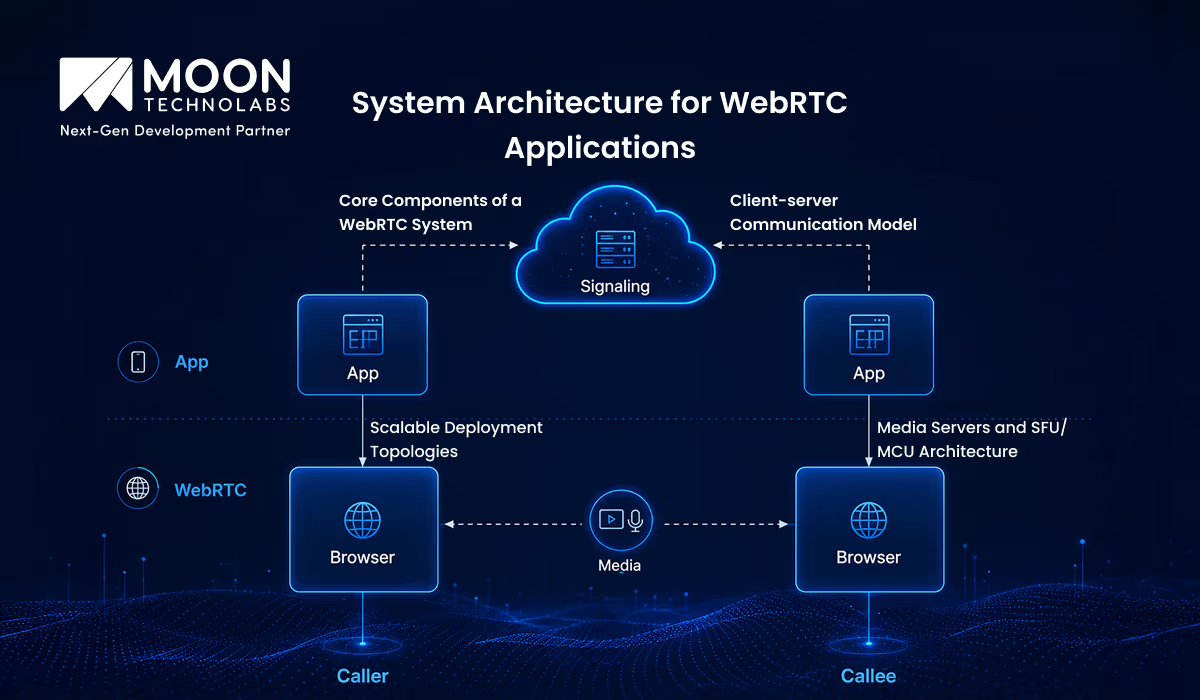
Understanding WebRTC architecture before you start building saves you from costly redesigns later. There are several moving parts in a WebRTC system. Knowing how they fit together can give you a clearer picture of what you are building.
Core Components of a WebRTC System
Each WebRTC application has three essential pieces: the client-side application running in the browser, the network infrastructure that handles actual media transport, and the signaling server that helps peers find each other. These three work together every time a call is made.
Client-server Communication Model
Though WebRTC is peer-to-peer, a server is involved from the start. The signaling server coordinates the initial handshake between two peers, exchanging connection details. They can then find and communicate with each other directly.
Media Servers and SFU/MCU Architecture
A direct peer-to-peer model doesn’t scale well for group calls. That’s where media servers help. An SFU (Selective Forwarding Unit) receives streams from each participant and forwards them selectively, keeping bandwidth usage efficient. An MCU (Multipoint Control Unit) takes it a step further by combining all streams into a single stream before sending it out.
Scalable Deployment Topologies
Your architecture must grow as your user base grows. For smaller groups, you can deploy WebRTC in a mesh topology. Use an SFU-based architecture for mid-scale applications, and combine multiple media services in a distributed setup for large-scale deployments.
Choosing Your WebRTC Tech Stack
Your choice of technology shapes how quickly you can build, how well the app scales, and how much you will struggle during each phase. Here’s a practical breakdown of what to consider at each layer of your stack.
Frontend Technologies for WebRTC Apps
Most WebRTC applications are built using JavaScript because it is natively available in the browser. You can use frameworks like React or Vue to build the UI layer on top. For mobile, you can use React Native or platform-specific SDKs.
Backend Frameworks and Signaling Servers
Build your signaling server with Node.js, Python, or Go. All these handle WebSocket connections well. Node.js with Socket.io is a great starting point for developers building their first WebRTC signaling layer, as it is simple and backed by a strong community.
Media Servers and Streaming Infrastructure
You need media servers for applications that go beyond one-on-one calls. Kurento, Mediasoup, and Janus are the most popular open-source options. Each has its strengths, depending on what you prioritize: flexibility, performance, or ease of integration.
Security and Encryption Technologies
WebRTC uses DTLS and SRTP by default for encryption. But you still need to secure the signaling layer separately using HTTPS and token-based authentication to prevent unauthorized access.
Open-Source WebRTC Tools and Libraries
Reduce development time by using libraries such as SimpleWebRTC, PeerJS, and OpenVidu. They abstract the more complex parts of the WebRTC API, making them a solid starting point for most projects.
Step-by-Step: Getting Your First WebRTC Application Running
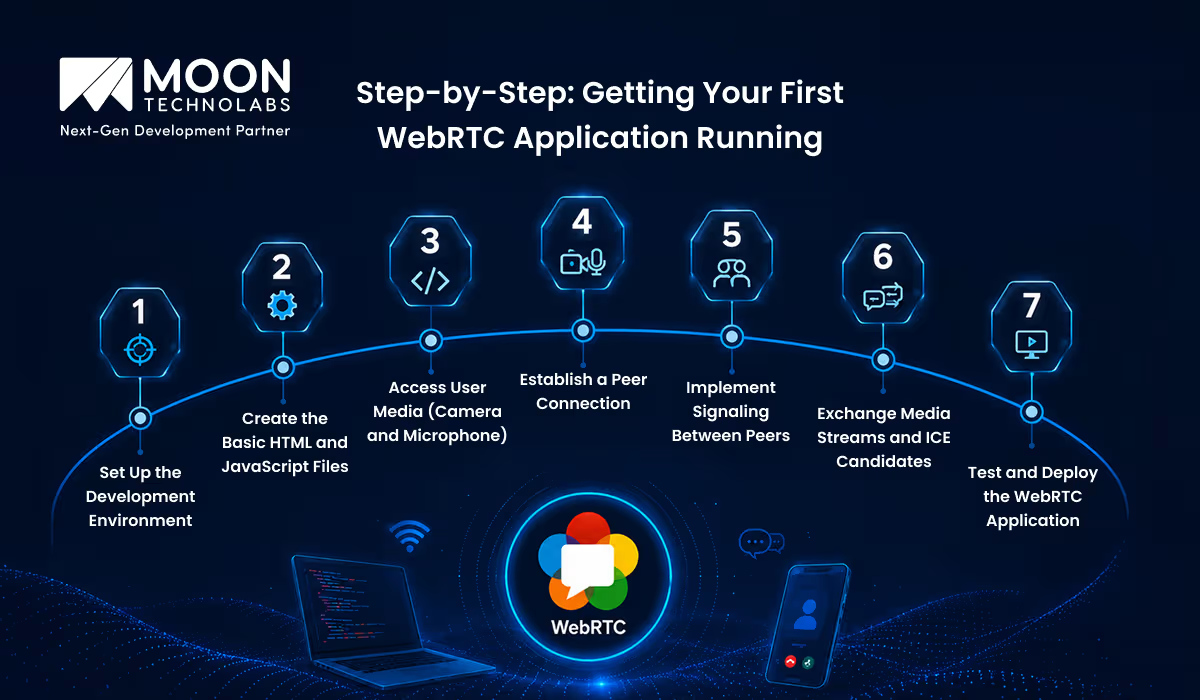
This is where things start getting hands-on. By now, you have a solid understanding of how WebRTC works conceptually. This section walks you through building your first WebRTC application, one step at a time.
Set Up the Development Environment
You need a modern browser, Node.js installed on your machine, and a basic code editor like VS Code. As WebRTC requires HTTPS for camera and microphone access, set it up as a local SSL certificate. You can also use a tool like ngrok to test it securely from localhost.
Create the Basic HTML and JavaScript Files
Start with simple HTML files that contain two video elements. One is for your local stream and the other for the remote stream. Include a button to initiate the call. Your JavaScript file will handle all the WebRTC logic that connects these two.
Access User Media (Camera and Microphone)
Use the browser’s getUserMedia API to request access to the user’s camera and microphone. Once the permission is granted, attach the local media stream to your video element. The user can see their own feed once the call connects.
Establish a Peer Connection
Create an RTCPeerConnection object, which is the core of every WebRTC application. This object manages the entire connection lifecycle, from negotiating formats to handling network changes during an active call.
Implement Signaling Between Peers
Use a WebSocket server to enable the exchange of session descriptions between the two peers. One peer creates an offer and sends it through the signaling server. The other peer responds. This handshake allows both sides to agree on how to communicate.
Exchange Media Streams and ICE Candidates
Once signaling is complete, you must add the local media stream to the peer connection and begin exchanging the ICE candidates. These candidates represent possible network paths. WebRTC will automatically pick the best one to establish a connection.
Test and Deploy the WebRTC Application
Test locally using two browser tabs and two devices on the same network. For deployment, you must host your signaling server on a cloud provider like AWS or Google Cloud. Set up the STUN server and configure the TURN server for users operating from behind the restrictive firewalls.
Key Challenges in WebRTC Development and How to Solve Them
Building a WebRTC application is one thing. Making it work reliably for every user on the network at any scale is another challenge altogether. Here are the most common roadblocks you will face and how you can get past them.
NAT Traversal and Firewall Restrictions
Many of your users are behind corporate firewalls or routers that block direct peer communication. A properly configured TURN server that relays traffic when a direct path isn’t possible is your solution. Services like Twilio or Coturn make this easier to set up without building from scratch.
Managing Latency and Packet Loss
WebRTC uses adaptive bitrate techniques to manage poor network conditions. But you can go further by tuning codec settings, monitoring network stats with the built-in RTCStatsAPI to catch issues early, and prioritizing audio over video when bandwidth drops.
Ensuring Cross-browser Compatibility
Most modern browsers support WebRTC. However, subtle differences in implementation can cause unexpected behavior. Using an abstraction library like adapter.js normalizes these differences and saves you from manually writing browser-specific workarounds.
Handling Scalability and Concurrent Users
Peer-to-peer works fine for small groups. But it breaks down at scale. Moving to an SFU-based architecture before you hit user growth prevents you from having to rebuild your infrastructure under pressure.
Monitoring Real-time Communication Quality
Poor call quality is often invisible till users start complaining. Integrate real-time monitoring tools that continuously track packet loss, connection quality, and jitter to help your team proactively identify and fix issues.
Security Fundamentals for WebRTC Applications
WebRTC has solid security built in by default. That doesn’t mean your application is automatically secure. There are layers you need to get right.
End-to-End Encryption in WebRTC
All media streams are encrypted with SRTP by default, and data channels with DTLS. So media passing between peers is protected without extra setup. If you are routing media through a server, that server can access unencrypted content. Your architectural decisions will immediately impact the encryption model.
Authentication and Access Control
Never allow users to join sessions without them verifying who they are. Use token-based authentication, such as JWT, to validate users before they can initiate or join peer connections. This keeps unauthorized users out of the signaling layer.
Preventing Unauthorized Media Access
Request for media permissions your application actually needs. Clearly communicate to users when their camera or microphone is active.
Securing Signaling Channels and APIs
Always run your signaling server over HTTPS and WSS. Validate incoming messages and rate limit your APIs. A poorly secured signaling layer can easily expose your communication infrastructure. It happens even when your media layer is perfectly encrypted.
Building Scalable WebRTC Applications
Scaling a WebRTC application isn’t about adding more servers. It needs deliberate architectural decisions from the start. Here’s what to plan for as your user base grows.
Load Balancing and Distributed Architecture
When concurrent users increase, single servers collapse under the load. Distribute your signaling and media servers across multiple loads. Use a load balancer to route the traffic efficiently, ensuring a single server doesn’t become a bottleneck.
Cloud-native WebRTC Deployments
You get the flexibility to scale infrastructure on demand with Cloud platforms like AWS and Google Cloud. Managed services for TURN signaling and media processing help reduce operational overhead and allow you to focus on building features.
Containerization with Docker and Kubernetes
Packaging your WebRTC services in Docker containers and orchestrating them with Kubernetes makes scaling repeatable and predictable. You can spin up new instances automatically, even when traffic spikes or demand drops.
Optimizing Infrastructure for High Traffic
Monitor your infrastructure continuously with real-time metrics. Optimize media server configurations, use CDN-based TURN servers geographically closer to your users, and fine-tune bandwidth allocation to reduce latency at scale.
Future Trends in WebRTC Development
WebRTC is already powerful. But where it is headed is even more exciting. Here are the trends shaping the next wave of real-time communication applications.
AI-powered Real-time Communication
AI is making way into WebRTC pipelines too, enabling real-time transcription, smart bandwidth adaptation, and background noise suppression. These will soon become the standard expectations.
5G and Ultra-low Latency Streaming
5G is quietly pushing latency to near zero, opening doors for use cases like live AR collaboration, remote surgery, and ultra-smooth mobile video experiences.
WebRTC in Metaverse and Virtual Collaboration
WebRTC is emerging as a communication backbone for spatial audio, avatar-based interaction, and real-time collaboration within virtual spaces.
Growth of UCaaS and CPaaS Platforms
Businesses are embedding communication directly into their workflow. WebRTC is an underlying engine that enables programmable, scalable communication across CPaaS and UCaaS platforms.
Real-time Translation and Voice Intelligence
Live language translation is built directly into WebRTC streams. It breaks down language barriers in real-time calls, making global communication accessible.
How Moon Technolabs Helps You Build Scalable WebRTC Solutions?
Building a WebRTC application that actually performs in production is harder than it looks. The architectural decisions, scaling strategies, and protocol configurations require hands-on expertise to get right.
That’s where Moon Technolabs comes in. With extensive experience building real-time communication applications across edtech, enterprises, and telehealth, our team understands what it takes to move your idea from prototype to a production-ready platform.
We help choose the right architecture for your use case, set up secure and scalable infrastructure, and build a communication layer your users can rely on. Whether you are starting from scratch or improving an existing system, we bring technical depth, practical experience, and expertise to get it right.
Moon Technolabs helps you move from concept to a fully deployed WebRTC application using the right stack, architecture, and team.
Conclusion: Your Roadmap Forward
WebRTC has matured into one of the most accessible and reliable technologies for building real-time communication platforms. From understanding core protocols to designing scalable architectures, you now have a clearer picture of what it takes to create applications that perform when reliability and low latency matter the most.
The best approach is to start with the fundamentals, launch a working prototype, and gradually strengthen your platform with the right security, infrastructure, and scalability decisions as your application evolves. You do not need to solve every challenge on day one.
Real-time communication is no longer a differentiator. It has become a baseline user expectation across industries. Whether you are building a telehealth platform, video conferencing solution, live streaming app, or collaboration tool, having the right technical expertise makes all the difference. If you are planning to scale faster and want to hire WebRTC developers with hands-on experience in real-time application development, Moon Technolabs is ready to help you build reliable, future-ready communication solutions.
FAQs
01
What is WebRTC and how does it work?
WebRTC is an open-source technology that enables real-time audio, video, and data sharing directly between browsers and devices. It works by establishing a peer-to-peer connection using a set of protocols that handle media capture, encryption, and network traversal.02
Which industries use WebRTC applications the most?
Edtech, enterprise collaboration, live events, and customer support are among the industries that use WebRTC extensively. Industries that rely on real-time communication between people are strong candidates for WebRTC-powered applications.03
What are the biggest challenges in WebRTC development?
NAT traversal, managing latency under poor network conditions, cross-browser compatibility, and scaling beyond peer-to-peer connections are among the most common challenges developers face while building WebRTC applications.04
How much does WebRTC application development cost?
The cost of developing a WebRTC application depends on the application's complexity, the required infrastructure, and whether you plan to develop in-house. A basic application can be built on a modest budget.05
Can WebRTC support large-scale video conferencing platforms?
Yes, but not with a pure peer-to-peer setup. Large-scale applications depend on an SFU- and MCU-based media server architecture that efficiently manages thousands of concurrent users.




Jayanti Katariya is the CEO of Moon Technolabs, a fast-growing IT solutions provider, with 18+ years of experience in the industry. Passionate about developing creative apps from a young age, he pursued an engineering degree to further this interest. Under his leadership, Moon Technolabs has helped numerous brands establish their online presence and he has also launched an invoicing software that assists businesses to streamline their financial operations.
Submitting the form below will ensure a prompt response from us.
We refine our expertise to deliver innovative business solutions.





205 N Michigan Avenue, #810, Chicago, 60601, Illinois, United States
13500 Long Is Dr, Pflugerville, TX 78660, USA

C/105 Ganesh Meridian, S.G. Highway, Ahmedabad, GJ 380060


Ayse D.
Co-Founder France
“ I highly recommend Moon Technolabs as the quality of service is wonderful. We have hired this company to develop the product based on some complex & technical issues. We get the best quality services as compared with others in the market. Huge Thanks to Moon Technolabs as the team is always ready to give the solution all time.”

Justin G.
Founder & CEO USA
USA“ Moon Technolabs is a pioneer in the WebRTC based project as they have fixed complicated segments of the module by fulfilling different product lines by providing 24X7 customer support. We really recommended Moon Technolabs as they are able to develop products as per the module deadline and project timeline.”

Flavio S.
Founder & Managing Director Germany
“I am happy to recommend Moon Technolabs for their app development services. They successfully developed apps for me, and I am highly satisfied with the overall outcomes. The development team has swiftly addressed the issues with responsive and effective communication to understand the requirement quickly and actively resolve the back-and-forth problems that arose...”

Jay M.
Founder & CEOUSA“Moon Technolabs is the best company that provides advanced apps and websites development services in the USA and Europe. I am a newbie to develop my app with an external team. I am really happy to work with them as I am not that much mobile apps user. Here, the team and specially the CEO of Moon Technolabs helps me to let me know about the benefits of my app to generate revenue....”


Our Offices
India
C/105 Ganesh Meridian,S.G. Highway, Ahmedabad, GJ 380060USA
205 N Michigan Avenue, #810, Chicago, 60601, Illinois, United StatesContact Information


