


Test Coverage: A Complete Guide to Measuring Software Testing Effectiveness

Software Development Team
Last Updated: Aug 07, 2026 Total Views: 87
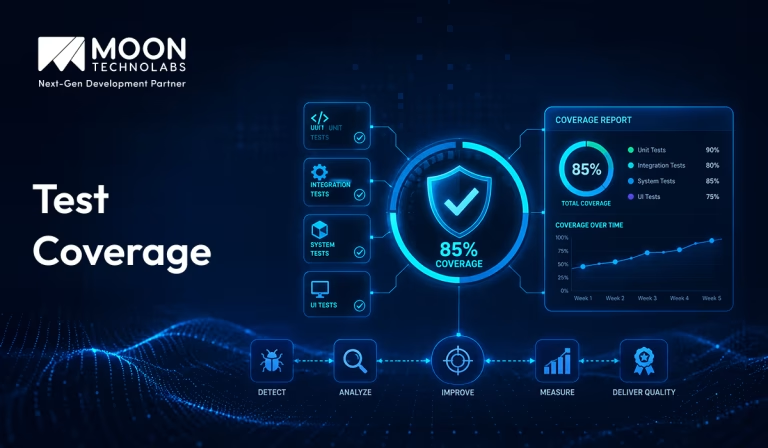
Table of Content


Blog Summary:
Test coverage helps teams understand how thoroughly their application is being tested by identifying untested areas, measuring testing effectiveness, and guiding smarter QA decisions. This blog explores key coverage metrics, different measurement approaches, common challenges, and best practices to help organizations improve software quality, reduce defects, and deliver more reliable applications.
Table of Content
Software testing is only effective when it validates the parts of your application that matter most. Running hundreds of test cases means little if critical code paths remain untested. That’s why test coverage is an essential metric; it helps you measure how much of your application is actually being tested and reveals gaps that could lead to production issues.
In this guide, you’ll learn what test coverage is, why it matters, the different types of coverage metrics, and how to use them to improve software quality without relying on misleading percentages.
What is Test Coverage?
Test Coverage is a software testing metric that measures the extent to which automated or manual test cases check an application’s code, functionality, or requirements. It helps teams understand which parts of the software have been validated and identifies areas that still need testing. Higher test coverage generally improves confidence in the application’s quality, although it does not guarantee that the software is free of defects.
Different types of test coverage include code, branch, statement, and requirement coverage. By analyzing test coverage, development teams can find untested code, reduce the risk of bugs, and ensure that critical features are thoroughly verified before software is released.
Why Test Coverage Matters in Modern Software Development?
Test coverage plays a vital role in modern software development by ensuring that critical parts of an application are thoroughly tested before deployment. It helps developers identify untested code, identify defects early, and reduce the risk of software failures. As applications become more complex, maintaining good test coverage improves overall software reliability and stability.
In Agile and DevOps environments, where code changes are frequent, test coverage supports continuous integration and continuous delivery by validating new updates without affecting existing functionality. It also increases developer confidence during code changes, reduces maintenance costs, and helps deliver high-quality software that meets user expectations.
Common Types of Test Coverage
Here are the most common types of test coverage used to evaluate the effectiveness and completeness of your testing efforts.
Requirements Coverage
Requirements coverage measures whether all documented business and system requirements are verified by at least one test case. Each requirement should be mapped to corresponding tests to ensure complete validation.
Purpose:
- Ensures every requirement is tested.
- Confirms that the software meets customer and business needs.
- Helps identify missing or untested requirements.
Functional Coverage
Functional coverage measures how thoroughly the application’s features and functionalities are tested against the expected behavior. It focuses on validating that each function works correctly under different conditions.
Purpose:
- Verifies all application features.
- Ensures functions produce the expected results.
- Detects missing or incorrect functionality.
Code Coverage
Code coverage measures the percentage of source code executed while running test cases. It helps determine which parts of the code have been tested and which areas still require additional testing.
Purpose:
- Identifies untested code.
- Improves confidence in software quality.
- Helps developers create more effective test cases.
Risk Coverage
Risk coverage measures whether testing adequately covers the application’s high-risk or critical areas. Testing efforts are prioritized based on the potential impact and likelihood of failures.
Purpose:
- Focuses testing on critical modules.
- Reduces the risk of major software failures.
- Improves system reliability and stability.
Branch Coverage
Branch coverage verifies that every possible outcome of a decision statement (True and False) has been executed during testing. It ensures that all decision paths are tested.
Purpose:
- Tests all branches of decision statements.
- Detects logical and control-flow errors.
- Improves the completeness of testing.
Statement Coverage
Statement coverage checks whether every executable statement in the source code has been executed at least once during testing. It is one of the basic forms of code coverage.
Purpose:
- Ensures every executable statement is tested.
- Helps identify unreachable or unexecuted code.
- Increases overall code quality.
Condition Coverage
Condition coverage verifies that each condition in a decision statement evaluates to both True and False at least once. This provides more detailed testing of logical expressions.
Purpose:
- Tests every logical condition independently.
- Detects errors in complex conditional expressions.
- Improves the accuracy and effectiveness of testing.
Achieve Higher Software Quality Through Better Test Coverage
Partner with our QA experts to evaluate testing effectiveness, identify gaps, and build reliable software solutions with confidence.
Test Coverage vs Code Coverage
Explore the key differences between test coverage and code coverage in a detailed comparison table that highlights their purposes, metrics, and importance:
| Aspect | Test Coverage | Code Coverage |
|---|---|---|
| Definition | Measures how much of the application’s functionality and requirements are tested. | Measures how much of the source code is executed while running tests. |
| Focus | Validates features, user scenarios, business logic, and requirements. | Tracks executed code statements, branches, functions, or lines. |
| Purpose | Ensures the software behaves correctly from a user’s perspective. | Identifies untested portions of the codebase. |
| Measurement | Based on test cases covering requirements and use cases. | Based on code execution metrics generated by coverage tools. |
| Example | Testing login, registration, and password reset workflows. | Reporting that 85% of code lines and 78% of branches were executed during testing. |
| Goal | Improve software quality and functional reliability. | Improve confidence that tests have exercised code. |
When to Use Test Coverage vs. Code Coverage
Use Test Coverage When:
- Validating business requirements.
- Performing functional, integration, or acceptance testing.
- Ensuring all user stories and application workflows are tested.
- Measuring overall software quality from the end-user perspective.
Use Code Coverage When:
- Evaluating the effectiveness of automated unit tests.
- Identifying untested code sections.
- Improving test suites during development.
- Maintaining code quality in continuous integration (CI/CD) pipelines.
Why Are Both Necessary?
Test coverage and code coverage complement each other rather than replace one another.
- Test coverage ensures that all important features, business rules, and user scenarios are verified.
- Code coverage ensures that tests actually execute the underlying implementation and help uncover untested code paths.
- Relying only on test coverage may leave hidden code paths untested.
- Relying solely on code coverage can create a false sense of confidence, since code can be executed without verifying that the results are correct.
- Using both together leads to more reliable, maintainable, and higher-quality software by combining functional validation with technical verification.
Key Test Coverage Metrics
Understand the most important test coverage metrics used in software testing, including their purpose, measurement methods, and how they help improve overall application quality:
Test Case Execution Percentage
It measures the proportion of planned test cases executed during a testing cycle. It indicates overall testing progress by comparing completed test cases to the total planned, helping teams monitor whether testing is on schedule.
Formula:
Test Case Execution Percentage = (Executed Test Cases / Total Planned Test Cases) × 100
Importance:
- Tracks testing progress.
- Helps identify pending test activities.
- Ensures the test plan is being followed.
Requirements Coverage
Requirements coverage measures the extent to which functional and non-functional requirements are validated through test cases. It ensures that all specified requirements are tested, reducing the risk of missing important features before software release.
Formula:
Requirements Coverage = (Requirements Covered by Test Cases / Total Requirements) × 100
Importance:
- Ensures all business requirements are tested.
- Identifies missing or untested requirements.
- Improves product quality and compliance.
Defect Detection Rate
It measures how effectively the testing process identifies defects. It indicates the number of defects found relative to the testing effort, helping evaluate the quality and effectiveness of the testing process.
Formula:
Defect Detection Rate = Total Defects Found / Total Test Cases Executed.
Importance:
- Evaluates the effectiveness of the testing process.
- Helps identify areas with high defect density.
- Supports quality improvement initiatives.
Automation Coverage
It measures the percentage of test cases that are automated using testing tools. It reflects the maturity of the automation process and improves testing efficiency by reducing manual effort and enabling faster regression testing.
Formula:
Automation Coverage = (Automated Test Cases / Total Test Cases) × 100
Importance:
- Indicates automation maturity.
- Reduces manual testing effort.
- Improves regression testing efficiency.
Pass/Fail Rate
Pass/fail rate measures the percentage of executed test cases that pass or fail during testing. It provides an overview of software quality and helps determine whether the application is stable and ready for release.
Formula:
- Pass Rate = (Passed Test Cases / Executed Test Cases) × 100
- Fail Rate = (Failed Test Cases / Executed Test Cases) × 100
Importance:
- Reflects the overall quality of the application.
- Helps monitor testing progress.
- Highlights areas requiring immediate attention.
Risk-based Coverage
Risk-based coverage measures the thoroughness of testing for high-risk and business-critical features. It ensures that testing focuses on areas with the greatest potential impact, helping reduce risks and improve software reliability.
Formula:
Risk-based Coverage = (High-Risk Requirements Tested / Total High-Risk Requirements) × 100
Importance:
- Ensures critical features receive maximum testing.
- Minimizes the likelihood of production failures.
- Supports informed release decisions based on risk assessment.
You Might Also Like:
Generative AI in Software Testing: Transforming QA and Test Automation
Test Coverage Techniques
Learn about various test coverage techniques that help measure testing completeness, uncover hidden issues, and enhance the overall effectiveness of quality assurance processes:
Requirement-based Testing
It is a test coverage technique in which test cases are designed based on the software requirements. It ensures that every functional and non-functional requirement is tested, helping verify that the application meets the specified requirements.
Risk-based Testing
This technique prioritizes testing based on the likelihood and impact of potential defects. Critical features are tested first to reduce business risks and ensure the most important functionalities work reliably.
Model-based Testing
This technique uses models that represent the system’s behavior to generate test cases. It improves test coverage, supports automation, and helps identify defects early in the software development process.
Exploratory Testing
Exploratory testing is an approach in which testers learn, design, and execute tests simultaneously, without predefined test cases. It is useful for discovering unexpected defects and evaluating the application’s usability.
Boundary Value Analysis
Boundary value analysis is a black-box testing technique that focuses on testing values at the boundaries of valid input ranges. Since defects often occur at boundary limits, this method helps identify input validation errors effectively.
Equivalence Partitioning
Equivalence Partitioning is a black-box testing technique that divides input data into valid and invalid groups called partitions. One representative value from each partition is tested, reducing the number of test cases while maintaining effective coverage.
Benefits of High Test Coverage
Discover the advantages of maintaining high test coverage and how it supports efficient testing, faster releases, increased confidence, and long-term software success:
Better Software Quality
High test coverage helps identify bugs, defects, and unexpected behavior early in the development process. By thoroughly testing application features, developers can ensure the software performs as intended, resulting in a more stable, reliable, and high-quality product.
Faster Releases
With comprehensive test coverage, automated testing can quickly validate new code changes, reducing the time spent on manual testing. This enables development teams to release updates and new features faster while maintaining confidence in the software’s stability.
Reduced Maintenance Costs
Detecting issues during development is significantly less expensive than fixing them after deployment. High test coverage minimizes production defects, reduces debugging efforts, and lowers the long-term cost of maintaining and supporting the application.
Greater Confidence During Deployment
When critical functionalities are backed by well-designed tests, development and operations teams can deploy updates with greater confidence. Comprehensive testing reduces the risk of unexpected failures in production and supports smoother, more reliable releases.
Improved Customer Satisfaction
Reliable software with fewer bugs delivers a better user experience. High test coverage helps ensure consistent performance, minimizes downtime, and reduces user-facing issues, leading to increased customer trust, satisfaction, and loyalty.
Best Practices to Improve Test Coverage
Achieving high test coverage is not just about increasing percentages—it is about ensuring your application is reliable, maintainable, and resilient to change. By following proven testing practices, teams can identify defects early, reduce production issues, and deliver higher-quality software:
Prioritize High-risk Features
Focus your testing efforts on the most critical areas of the application, such as core functionality, payment workflows, authentication, and frequently used features. Prioritizing high-risk components helps maximize the impact of your efforts while minimizing potential business risks.
Automate Repetitive Tests
Automate test cases that are executed frequently, including regression, smoke, and integration tests. Automation reduces manual effort, speeds up testing cycles, improves consistency, and enables faster feedback during development.
Review Coverage Regularly
Monitor test coverage metrics regularly to identify untested or under-tested areas of the codebase. Periodic reviews help ensure that new features, bug fixes, and code changes are adequately validated and that coverage remains meaningful over time.
Update Test Cases Continuously
As the application evolves, test cases should evolve with it. Regularly review and update existing tests to reflect changing business requirements, new functionality, and modifications to application logic. Keeping test cases up to date prevents outdated or ineffective tests.
Combine Manual and Automated Testing
A balanced testing strategy delivers the best results. Use automated testing for repetitive and predictable scenarios, while relying on manual testing for exploratory testing, usability evaluation, and complex user interactions that require human judgment.
Integrate Coverage Reports into CI/CD
Incorporate test coverage reporting into your CI/CD pipeline. Automatically generating coverage reports after each build helps teams identify gaps early, maintain quality standards, and prevent insufficiently tested code from reaching production.
Popular Test Coverage Tools
Test coverage tools help development teams measure how much of their source code is executed during automated testing. They identify untested code, improve software quality, and support CI/CD pipelines:
JaCoCo
JaCoCo (Java Code Coverage) is one of the most widely used code coverage tools for Java applications.
Key Features:
- Supports line, branch, method, and class coverage.
- Integrates with Maven, Gradle, Jenkins, and SonarQube.
- Generates HTML, XML, and CSV coverage reports.
- Lightweight and easy to configure.
Best For: Java applications and enterprise projects.
Istanbul (nyc)
Istanbul, commonly used through the nyc command-line tool, is a popular code coverage solution for JavaScript and Node.js applications.
Key Features:
- Measures statement, branch, function, and line coverage.
- Works seamlessly with testing frameworks like Jest, Mocha, and Ava.
- Generates detailed HTML and LCOV reports.
- Supports ES6+ and TypeScript through transpilers.
Best For: JavaScript and Node.js development.
Cobertura
Cobertura is an open-source code coverage tool designed for Java programs.
Key Features:
- Tracks line and branch coverage.
- Produces XML and HTML reports.
- Integrates with Ant, Maven, and Jenkins.
- Helps identify untested sections of code.
Best For: Legacy Java projects and simple coverage reporting.
OpenCover
OpenCover is an open-source code coverage tool for the .NET Framework.
Key Features:
- Supports C# and other .NET languages.
- Works with NUnit, MSTest, and xUnit.
- Generates XML reports compatible with reporting tools.
- Provides detailed coverage statistics.
Best For: .NET Framework applications.
SonarQube
SonarQube is a comprehensive code quality platform that includes code coverage and static code analysis.
Key Features:
- Imports coverage reports from tools like JaCoCo, Istanbul, OpenCover, and Cobertura.
- Displays dashboards with coverage trends and quality metrics.
- Detects bugs, vulnerabilities, and code smells.
- Supports multiple programming languages.
Best For: Enterprise projects requiring code quality management and continuous inspection.
Common Challenges in Achieving Test Coverage
Learn about common test coverage challenges, from identifying critical areas to managing testing complexity, and their impact on software development processes:
Incomplete Requirements
When project requirements are unclear, incomplete, or frequently changing, it becomes difficult to create comprehensive test cases. Testers may miss important scenarios or make incorrect assumptions, leading to gaps in test coverage. Close collaboration between stakeholders, developers, and testers helps ensure requirements are well-defined before testing begins.
Legacy Systems
Legacy applications often have outdated architectures, limited documentation, and tightly coupled components. These factors make it challenging to understand the system’s behavior and identify all areas that require testing. Incremental modernization, proper documentation, and risk-based testing can help improve coverage in legacy systems.
Time Constraints
Tight release schedules often force teams to prioritize only critical functionalities, leaving less time for extensive regression, edge-case, or exploratory testing. As a result, some defects may remain undetected. Effective test planning, prioritization, and automation can help maximize coverage within limited timelines.
Limited Automation
Relying heavily on manual testing can reduce the scope and frequency of testing, especially for repetitive regression tests. Without sufficient automation, achieving consistent and broad test coverage becomes difficult. Implementing automated test scripts for stable and repetitive scenarios improves efficiency and allows testers to focus on complex test cases.
Maintaining Test Suites
As software evolves, test cases must be updated to reflect new features, bug fixes, and changing business requirements. Poorly maintained test suites can become outdated, leading to inaccurate results and reduced test effectiveness. Regular reviews, removal of obsolete tests, and continuous updates ensure that test suites remain reliable and provide meaningful coverage.
Overcome Test Coverage Challenges With Expert Solutions
Struggling with coverage gaps and testing complexity? Our experts help you develop effective strategies to improve software quality.
A Final Word
Test coverage is more than just a percentage; it’s a measure of how confidently you can release software. By tracking the right coverage metrics and combining them with well-designed test cases, teams can identify gaps early, reduce defects, and deliver reliable applications faster. Instead of chasing 100% coverage, focus on testing the code that has the greatest impact on your users and business.
If you’re looking to improve software quality, automate testing workflows, or build a robust QA strategy, partnering with an experienced software testing services provider can help you achieve faster releases with greater confidence.
FAQs
01
How to calculate test coverage?
Test coverage is calculated by dividing the number of requirements, code statements, or test conditions tested by the total number of requirements, statements, or conditions, and then multiplying by 100. It helps determine how much of the application has been verified through testing.02
What is the difference between test coverage and requirement coverage?
Test coverage measures how much of the code, features, or functionality is tested. Requirement coverage focuses on whether all specified business and user requirements have corresponding test cases. Requirement coverage ensures expectations are met, while test coverage evaluates the depth of testing.03
How to ensure 100% test coverage?
Achieving 100% test coverage requires creating comprehensive test cases for all requirements, code paths, scenarios, and edge cases. Regular reviews, automation, continuous testing, and tracking coverage reports help identify gaps. However, complete coverage does not always guarantee defect-free software.04
How to measure test coverage in Agile?
In Agile, test coverage is measured continuously through automated testing tools, sprint reports, and coverage metrics. Teams track covered user stories, acceptance criteria, code coverage, and executed test cases. Regular feedback from developers and testers helps maintain effective coverage throughout each sprint.



The Software Development Team at Moon Technolabs includes experienced developers, solution architects, and technology consultants who contribute content on software engineering, application development, system architecture, and digital innovation. Their articles are based on real-world project experience and aim to help businesses make informed technology decisions.
Submitting the form below will ensure a prompt response from us.
We refine our expertise to deliver innovative business solutions.





205 N Michigan Avenue, #810, Chicago, 60601, Illinois, United States
13500 Long Is Dr, Pflugerville, TX 78660, USA

C/105 Ganesh Meridian, S.G. Highway, Ahmedabad, GJ 380060


Ayse D.
Co-Founder France
“ I highly recommend Moon Technolabs as the quality of service is wonderful. We have hired this company to develop the product based on some complex & technical issues. We get the best quality services as compared with others in the market. Huge Thanks to Moon Technolabs as the team is always ready to give the solution all time.”

Justin G.
Founder & CEO USA
USA“ Moon Technolabs is a pioneer in the WebRTC based project as they have fixed complicated segments of the module by fulfilling different product lines by providing 24X7 customer support. We really recommended Moon Technolabs as they are able to develop products as per the module deadline and project timeline.”

Flavio S.
Founder & Managing Director Germany
“I am happy to recommend Moon Technolabs for their app development services. They successfully developed apps for me, and I am highly satisfied with the overall outcomes. The development team has swiftly addressed the issues with responsive and effective communication to understand the requirement quickly and actively resolve the back-and-forth problems that arose...”

Jay M.
Founder & CEOUSA“Moon Technolabs is the best company that provides advanced apps and websites development services in the USA and Europe. I am a newbie to develop my app with an external team. I am really happy to work with them as I am not that much mobile apps user. Here, the team and specially the CEO of Moon Technolabs helps me to let me know about the benefits of my app to generate revenue....”


Our Offices
India
C/105 Ganesh Meridian,S.G. Highway, Ahmedabad, GJ 380060USA
205 N Michigan Avenue, #810, Chicago, 60601, Illinois, United StatesContact Information


