


A Complete Guide to Migrate SQL Server to Azure for Modernising Your Workloads

Jayanti Katariya
Last Updated: Sep 14, 2026 Total Views: 419
Table of Content


Blog Summary:
The guide provides comprehensive information on Azure SQL migration and its importance for businesses in redefining their operations. Whether it’s benefits, necessary steps, migration methods, tools, or top practices, we discuss everything in depth.
Table of Content
Most businesses have struggled with outdated, slow SQL servers that degrade performance, operations, productivity, and, thus, growth. Whether it’s increased infrastructure costs, frequent downtime, or complex manual management, these approaches consume resources extensively while limiting innovation.
To overcome these challenges, you can Migrate SQL Server to Azure. It’s a significant shift toward agile and modern infrastructure. Azure not only minimizes your operational overhead but also improves performance while ensuring compliance. It also streamlines your workloads with automation and AI.
The growing popularity and adoption of Microsoft Azure among businesses have significantly expanded the cloud services market. Precedence Research predicts that the cloud services market size will reach $2,726.94 billion by 2034, up from $721.87 billion in 2025.

The Azure SQL migration process requires extensive planning and strategy development to ensure successful execution. We will discuss the migration process and related topics in depth.
What is Migrating SQL Server to Azure?
The Azure SQL migration process aims to move your apps, databases, and workloads to Azure for several reasons. These mainly include an improved performance, scalability, cost efficiency, and more. In this process, you don’t need to manage physical servers; instead, you migrate your business to Azure SQL services, including Azure SQL Managed Instance, Azure SQL Database, and more.
This migration modernizes your legacy systems, improves security and availability, and more. It also helps businesses migrate legacy applications to cloud environments to leverage cloud-native capabilities, including monitoring, automation, AI integration, and more. These enable companies to run their data operations reliably and efficiently on cloud infrastructure.
Business Drivers and Benefits of Migrating to Azure
Migration from SQL Server to Azure is a strategic move rather than a technical upgrade, offering several benefits. We will discuss some of these benefits as follows:
Cost Efficiency
One of the major advantages of migrating SQL Server to Azure is that it eliminates the cost of maintaining physical infrastructure. It lets businesses shift from upfront costs to pay-as-you-go, flexible pricing. It shows that you pay only for what you use.
In addition, built-in features such as storage optimization and automated scaling help minimize waste. Options like reserved instances and Azure Hybrid Benefits can significantly reduce licensing and compute costs. It makes cloud migration cost-efficient and predictable while increasing ROI.
Scalability and Performance
On-demand scalability is another great advantage of Azure. Whether you seek long-term growth or seasonal growth, Azure SQL services scale automatically to maintain their overall performance.
Whether it’s global data centers, high-availability architecture, or performance-optimized storage, these deliver improved query execution and lower latency. It shows that your apps remain responsive even as users load and data volumes increase.
Security and Compliance
Built with enterprise-grade security, Azure provides network isolation, built-in encryption, access controls, threat detection, advanced monitoring, and more to protect sensitive data.
Azure has emerged as a reliable choice for related industries due to its compliance certifications, including PCI DSS, HIPAA, ISO, SOC, and GDPR. Additionally, automatic updates and patching minimize vulnerabilities and ensure the safety of the SQL environment without manual overhead.
Modernisation and AI Readiness
Azure SQL migration also offers significant opportunities for innovation. It provides full access to cloud-native capabilities, including automation, serverless compute, DevOps integration, intelligent monitoring, and more.
With Azure, you can adopt advanced analytics and AI services, including Microsoft Fabric and Azure Synapse. It helps you gather important insights, evolve from legacy data systems to future-ready digital platforms, and improve decision-making.
Operational Simplicity
Azure simplifies day-to-day database management with features including performance tuning, automated backups, built-in disaster recovery, monitoring dashboards, and more. This reduces downtime and administrative workload and improves reliability across environments. It allows teams to focus on innovation rather than routine maintenance, making operations more cost-efficient and smooth.
Redefine your database with scalable, secure Azure SQL solutions. Migrate seamlessly with expert guidance.
10 Essential Steps to Migrate SQL Server to Azure
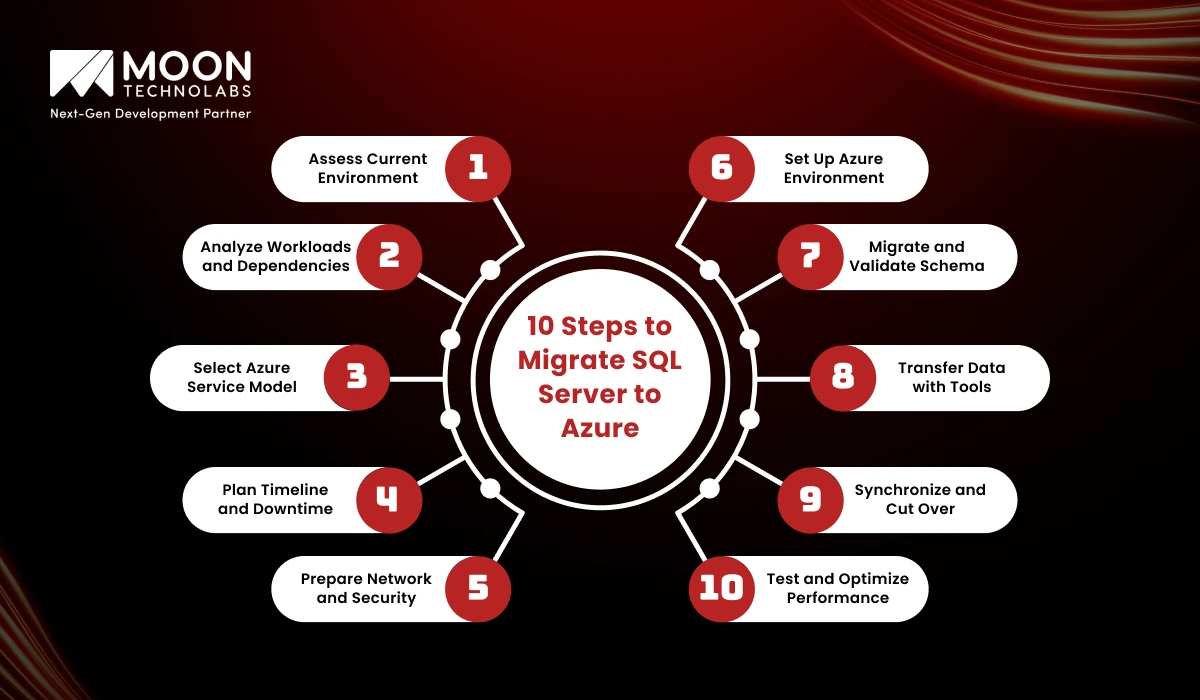
Moving SQL Server to Azure involves extensive planning and several important steps. The following are some of the important steps companies should go through to ensure a secure and smooth transition:
Assess Current Environment
In the first step, you need to gain complete visibility into your existing SQL server landscape. It includes identifying storage configurations, hardware specifications, database versions, performance baselines, and more. It’s important to gather details about your existing workload to identify potential issues, risks, and compatibility concerns before the migration.
Additionally, tools, including SQL Server assessment-to-Azure migration, can produce detailed health reports and provide recommendations. By performing a thorough assessment, you can ensure your migration strategy is better aligned with your app’s business and technical requirements.
Analyze Workloads and Dependencies
You need to know that every SQL workload interacts with various systems, including APIs, applications, reporting solutions, monitoring tools, and third-party integrations. You need to verify these dependencies to avoid disruptions during the migration.
You need to determine your workload characteristics, such as latency sensitivity, transaction volume, high-availability requirements, peak usage hours, and more. With this analysis, you will be able to select the top Azure SQL deployment model.
Select Azure Service Model
Azure provides a range of SQL deployment models. Each of these models is perfect for specific scenarios, which are as follows:
- Azure SQL Managed Instance
- Azure SQL Database
- SQL Server on Azure Virtual Machines
Your final decision depends on numerous factors, including required control, existing configurations, compatibility, modernization goals, high availability, and other requirements. Selecting the best model ensures smooth, long-term management and operational efficiency.
Plan Timeline and Downtime
One thing you need to keep in mind is that any migration plan is incomplete without a realistic timeline. You need to define the following steps: preparation, assessment, validation, data migration, and cutover. You should always review operations that require downtime and classify them as minimal, acceptable, or zero-downtime scenarios.
Hybrid approaches, such as transactional replication, help minimize disruptions to apps. It’s a good practice to communicate timelines to stakeholders as early as possible while ensuring proper coordination across multiple teams.
Prepare Network and Security
Before you move your data, ensure security foundations and networks are centralized. It includes VPNs, setting up Virtual Networks, configuring firewall rules, ExpressRoute, and more.
You need to implement encryption policies, role-based access control (RBAC), compliance controls, identity and access management (IAM), and more. Proper security preparation and network not only prevent data loss but also ensure smooth connectivity during and after the migration process.
Set Up Azure Environment
In this step, you need to build an Azure SQL target environment according to the selected service model. It’s important to compute tiers, configure storage, define failover groups, set backup preferences, and define maintenance windows, etc.
Besides, you also need to configure monitoring tools such as Log Analytics or Azure Monitor. Make sure your on-premises configuration minimizes post-migration performance issues.
Migrate and Validate Schema
The next key consideration is that schema migration is a critical step to ensure structural compatibility. You can use tools such as the Data Management Assistant (DMA) to migrate tables, stored procedures, indexes, functions, and triggers.
Once the migration is complete, you need to validate the schema to detect any attribute mismatches, unsupported features, deprecated objects, and more. Proper schema validation minimizes runtime errors.
Transfer Data with Tools
After validating the schema, you need to plan the data migration. It relies mainly on your key objectives:
- DACPAC/BACPAC: It’s good for structured or small datasets
- Azure Database Migration Service (DMS): It’s for offline/online migration
- T-SQL Scripts, BCP, or Transactional Replication: It’s for continuous or large-scale sync
You should always choose a method that aligns with your workload size, downtime tolerance, application availability requirements, and other factors. Once you complete the initial transfer, you need to validate testing to ensure completeness and data accuracy.
Synchronize and Cut Over
Most teams opt for continuous synchronization between the Azure target database and on-premises SQL Server. After syncing and validating data changes, you need to carefully plan the final cutover.
It involves services, application switching, user traffic, and more within the Azure environment. Make sure your communication and rollback procedures plans are ready in case of any unexpected issues, even during cutover.
Test and Optimize Performance
Once you complete the cutover, you can perform thorough testing across performance, functional, and security. It’s advisable to analyze query performance, network latency, memory/CPU utilization, and more.
Azure offers built-in capabilities such as intelligent insights, query store, automatic tuning, and more. These help optimize workloads rapidly. Whether adjusting compute tiers, fine-tuning indexes, or validating failover policies, these measures help ensure your Azure SQL environment remains reliable and performs well over the long term.
Migration Methods and Tools
For Azure SQL migrations, you can leverage a range of tools to ensure a smooth transition. Each tool offers unique strengths, depending on factors such as downtime tolerance, workload size, organizational maturity, and more. The following are the most widely used tools and techniques you can consider using:
Data Migration Assistant (DMA)
DMA is the first and most important tool to leverage during planning. The tool enables a comprehensive assessment of your existing SQL Server environment for deprecated features, compatibility issues, breaking changes, and more.
It provides comprehensive recommendations for security, performance, and reliability improvements before deploying to Azure. DMA migrates schemas and also small datasets beyond complete assessments.
This makes it an important tool even during the early proof-of-concept and evaluation phases. It’s perfect for schema validation and pre-migration analysis, rather than large-scale data movement.
Azure Database Migration Service (DMS)
Being a recommended tool for complete migration, Azure DMS supports both online and offline migration. It lets businesses minimize or eliminate downtime. DMS can automate data transfer, schema migration, cutover management, continuous synchronization, and more.
It’s quite effective for mission-critical workloads, large databases, and environments requiring a phased migration. It includes a guided workflow that minimizes human error and ensures a predictable migration experience.
Azure SQL Migration Extension (Azure Data Studio)
The Azure SQL migration extension integrates with Azure Data Studio, enabling database administrators to plan and implement migrations more efficiently. It makes the entire process easier, whether for dependent analysis, assessments, migration orchestration, or sizing recommendations.
The extension also supports connecting to DMS and Azure Migrate, providing a smooth pipeline from evaluation to implementation. It’s perfect for teams seeking a developer-friendly environment.
Transactional Replication
You can use transactional replication to enable near-zero-downtime migrations. It ensures continuous synchronization of changes between the on-premises SQL Server and the Azure SQL Database. This method is well-suited to environments with stringent availability requirements or high transaction volumes.
After synchronization is complete, teams just cut over by redirecting traffic to Azure. Meanwhile, it also requires proper configuration and is better suited to support relocation and handling workload constraints.
DACPAC and BACPAC
DACPAC files can handle schema-only migrations. On the other hand, BACPAC files include both data and schema. These file-based methods are appropriate and simple for small databases, development environments, and for importing or exporting structured data. They are well-suited to larger datasets due to longer export/import times, as they are easy to automate and maintain.
Bulk Copy Program (BCP) and T‑SQL Scripts
BCP is a command-line utility for fast bulk data import and export. It’s highly effective for ETL-style operations, large tables, custom migration workflows, and more.
T-SQL scripts provide greater control over data manipulation, schema changes, fine-grained migration tasks, and more. These methods are used effectively by advanced DBAs who require both performance and precision, especially in hybrid or complex environments.
Third‑Party and Partner Tools
Be it Quest, Redgate, or SolarWinds, tools from different vendors offer version control, advanced automation, migration monitoring, and schema comparison. Many organizations select third-party solutions, especially when they require deep insights, enterprise-level validation, and improved rollback capabilities.
You can use tools that streamline workflows and reduce manual effort, especially in multi-cloud or multi-database environments.
We help you transform your existing systems effortlessly with Azure and achieve higher performance. Let’s help you transform your workload now.
Best Practices and Recommendations
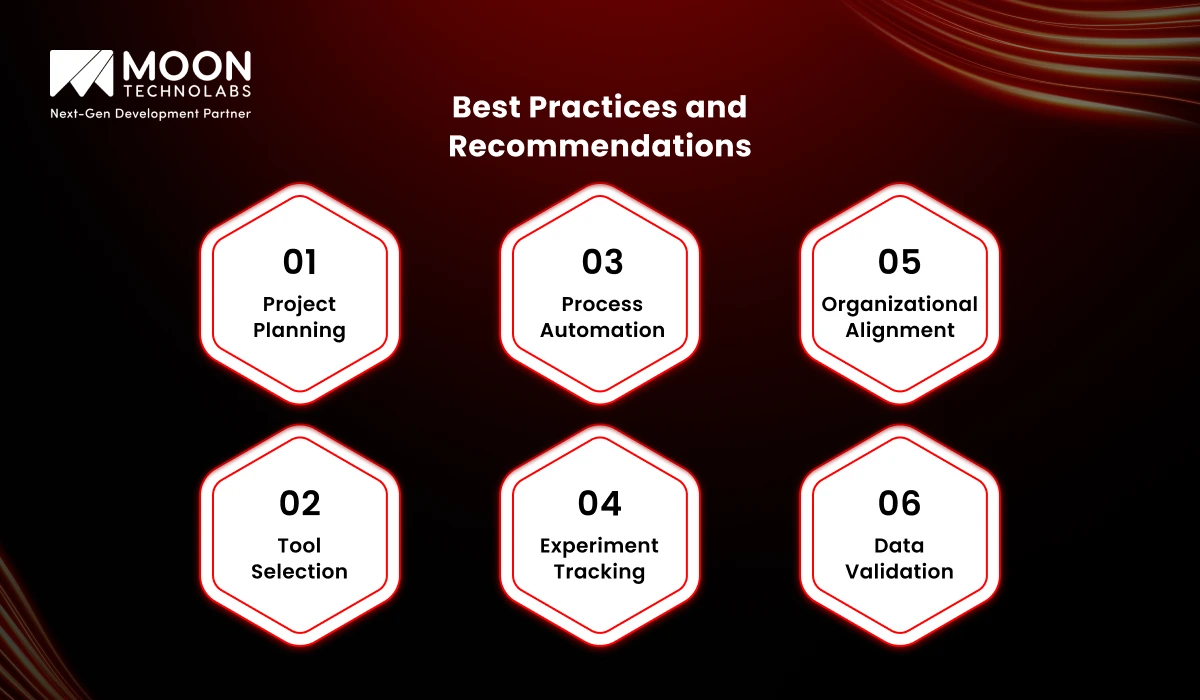
Implementing the right practices for SQL Server to Azure migrations helps you accelerate timelines, minimize risks, and build a stable, high-performing Azure SQL environment. Let’s explore some of the top practices and recommendations:
Project Planning
Keep in mind that a solid plan is the foundation for a seamless migration. Begin the process by outlining your objectives, whether it’s improving performance, minimizing infrastructure costs, preparing for AI-based workloads, or enabling modernization.
It’s advisable to make a detailed inventory of existing databases, dependencies, workloads, compliance needs, and more. You need to segment databases by criticality, complexity, and downtime tolerance for prioritizing migration waves.
It’s essential to create a complete migration roadmap that defines roles, timelines, milestones, responsibilities, and success metrics. It should include rollback strategies, risk assessment, UAT cycles, and communication plans. Early alignment with business stakeholders helps avoid issues.
You Might Also Like
Tool Selection
The selection of the top tool significantly impacts the migration’s reliability and efficiency. You can use DMA for schema validation and assessments, then choose the appropriate data transfer method based on the criticality and size of your workloads. You can select the tool based on the nature of the task:
- Azure Database Migration Service is a reliable choice for mission-critical and large database systems. It’s mainly because of online migration capabilities and automation.
- You can use the Azure SQL Migration extension to enable developer-friendly, controlled workflows.
- You can use transactional replication for minimal-downtime scenarios.
- You can leverage BCP/T-SQL scripts and DACPAC/BACPAC files for targeted migrations or small datasets.
- Use third-party tools for monitoring, automation, and rollback support.
Make sure you select a tool that better aligns with your data volume, downtime tolerance, internal skill sets, and more.
Process Automation
The major drawback of a manual process is that it increases the risk of inconsistencies, errors, and delays. You should automate key steps, including data movement, schema comparison, configuration setup, backup routines, validation tests, and more.
Azure offers native automation capabilities via the Azure CLI, PowerShell scripts, DevOps pipelines, and ARM/Bicep templates. Automation minimizes labor-intensive workloads, enables repeatability, and improves migration performance in multi-database or large environments. It simplifies monitoring, rollback, compliance tracking, and more.
Experiment Tracking
Rather than a one-and-done process, migration involves multiple trial runs to uncover hidden dependencies, validate assumptions, refine the cutover plan, test performance, and more. You need to track every experiment diligently, including bottlenecks, used tools, schema mismatches, durations, user feedback, and data inconsistencies.
Performance baselines and logs help you compare iterations and optimize key cycles. Experiment tracking is necessary for continuous improvement and helps minimize surprises, even during the final production migration.
Organizational Alignment
Migration often relates to organizational reforming – it’s almost the same as technical transformation. Ensure all key teams are better aligned, including developers, DBAs, network and security teams, DevOps, compliance, and business leadership.
Make sure you define shared objectives completely, schedule regular checkpoints, establish clear communication channels, and more. Non-technical stakeholders must be aware of expected downtime, timelines, user impact, and more.
Data Validation
Regardless, data validation is crucial. It’s advisable to conduct targeted testing of triggers, complex procedures, high-transaction tables, and related areas. For testing, you can use tools such as SQL Server Profiler, Query Store, and third-party comparison utilities.
These help you validate data consistency. You need to conduct load and functional testing to ensure the migration doesn’t introduce performance issues. Thorough validation ensures the reliability of the new Azure environment while protecting business continuity.
Why Trust Moon Technolabs to Guide Your SQL Server Journey to Azure?
We have the necessary skills and expertise to carry out the Azure SQL migration smoothly, leveraging a proven strategy and a holistic approach. We redefine your operations with a scalable, secure, and high-performing Azure architecture.
Whether it’s structured migration frameworks or strong technical skills, our certified Azure experts have everything to deliver low-risk, smooth transitions. We provide end-to-end execution tailored to your specific business requirements, from planning through post-deployment.
Conclusion
Now that you understand the entire Azure SQL migration process, it’s important to follow a well-structured approach and use the best tools to minimize disruption and improve performance.
To ensure a smooth transition, implement best practices such as automation, strong alignment, and centralized validation. Partner with us to get expert guidance, a perfect implementation, and a future-proof Azure environment that maximizes growth.
FAQs
01
How can I determine which Azure SQL services are best suited to my requirements?
You need to determine the right Azure SQL services by considering performance needs, workload size, security requirements, budget, scalability goals, and more. It’s advisable to compare Azure SQL Database, SQL VMs, and Managed Instance based on migration complexity, flexibility, long-term growth, and other factors.02
How can I reduce downtime during the migration process?
You can reduce downtime by enabling replication, implementing phased migration, and scheduling crossovers during low-traffic periods. It’s important to test properly in a staging environment, automate important tasks, and leverage Azure tools.03
Can I scale up or scale down Azure SQL resources after migration?
Yes, you can scale your Azure SQL resources up or down after the migration is complete. Azure allows you to adjust storage, compute, and performance tiers irrespective of time. It allows you to keep your workloads fully responsive while optimizing costs in line with evolving business requirements.04
Can third-party tools make large database migrations easier?
Yes, you can use third-party tools to simplify even a large data migration. This becomes possible by minimizing manual errors, automating schema assessments, and streamlining data transfer. It improves accuracy, speed, and reliability.05
How do I migrate SQL Server CLR objects to Azure SQL?
You can migrate SQL Server CLR objects to Azure SQL with supported built-ins, validating permissions, replacing unsupported assemblies, refactoring code, and more. Since SQL doesn’t support CRL, redesigning functionality is quite necessary for compatibility.




Jayanti Katariya is the CEO of Moon Technolabs, a fast-growing IT solutions provider, with 18+ years of experience in the industry. Passionate about developing creative apps from a young age, he pursued an engineering degree to further this interest. Under his leadership, Moon Technolabs has helped numerous brands establish their online presence and he has also launched an invoicing software that assists businesses to streamline their financial operations.
Submitting the form below will ensure a prompt response from us.
We refine our expertise to deliver innovative business solutions.





205 N Michigan Avenue, #810, Chicago, 60601, Illinois, United States
13500 Long Is Dr, Pflugerville, TX 78660, USA

C/105 Ganesh Meridian, S.G. Highway, Ahmedabad, GJ 380060


Ayse D.
Co-Founder France
“ I highly recommend Moon Technolabs as the quality of service is wonderful. We have hired this company to develop the product based on some complex & technical issues. We get the best quality services as compared with others in the market. Huge Thanks to Moon Technolabs as the team is always ready to give the solution all time.”

Justin G.
Founder & CEO USA
USA“ Moon Technolabs is a pioneer in the WebRTC based project as they have fixed complicated segments of the module by fulfilling different product lines by providing 24X7 customer support. We really recommended Moon Technolabs as they are able to develop products as per the module deadline and project timeline.”

Flavio S.
Founder & Managing Director Germany
“I am happy to recommend Moon Technolabs for their app development services. They successfully developed apps for me, and I am highly satisfied with the overall outcomes. The development team has swiftly addressed the issues with responsive and effective communication to understand the requirement quickly and actively resolve the back-and-forth problems that arose...”

Jay M.
Founder & CEOUSA“Moon Technolabs is the best company that provides advanced apps and websites development services in the USA and Europe. I am a newbie to develop my app with an external team. I am really happy to work with them as I am not that much mobile apps user. Here, the team and specially the CEO of Moon Technolabs helps me to let me know about the benefits of my app to generate revenue....”


Our Offices
India
C/105 Ganesh Meridian,S.G. Highway, Ahmedabad, GJ 380060USA
205 N Michigan Avenue, #810, Chicago, 60601, Illinois, United StatesContact Information


