


12 Best Vibe Coding Tools for Faster Software Development

Software Development Team
Last Updated: Sep 21, 2026 Total Views: 87
Table of Content


Blog Summary:
Vibe coding makes it easier to build software with AI and natural-language prompts. In this blog, we cover 12 popular vibe coding tools, what each offers, and how they can speed up software development. Whether you’re a developer, startup, or business, these tools provide new ways to approach everyday coding tasks.
Table of Content
Software development is evolving rapidly, and AI-powered “vibe coding” is making it easier to turn ideas into working software. By using natural-language prompts, developers can ask AI tools to generate, edit, debug, and improve code, often in a fraction of the time.
Today, more vibe coding tools than ever exist, from AI-powered code editors and coding agents to no-code and browser-based platforms. Each offers different features and workflows for developers, teams, and beginners.
In this guide, we’ll explore the best vibe coder tools, compare their key features and use cases, and help you find the right tool for your development workflow.
What are Vibe Coding Tools?
Vibe coding tools are conversational AI platforms that let users build software entirely through natural-language prompts, without writing traditional code line by line. Instead of focusing on syntax, developers and creators focus on intent, describing what they want to see rather than how to implement it.
These platforms translate high-level concepts, iterative instructions, and creative ideas into fully functioning applications, complex user interfaces, or precise code snippets.
By handling everything from initial scaffolding to final vibe coding cleanup, they bridge the gap between human imagination and technical execution, democratizing software development and making it uniquely accessible to seasoned engineers looking to accelerate workflows and complete beginners.
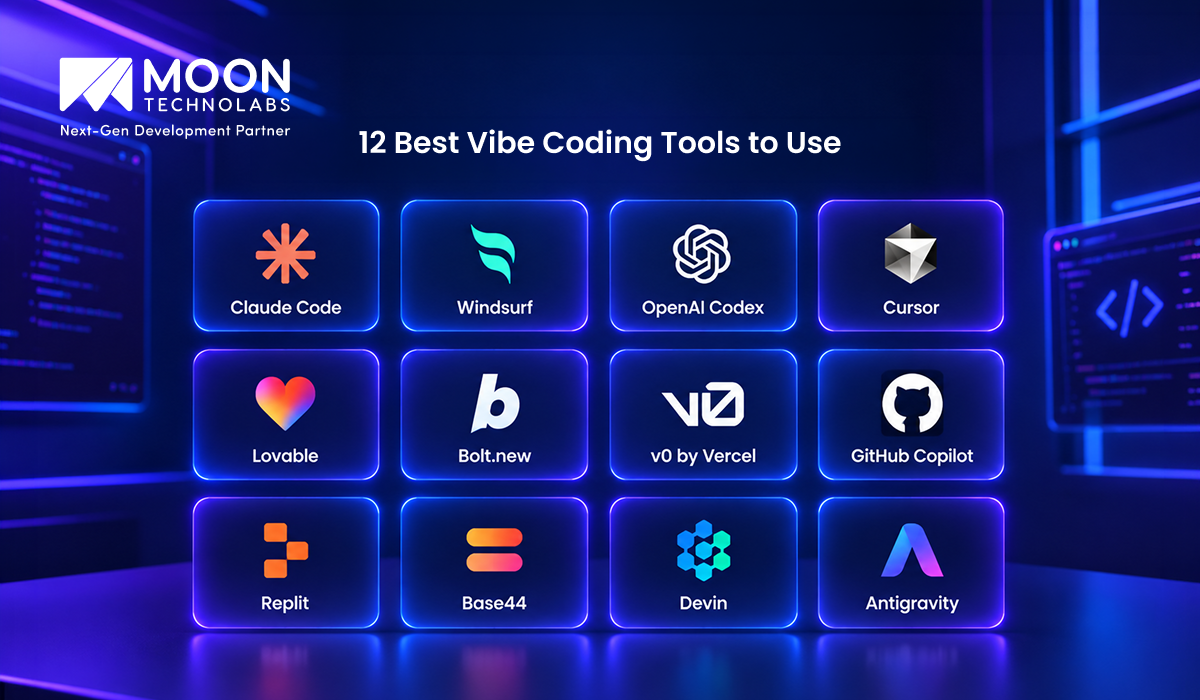
12 Best Vibe Coding Tools to Use
Vibe coder tools speed up software development by letting users describe what they want in natural language and letting AI handle much of the coding process. From generating complete applications to debugging existing code, these tools offer different approaches for developers, startups, and beginners.
Here are 12 popular vibe coder tools worth exploring:
Claude Code
Claude Code is an AI coding agent that works directly with your codebase. It can understand project files, write and modify code, fix bugs, run commands, and help with development tasks through natural-language instructions.
It is particularly useful for developers who want an AI assistant that can work across an entire project rather than simply suggesting individual lines of code.
Windsurf
Windsurf is an AI-powered development environment built around an agentic coding experience. It can understand your project context, generate code, make changes across files, and help developers complete complex development tasks using natural-language prompts.
Its AI-assisted workflow makes it useful for both everyday coding and building features from scratch.
OpenAI Codex
OpenAI Codex is an AI coding agent that can help developers write, review, debug, and modify code. It is designed to handle software engineering tasks based on natural-language instructions and can work through larger coding tasks with less manual intervention.
Codex can be useful when you want an AI agent to take on development tasks while you focus on reviewing and directing the work.
Cursor
Cursor is an AI-powered coding platform that integrates AI directly into the development workflow. Developers can ask questions about their codebase, generate new code, edit existing files, and use AI assistance while working on projects.
Its combination of a familiar coding environment and AI features makes it a popular choice for developers who want to incorporate AI into their existing workflow.
Lovable
Lovable focuses on turning natural-language ideas into working web applications. Users can describe an application, interface, or feature and use AI to generate and refine the project.
It is particularly useful for rapid prototyping, MVP development, and users who want to move from an idea to a functional web application without writing everything manually.
Bolt.new
Bolt.new is a browser-based AI development platform that lets users create applications by describing what they want. It can generate code, make changes through prompts, and provide an environment to develop and test applications.
Its browser-based approach makes it easy to experiment with ideas and build prototypes quickly.
v0 by Vercel
v0 by Vercel is an AI-powered development tool focused heavily on generating user interfaces and applications from natural-language prompts. It can create UI components and help developers iterate on designs and functionality.
It is especially useful for developers and designers who want to quickly turn an idea or design concept into a working interface.
GitHub Copilot
GitHub Copilot provides AI-powered coding assistance directly within supported development environments. It can suggest code, generate functions, explain existing code, help with debugging, and assist with development tasks.
For developers who already use GitHub and traditional IDEs, Copilot can add AI assistance without requiring a completely different development workflow.
Replit
Replit combines an online development environment with AI-powered coding features. Users can create applications, work with code in the browser, and use AI to generate or modify projects.
Because much of the development experience happens online, Replit can be a convenient option for beginners, learners, and developers who want to build and share projects quickly.
Base44
Base44 is an AI-powered platform that allows users to create applications by describing their requirements in natural language. The platform handles much of the development process, so you can build functional applications without starting from a blank code editor.
It can help you quickly test ideas, build internal tools, and develop application prototypes.
Devin
Devin is an AI software engineering agent designed to take on development tasks with greater autonomy. It can work through tasks such as writing code, debugging, and making changes to software projects.
Devin is aimed more at AI-assisted software engineering workflows where developers can delegate specific tasks and review the resulting work.
Antigravity
Antigravity is an AI-first development environment designed to support agent-driven software development. It lets AI agents work on coding tasks while developers provide direction, review changes, and iterate on the results.
This workflow can help developers move beyond simple code completion toward more automated development processes.
Build Better Products With AI-Powered Development Expertise
From ideation to deployment, our experts help you leverage AI coding tools to create scalable, high-performing digital products.
How to Choose the Right Vibe Coding Tool?
Here’s how to choose the right vibe coding tool and find an option that fits your goals while making your development process smoother and more efficient:
Skill Level
Match the tool to your technical expertise. Non-technical creators or beginners should use browser-based full-stack builders that require zero setup. Experienced developers benefit more from AI-native IDEs and terminal agents that allow precise control over complex, multi-file codebases.
Control vs Speed
Decide whether you want total autonomy or fast automation. Fully automated browser builders maximize speed by generating web apps instantly from a prompt. AI-native IDEs and plugins offer deeper control, letting you review, edit, and steer every line of code the assistant writes.
Pricing & Token Limits
Evaluate your budget and usage volume. Freemium tools offer limited free tiers suitable for light prototyping, but heavy development requires paid subscriptions. If you choose open-source or API-driven options, factor in ongoing LLM token costs for continuous agent workflows.
Where Can Vibe Coding Tools Be Used?
Here’s where vibe coding tools can be used to simplify different stages of software development, from turning ideas into prototypes to building and improving applications:
Rapid Prototyping and MVP Development
Vibe coding tools excel at transforming abstract concepts into interactive MVPs within minutes. Startup founders and product teams use browser-based full-stack generators to instantly spin up frontend layouts, basic logic, and user flows. This allows creators to test ideas, gather feedback from users, and pitch to investors without committing weeks to manual coding.
Web and Application Development
These tools are widely used to build fully functional web applications, marketing landing pages, and interactive microsites. Non-technical creators and developers alike leverage AI-native platforms to design responsive user interfaces, configure server-side routines, and deploy complete projects directly from conversational prompts.
Code Debugging and Existing Project Enhancement
Within established codebases, developers use AI-powered IDEs and terminal agents to navigate complex file structures, write automated tests, and refactor logic. Vibe coding workflows help streamline maintenance tasks by instantly locating errors, suggesting performance optimizations, and writing auxiliary scripts or internal developer dashboards.
Which Vibe Coding Tool Should You Use?
Choosing the right vibe coding tool depends on your coding experience, project requirements, and preferred workflow. No single tool works best for everyone.
If you’re a beginner, look for tools with an intuitive interface and strong natural-language capabilities. Experienced developers can use AI-powered code editors and coding agents for more control and faster day-to-day development.
For rapid prototyping, choose a tool that can quickly turn prompts into functional applications. If you’re working on larger or more complex projects, consider tools with better codebase understanding, debugging, Git integration, and customization options.
Before choosing a tool, consider your skill level, project type, integrations, AI capabilities, pricing, and level of control. The right choice fits naturally into your development workflow and helps you build faster without sacrificing code quality.
Take Your Development Workflow To The Next Level
See how our development expertise and AI-powered tools can help your team build, test, and launch products more efficiently.
How Moon Technolabs Helps with AI-powered Software Development
Moon Technolabs helps businesses leverage AI-powered software development to build smarter applications, automate repetitive processes, and improve development efficiency. By combining AI technologies with software engineering expertise, we help businesses turn ideas into reliable, scalable digital solutions.
From developing AI-powered applications from scratch to integrating intelligent features into existing software, we support businesses throughout the development lifecycle. Our expertise includes AI automation, intelligent assistants, predictive solutions, and other AI capabilities tailored to specific business requirements.
For businesses looking to build innovative digital products, partnering with a leading AI-powered software development company can provide the technical expertise needed to integrate AI into modern applications while focusing on scalability, performance, and user experience.
Conclusion
Vibe coding is transforming software development by making it easier to turn ideas into functional applications using natural-language prompts and AI assistance. From AI-powered code editors to autonomous coding agents and rapid app-building platforms, these tools can help developers save time and streamline their workflows.
However, the right tool depends on your project requirements, coding experience, budget, and preferred workflow. While AI can handle many development tasks, reviewing generated code and focusing on security, performance, scalability, and quality are still essential.
If you want to accelerate your product roadmap with expert help, exploring specialized vibe coding development services can help you bridge the gap between concept and execution more efficiently.
As these tools evolve, vibe coding will likely become an increasingly useful part of modern software development. Whether you’re building a quick prototype or working on a larger application, choosing the right tool can help you move from idea to implementation more efficiently.
FAQs
01
Are vibe coding tools free?
Most of the vibe coding tools use freemium models, with limited free credits. Heavy use requires paid monthly subscriptions around $20 to $30+. Open-source projects like bolt.diy are free, but require your own paid LLM API keys.02
What AI tools are available for vibe coding?
Full-stack builders like Bolt, Lovable, v0, and Replit Agent generate entire apps from prompts. Dedicated coding assistants and terminal agents like Cursor, Claude Code, Aider, and GitHub Copilot handle deeper codebase navigation and editing.03
Which IDE to use for vibe coding?
Cursor and Windsurf are the leading AI-native IDEs. Traditional editors like VS Code are popular when paired with plugins like Cline, Roo Code, or GitHub Copilot, while developers also use terminal tools like Claude Code.04
Is vibe coding risky?
Yes. It frequently introduces technical debt, messy underlying code, hidden security vulnerabilities, and logic hallucinations that can be extremely difficult to debug when the application breaks.05
What is replacing casual AI prompting?
It is moving toward structured AI workflows and clear planning. Instead of guessing and checking prompts until something works, developers now write a clear plan (a specification) and let AI agents build the code while automated tests check it.



The Software Development Team at Moon Technolabs includes experienced developers, solution architects, and technology consultants who contribute content on software engineering, application development, system architecture, and digital innovation. Their articles are based on real-world project experience and aim to help businesses make informed technology decisions.
Submitting the form below will ensure a prompt response from us.
We refine our expertise to deliver innovative business solutions.





205 N Michigan Avenue, #810, Chicago, 60601, Illinois, United States
13500 Long Is Dr, Pflugerville, TX 78660, USA

C/105 Ganesh Meridian, S.G. Highway, Ahmedabad, GJ 380060


Ayse D.
Co-Founder France
“ I highly recommend Moon Technolabs as the quality of service is wonderful. We have hired this company to develop the product based on some complex & technical issues. We get the best quality services as compared with others in the market. Huge Thanks to Moon Technolabs as the team is always ready to give the solution all time.”

Justin G.
Founder & CEO USA
USA“ Moon Technolabs is a pioneer in the WebRTC based project as they have fixed complicated segments of the module by fulfilling different product lines by providing 24X7 customer support. We really recommended Moon Technolabs as they are able to develop products as per the module deadline and project timeline.”

Flavio S.
Founder & Managing Director Germany
“I am happy to recommend Moon Technolabs for their app development services. They successfully developed apps for me, and I am highly satisfied with the overall outcomes. The development team has swiftly addressed the issues with responsive and effective communication to understand the requirement quickly and actively resolve the back-and-forth problems that arose...”

Jay M.
Founder & CEOUSA“Moon Technolabs is the best company that provides advanced apps and websites development services in the USA and Europe. I am a newbie to develop my app with an external team. I am really happy to work with them as I am not that much mobile apps user. Here, the team and specially the CEO of Moon Technolabs helps me to let me know about the benefits of my app to generate revenue....”


Our Offices
India
C/105 Ganesh Meridian,S.G. Highway, Ahmedabad, GJ 380060USA
205 N Michigan Avenue, #810, Chicago, 60601, Illinois, United StatesContact Information


