


Top 10 Chat Apps: Best Messaging Apps Compared

App Development Team
Last Updated: Nov 17, 2026 Total Views: 85
Table of Content


Blog Summary:
Explore the top 10 chat apps and compare their features, privacy, usability, and communication tools. From instant messaging and voice calls to file sharing and online communities, discover what each platform offers, where it falls short, and which messaging app best suits your personal or business communication needs.
Table of Content
Messaging apps have become a part of everyday life, but choosing the right one isn’t always straightforward. Some are built for quick conversations, others focus on privacy, while a few offer much more through communities, file sharing, and integrated digital services.
According to Statista, 94.1% of internet users worldwide accessed online chat and messaging services monthly in Q2 2026, highlighting just how important these platforms have become.
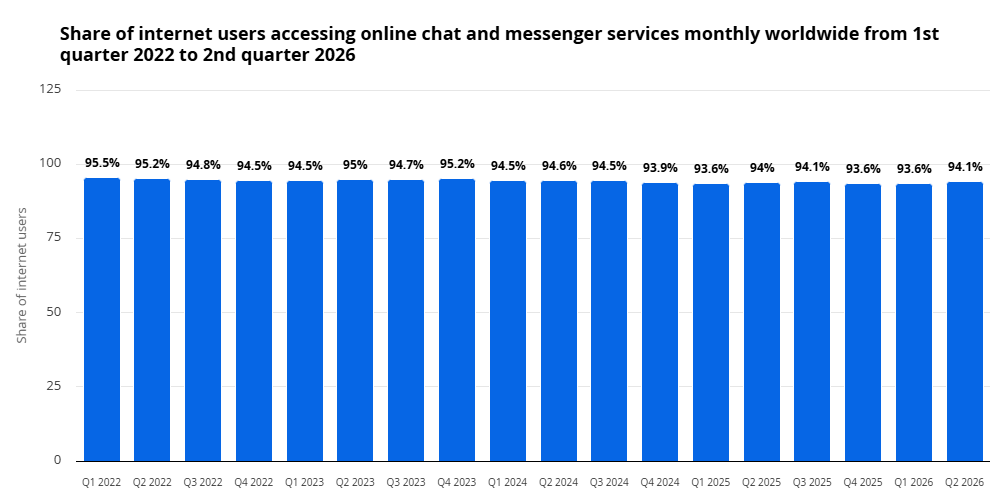
With so many options available, finding the right platform can be challenging. This list of the top 10 chat apps compares popular messaging platforms by features, security, ease of use, calling experience, and overall usability. We’ll explore each app’s key strengths, where it falls short, and which one best fits different communication needs.
Latest Trends in Chat Apps
These days, chat apps are no longer just about texting. AI features, encrypted conversations, and richer calling experiences are changing how users connect. Here are the trends driving this shift:
AI-powered Messaging and Smart Assistants
Chat apps are increasingly using AI to suggest replies, summarize long conversations, translate messages, and automate routine tasks. These features help users communicate faster and manage chats more efficiently.
Growing Demand for Privacy-focused Chat Apps
People are becoming more careful about who can access their personal conversations and data. This is driving interest among users seeking stronger encryption, disappearing messages, private chats, and better control over personal information.
Cross-platform Messaging and Device Synchronization
People increasingly expect their conversations to remain accessible across smartphones, tablets, and computers. Chat apps are improving multi-device support, allowing users to switch devices without losing messages, shared files, or conversation history.
Chat App Spotlight: WhatsApp
WhatsApp remains one of the most widely used messaging platforms, offering more than just everyday chats. From group conversations and voice calls to privacy controls and media sharing, let’s explore its key features and what makes it popular:
Key Features That Make WhatsApp Popular
WhatsApp offers more than basic text messaging. Users can create group chats, share photos and documents, send voice notes, make video calls, and share live locations. Features like WhatsApp Web, message editing, disappearing messages, and status updates make everyday conversations easier and more convenient. Its familiar interface and cross-device availability also make it accessible to a wide range of users.
Privacy and End-to-End Encryption
Privacy is an important part of WhatsApp’s messaging experience. Personal messages and calls are protected with end-to-end encryption by default, meaning only the communicating users can access their content.
WhatsApp also offers privacy controls such as chat locks, disappearing messages, two-step verification, and options to control profile visibility. However, users should also review their backup settings, as cloud backups have separate encryption options.
WhatsApp for Personal and Business Communication
WhatsApp is widely used for both personal conversations and customer communication. Individuals use it to stay connected with friends and family, share updates, and make calls. Businesses can use the WhatsApp Business app to display product catalogs, share business information, send customer updates, and respond to inquiries.
These features make it easier for businesses to communicate directly with customers, answer questions, and manage everyday interactions through one platform.
Get expert help to build a custom messaging platform with real-time communication, file sharing, and advanced integrations.
App Store and Google Play Ratings Comparison
App ratings offer a quick way to understand how users feel about their favorite messaging platforms. The following comparison highlights their ratings on Apple’s App Store and Google Play, helping readers see how each app performs across iOS and Android:
| Chat App | Apple App Store Rating | Google Play Rating |
|---|---|---|
| 4.7 | 4.4 | |
| Telegram | 4.0 | 4.1 |
| Signal | 4.7 | 4.5 |
| Facebook Messenger | 4.7 | 4.4 |
| 3.9 | 2.9 | |
| Viber | 4.6 | 3.9 |
| LINE | 3.2 | 3.4 |
| Discord | 4.7 | 4.5 |
| Snapchat | 4.5 | 4.2 |
| Google Messages | 4.6 | 4.5 |
Top 10 Chat Apps Reviewed
Messaging apps have become an essential part of everyday communication, helping people stay connected through text messages, voice and video calls, group chats, file sharing, and multimedia messaging. However, each app offers a different combination of features, privacy, security, and user experience.
Here is a review of the top 10 chat apps, highlighting their key features, advantages, and limitations:
WhatsApp remains a favorite for everyday communication thanks to its widespread adoption and simple interface. From family group chats to business conversations, it offers a convenient way to stay connected. Its combination of messaging, calling, and sharing features makes it a practical choice for almost everyone.
Key features:
- End-to-end encrypted personal messages and calls.
- Voice and video calls, group chats, and communities.
- Status updates, Channels, and document sharing.
- WhatsApp Web and multi-device support.
Our verdict: WhatsApp may not be the most innovative messenger, but its convenience, reliability, and enormous user base make it the best all-round choice.
Telegram
Telegram offers much more than conventional messaging. Its large groups, public channels, bots, and cloud-based synchronization make it especially useful for communities and content creators. Users also benefit from extensive customization and convenient access across multiple devices.
Key features:
- Large groups and public broadcasting channels.
- Bots, usernames, and cloud synchronization.
- File sharing and multi-device access.
- Custom themes and secret chats.
Our verdict: Telegram is excellent for advanced users and large communities. However, ordinary cloud chats are not end-to-end encrypted by default, which is important to understand.
Signal
Signal focuses on secure communication rather than social networking or entertainment. Its privacy-first approach, simple interface, and strong encryption make it particularly attractive to people who want greater control over their conversations.
Key features:
- End-to-end encrypted messages and calls by default.
- Disappearing messages and privacy controls.
- Open-source applications and signal protocol.
- Minimal data collection.
Our verdict: Signal is one of the strongest choices for privacy-conscious users. Its biggest challenge is its smaller user base compared with WhatsApp and Telegram.
Facebook Messenger
Facebook Messenger makes it easy to connect with friends, family, and social contacts, particularly for people already using Facebook. Its messaging and calling features extend the social networking experience.
Key features:
- Individual and group messaging.
- Voice and video calls.
- Stickers and multimedia sharing.
- Integration with Facebook and other Meta services.
Our verdict: Messenger is a practical option for Facebook users, although its increasingly crowded interface and privacy considerations leave room for improvement.
WeChat goes beyond traditional messaging by combining communication, payments, social networking, and digital services in one application. Its popularity is particularly strong in China, where it plays an important role in everyday digital activities.
Key features:
- Text messaging and voice and video calls.
- WeChat Pay in supported markets.
- Mini-programs and moments social sharing.
- Integrated lifestyle and digital services.
Our verdict: WeChat is an impressive all-in-one platform, especially for users in China. However, regional restrictions and privacy considerations may limit its appeal elsewhere.
Viber
Viber offers a familiar messaging experience with useful voice and video calling options. It is particularly convenient for people who regularly communicate internationally and already have contacts on the platform.
Key features:
- Messaging and voice and video calls.
- Group conversations and communities.
- End-to-end encrypted personal chats.
- Viber Out paid international calling.
Our verdict: Viber remains a capable messaging alternative with useful calling features, although advertisements and competition from WhatsApp and Telegram affect its appeal.
LINE
LINE makes everyday conversations more entertaining through creative stickers, themes, and social features. It is particularly popular in Japan, Taiwan, and Thailand, where it has become an important part of everyday communication.
Key features:
- Text messaging, voice calls, and video calls.
- Extensive sticker and theme collections.
- Social sharing and group conversations.
- Additional integrated services in supported markets.
Our verdict: LINE is an enjoyable platform for people who value personalization and expressive conversations, although its regional popularity limits its reach in some markets.
Discord
Discord takes a different approach to messaging by organizing conversations into servers and dedicated channels. It is particularly popular among gamers, creators, developers, and online communities that need organized discussions.
Key features:
- Servers with topic-based text channels.
- Voice rooms and video calls.
- Screen sharing and streaming.
- Bots, integrations, and moderation tools.
Our verdict: Discord is excellent for community management and group communication, though its interface can feel overwhelming for people who want a traditional messenger.
Snapchat
Snapchat focuses on visual communication through photos, short videos, stories, filters, and disappearing messages. Its camera-first approach makes conversations more interactive and entertaining, particularly among younger audiences.
Key features:
- Photo and video messaging.
- Stories, filters, and augmented-reality lenses.
- Group chats and voice and video calls.
- Interactive social features.
Our verdict: Snapchat is great for casual social interaction and creative communication, but its navigation and entertainment-focused design may not suit everyone.
Google Messages
Google Messages modernizes traditional texting through SMS, MMS, and Rich Communication Services (RCS). Its clean interface and Android integration make it a convenient option for everyday mobile communication.
Key features:
- RCS messaging with typing indicators and read receipts.
- Improved media sharing and group conversations.
- Spam detection and protection.
- End-to-end encryption for eligible RCS conversations.
Our verdict: Google Messages is a practical choice for Android users who want modern texting capabilities without adopting another social instant messaging platform.
You May Also Like:
How Much Does It Cost to Build a Chat App? Your Budget Guide
How we Rank and Review Chat Apps
Here’s a closer look at how we assess each chat app, the factors we consider, and what makes our comparisons useful when choosing a messaging platform:
Messaging Features and User Experience
We assess messaging capabilities, including instant text messaging, group chats, message reactions, stickers, and customization options. We also consider interface design, ease of navigation, responsiveness, and overall user experience to determine how convenient each app is for everyday communication.
Privacy and Security
Security is a critical factor in our evaluation. We review end-to-end encryption, data protection policies, two-factor authentication, disappearing messages, and privacy controls. We prioritize apps that protect sensitive conversations and provide users with greater control over their personal information.
Voice and Video Calling
We evaluate voice and video calling quality based on connection stability, audio clarity, video resolution, and call reliability. We also examine group calling, screen sharing, and other communication features that improve the overall calling experience.
Cross-platform Compatibility
We check whether each chat application works smoothly across Android, iOS, Windows, macOS, and web browsers. Our evaluation considers device synchronization, account accessibility, messaging consistency, and the ability to switch between mobile and desktop without interruptions.
File Sharing and Media Support
We review file-sharing capabilities, including supported file formats, upload limits, image and video quality, document sharing, and storage options. We also consider media compression, transfer speeds, and cloud integration to understand how effectively each app handles shared content.
Pricing and Premium Features
We compare free and paid plans to determine the overall value each application provides. Our assessment includes subscription costs, premium features, storage limits, advertisements, and additional business tools, helping users choose an affordable solution that meets their communication needs.
Best Chat Apps by User Needs
Choosing the right chat app depends on how you communicate, who you connect with, and what features matter most to you. While some apps are perfect for everyday conversations, others focus on privacy, large communities, gaming, social interactions, or professional communication.
Here are some of the best chat apps based on different user needs:
Best for Everyday Messaging: WhatsApp
WhatsApp is one of the most popular messaging apps for everyday communication. It lets users send text messages, make voice and video calls, share photos, videos, and documents, and create group chats. Its simple interface and wide user base make it a convenient choice for staying connected with friends, family, and colleagues.
Best for Privacy and Security: Signal
Signal is an excellent choice for users who prioritize privacy and secure communication. It offers end-to-end encryption for messages and calls, along with features like disappearing messages and minimal data collection. It is particularly suitable for people who want more control over their personal conversations.
Best for Large Communities: Telegram
Telegram is well-suited for people who want to join large groups, follow public channels, and connect with communities that share similar interests. It supports large group conversations, file sharing, bots, and cross-device access, making it useful for both personal and community communication.
Best for Gaming Communities: Discord
Discord is a popular platform among gamers and online communities. It offers text channels, voice chats, video calls, and screen sharing, allowing users to communicate while playing games or collaborating on shared interests. It also works well for study groups, hobby communities, and online teams.
Best for Social Messaging: Snapchat
Snapchat is ideal for users who enjoy casual, visual communication. It allows people to share photos, short videos, stories, and messages with friends. Features like filters, lenses, and disappearing messages make conversations more interactive and entertaining.
Best for Business Communication: WeChat
WeChat is a versatile communication platform widely used in China for personal and professional interactions. Along with messaging and voice and video calls, it offers features such as group chats, file sharing, and business-related services. Its integrated ecosystem makes it particularly useful for people and businesses operating in the Chinese market.
Desktop vs Mobile Chat Apps: Key Differences
Chat apps are available on both desktop and mobile devices, allowing users to stay connected from almost anywhere. However, the messaging experience can vary by device. Desktop chat apps are generally preferred for multitasking, typing long messages, and managing files, while mobile chat apps offer greater convenience and on-the-go communication.
Let’s explore the key differences between desktop and mobile chat apps:
Messaging Experience Across Devices
Desktop chat apps provide a comfortable messaging experience with a larger screen, physical keyboard, and easier multitasking. Users can type long messages, manage multiple conversations, and switch between applications with little effort.
Mobile chat apps, on the other hand, are designed for quick and convenient communication. Users can send messages, share emojis, use voice typing, and access conversations directly from their smartphones. They are especially useful when communicating while traveling or away from a computer.
Voice and Video Calling Quality
Desktop chat apps often provide a better experience for longer voice and video calls because users can connect external microphones, headphones, webcams, and larger displays. This makes desktop platforms useful for online meetings, interviews, and professional discussions.
Mobile chat apps offer the flexibility to make calls from almost anywhere. Smartphones also provide built-in cameras and microphones, making it easy to start video or voice calls without additional equipment. However, call quality may depend on the device, internet connection, and network conditions.
File Sharing and Media Management
Desktop chat apps make it easier to share and manage large files, documents, images, and videos. Users can drag and drop files, browse folders, and download multiple attachments directly to their computers. This is particularly helpful for workplace communication and professional collaboration.
Mobile chat apps allow users to instantly share photos, videos, voice notes, contacts, and documents stored on their smartphones. Features like direct camera access and gallery integration make sharing media convenient. However, managing large numbers of files can sometimes be less convenient on smaller screens.
Notifications and Device Synchronization
Desktop chat apps provide notifications directly on the computer screen, helping users stay updated while working. Many platforms also sync conversations across devices, letting users continue chats on their desktops after starting them on their phones.
Mobile chat apps offer real-time push notifications, making it easier to respond to messages instantly. Most modern messaging platforms also support multi-device synchronization, though availability and functionality vary by app.
Security and Privacy Controls
Both desktop and mobile chat apps offer security and privacy features, but available controls may differ by platform. Features such as end-to-end encryption, two-factor authentication, screen locks, and privacy settings help protect conversations and personal information.
Desktop apps may require additional precautions, especially when used on shared or office computers. Users should log out after using their accounts and avoid saving sensitive information on public devices.
Mobile apps often provide additional protection through fingerprint authentication, facial recognition, and device-level security settings. Users should also keep their apps and operating systems updated to maintain security.
Free vs Paid Chat Apps: Features and Pricing
Explore the key features, available tools, limitations, and pricing differences between free and paid chat apps to understand what each plan offers:
Free Messaging and Calling Features
Most popular chat apps allow users to send text messages, share photos and videos, create group chats, and make voice or video calls without a subscription fee. Apps like WhatsApp, Signal, and Telegram offer these features for free, making them suitable for everyday communication without extra cost. However, internet data charges may still apply.
Premium Subscriptions and Additional Features
Some chat platforms offer paid subscriptions that unlock extra features beyond their free plans. These may include larger file uploads, increased cloud storage, advanced customization, exclusive stickers, and additional account controls. For example, Telegram Premium and Discord Nitro provide upgraded features for users who want more flexibility and fewer limitations.
Business Messaging and API Costs
Businesses often need more than basic messaging to handle customer inquiries and automated communication. Platforms such as the WhatsApp Business Platform offer API-based messaging with features like automated responses, customer notifications, and CRM integration. Pricing generally depends on factors such as message categories, recipient locations, and platform-specific charges, so businesses should review costs before choosing a solution.
Customer Support and Accessibility Features
Explore customer support options, available assistance channels, accessibility tools, and features that make chat apps easier for everyone to use:
In-app Help and Support
Chat apps offer help centers, FAQs, chat support, and troubleshooting guides to help users resolve common issues. These resources help users address login problems, failed message delivery, payment issues, or account-related concerns without leaving the app.
Accessibility and Language Options
Good chat apps make communication easier for people with different needs and language preferences. Features such as screen reader support, adjustable text sizes, voice messages, captions, and multiple language options help users navigate the app and communicate comfortably.
Account Recovery and Troubleshooting
Losing access to a chat account can interrupt important conversations and contacts. Recovery options such as OTP verification, backup restoration, email support, and device verification help users regain access, while troubleshooting tools address common login, notification, and syncing issues.
Privacy and Security Features of Chat Apps
Learn how chat apps manage user data, protect conversations, control account access, and safeguard personal information through built-in security measures:
End-to-End Encryption
End-to-end encryption ensures that only you and the person receiving your message can read it. Even the messaging platform cannot access the content of protected conversations.
Two-factor Authentication
Two-factor authentication protects your account even if someone knows your password. It requires an additional verification step, such as a login code, before allowing account access.
Data Collection and Privacy Policies
Not every free chat app handles personal information the same way. Some collect contact details, device information, and usage data, so checking privacy policies helps users understand what they share.
Message Backup and Cloud Storage
Cloud backups make it easier to recover chats when you switch phones or reinstall an app. However, unencrypted backups may expose private conversations if someone gains access to your cloud account.
Blocking, Reporting, and Spam Protection
Receiving messages from unknown accounts or suspicious links can put users at risk. Blocking unwanted contacts, reporting abusive profiles, and filtering spam help prevent scams and unwanted interactions.
Get a professionally developed chat application with real-time communication, multimedia sharing, and customized functionality.
How Moon Technolabs Helps Businesses Build Custom Chat Apps?
Creating a messaging app requires more than adding basic messaging functionality. Businesses need a platform that handles real-time conversations, supports growing user activity, and delivers a smooth experience across devices.
Moon Technolabs helps businesses develop custom chat applications based on their requirements, whether they want to build a one-to-one messaging platform, a community-based app, or an internal communication tool.
The development approach focuses on features that make the app useful for its intended audience, including real-time messaging, group conversations, media sharing, push notifications, and voice and video calls. Businesses planning to launch their chat applications on Apple devices can also explore our iOS app development services to create an experience suited to the iOS platform.
Conclusion
Chat apps continue to shape how people communicate, collaborate, and share information. While each platform offers a different set of features, the right choice depends on usability, security, and the interactions you need.
For businesses, these platforms also offer valuable inspiration for creating better communication experiences. If you’re planning to build a messaging platform for your audience, Moon Technolabs can help you explore the right development approach for your idea.
FAQs
01
What are the top 10 chat apps this year?
The top 10 chat apps include WhatsApp, Telegram, Signal, Facebook Messenger, WeChat, Viber, Discord, Slack, Microsoft Teams, and Snapchat. Each offers different features, including messaging, voice calls, video calls, collaboration, and privacy.02
Which chat app is best for private and secure messaging?
Signal is widely considered one of the best apps for private and secure messaging. It offers end-to-end encryption by default, disappearing messages, and minimal data collection. WhatsApp is another popular option with end-to-end encrypted personal conversations.03
What is the best alternative to WhatsApp?
Telegram, Signal, and Viber are popular alternatives to WhatsApp. Telegram offers large groups, channels, and cloud-based messaging, while Signal prioritizes privacy and security. Viber provides free messaging, voice calls, video calls, and community features.04
Which chat apps support free voice and video calls?
Several chat apps offer free voice and video calling, including WhatsApp, Telegram, Signal, Facebook Messenger, Viber, Discord, and Google Meet. These apps let users communicate globally over the internet, though mobile data or Wi-Fi charges may apply.05
Can I use the same chat app on mobile and desktop?
Yes, most popular chat apps support multiple devices. WhatsApp, Telegram, Signal, Slack, and Microsoft Teams offer mobile and desktop applications. Users can access conversations across supported devices, sync messages, and continue communicating seamlessly.06
Which chat app is best for business communication?
Slack and Microsoft Teams are excellent choices for business communication. They provide team messaging, file sharing, video meetings, integrations, and collaboration tools. Google Chat is another option for organizations seeking communication integrated with Google Workspace.07
How much does it cost to develop a chat app?
Developing a chat app can cost approximately 10,000–50,000 for a basic application, 50,000–150,000 for a feature-rich solution, and 150,000–300,000 or more for an advanced platform, depending on features, complexity, technology, and development location.08
What technologies are used to build real-time chat applications?
Real-time chat applications commonly use technologies like React Native, Flutter, Swift, Kotlin, Node.js, WebSockets, Firebase, and Socket.IO. Developers also use databases such as MongoDB or PostgreSQL, cloud infrastructure, and encryption protocols for secure messaging and scalability.



Stay updated with the latest trends, frameworks, and best practices in mobile app development. From Android and iOS to cross-platform technologies, this category explores development strategies, app architecture, performance optimization, and user experience to help build scalable mobile applications. Find valuable insights that support successful mobile app development from idea to deployment.
Submitting the form below will ensure a prompt response from us.
We refine our expertise to deliver innovative business solutions.





205 N Michigan Avenue, #810, Chicago, 60601, Illinois, United States
13500 Long Is Dr, Pflugerville, TX 78660, USA

C/105 Ganesh Meridian, S.G. Highway, Ahmedabad, GJ 380060




Ayse D.
Co-Founder France
“ I highly recommend Moon Technolabs as the quality of service is wonderful. We have hired this company to develop the product based on some complex & technical issues. We get the best quality services as compared with others in the market. Huge Thanks to Moon Technolabs as the team is always ready to give the solution all time.”

Justin G.
Founder & CEO USA
“ Moon Technolabs is a pioneer in the WebRTC based project as they have fixed complicated segments of the module by fulfilling different product lines by providing 24X7 customer support. We really recommended Moon Technolabs as they are able to develop products as per the module deadline and project timeline.”

Flavio S.
Founder & Managing Director Germany
“I am happy to recommend Moon Technolabs for their app development services. They successfully developed apps for me, and I am highly satisfied with the overall outcomes. The development team has swiftly addressed the issues with responsive and effective communication to understand the requirement quickly and actively resolve the back-and-forth problems that arose...”

Jay M.
Founder & CEOUSA“Moon Technolabs is the best company that provides advanced apps and websites development services in the USA and Europe. I am a newbie to develop my app with an external team. I am really happy to work with them as I am not that much mobile apps user. Here, the team and specially the CEO of Moon Technolabs helps me to let me know about the benefits of my app to generate revenue....”


Our Offices
India
C/105 Ganesh Meridian,S.G. Highway, Ahmedabad, GJ 380060USA
205 N Michigan Avenue, #810, Chicago, 60601, Illinois, United StatesContact Information


