


MCP Server Architecture: A Complete Guide to Model Context Protocol Architecture

Artificial Intelligence Team
Last Updated: Aug 26, 2026 Total Views: 143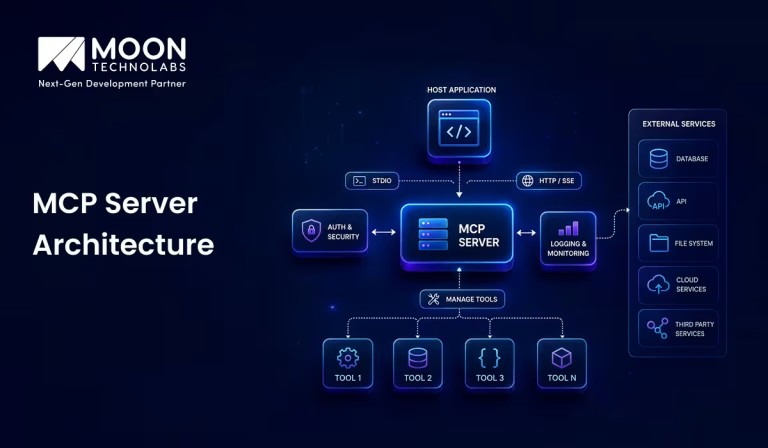
Table of Content


Blog Summary:
Unlike traditional AI integrations that hard-code connections between a model and individual services, MCP server architecture introduces a standardized interaction layer. An MCP server can expose specific tools, resources, and prompts that an AI client can discover and use when needed. This separation makes capabilities reusable across compatible AI applications while keeping access to external systems under the server’s control.
Table of Content
As AI applications move beyond simple chat and into real-world workflows, they need reliable ways to access tools, data, APIs, and business systems. This is where MCP (Model Context Protocol) server architecture comes in. It provides a standardized way for AI models to discover and interact with external capabilities without requiring a custom integration for every application.
But what actually happens behind the scenes when an AI assistant uses an MCP server? How do the client, server, tools, resources, and AI model communicate with each other? This guide breaks down MCP server architecture from the ground up, explains how its components work together, and explores why MCP is becoming an important building block for scalable AI applications.
What is MCP Server Architecture?
The Model Context Protocol (MCP) server architecture defines how an AI application connects to external tools and data. Instead of building a separate integration for every API or service, the AI client communicates with an MCP server that exposes capabilities in a consistent format.
The MCP server sits between the AI model and the systems it needs to access, such as databases, internal APIs, file systems, or SaaS platforms. It receives requests from the AI client, handles the required tool call or data retrieval, and returns structured results that the model can use in its response.
A typical architecture has three key parts: the MCP host/client, the MCP server, and the connected resources or tools. This separation keeps integrations modular, so developers can add or replace tools without redesigning the entire AI application.
How Does MCP Server Architecture Work?
Understanding how MCP server architecture works helps businesses efficiently connect AI applications to external tools and data sources. The following explains how the architecture enables seamless communication:
MCP Host
The MCP host is the AI application that the user interacts with, such as an AI assistant, IDE, or intelligent application.
The host manages MCP clients and coordinates communication with different MCP servers. It is responsible for the overall user experience and determines when to use external capabilities.
MCP Client
An MCP client acts as a bridge between the MCP host and an MCP server. It establishes and maintains the connection with the server, sends requests, and receives responses. An MCP host can have multiple clients, with each client typically managing a connection to a particular MCP server.
MCP Server
It provides capabilities that the AI application can use. An MCP server can connect to external systems such as databases, APIs, file systems, SaaS platforms, or other services. It exposes these capabilities through tools, resources, and prompts.
Tools
Tools are executable functions provided by an MCP server. They allow an AI application to perform actions such as:
- Querying a database
- Calling an external API
- Creating or updating records
- Searching files
- Sending information to another service
Tools are generally defined with structured input and output schemas, making it easier for the AI application to understand how to use them.
Resources
Resources provide data or contextual information to the AI application. Examples include:
- Documents
- Database records
- Configuration files
- API responses
- Application data
Resources are primarily used to provide information and context, rather than perform actions.
Prompts
Prompts are reusable prompt templates provided by an MCP server. They can contain predefined instructions or workflows for specific tasks. This allows applications to discover and use standardized prompts for interacting with a particular service or data source.
Communication and Transport Layer
It is responsible for exchanging messages between the MCP client and MCP server. MCP uses structured messages based on JSON-RPC for requests, responses, notifications, and errors.
The communication can use different transport mechanisms depending on the environment. For example:
- Stdio: Commonly used when the remote MCP server runs as a local process.
- Streamable HTTP: Used for network-based communication between clients and servers.
This separation between the protocol and transport allows MCP to work across different environments while maintaining a consistent communication model.
Simplify AI Integration With Scalable MCP Architecture
Create secure, connected AI ecosystems with our MCP expertise, enabling seamless tool integration, better data access, and scalable application connectivity.
Core Components of MCP Server Architecture
MCP server architecture comprises several essential components that work together to enable seamless communication among AI applications, tools, and data sources. These include:
Server Interface
The server interface manages communication between the MCP client and server. It receives requests, routes them to the appropriate component, and returns structured responses.
Tool Definitions and Execution
Tools are functions that allow AI applications to perform actions such as searching databases, creating records, or calling APIs. The server validates inputs, executes the requested tool, and returns the result.
Resource Management
Resources provide information and context to AI applications. They can include files, documents, database records, logs, and API data. The server manages how these resources are discovered and accessed.
Prompt Management
Prompt management provides reusable prompt templates for tasks such as summarization, data analysis, code review, and report generation. This helps maintain consistent instructions across applications.
Authentication and Authorization
This component ensures secure access to the MCP server. Authentication verifies the identity of users or applications, while authorization determines which tools and resources they can access.
External API and Data Source Integration
MCP servers can connect AI applications to databases, REST APIs, cloud services, and other external systems. This layer handles API requests, data transformation, authentication, and errors.
MCP Server Architecture: How the Request Flow Works
Understanding the MCP request flow shows how data and instructions move between the AI client, MCP server, and connected tools. Here’s how the process works:
Step 1: User Sends a Request to the AI Application
The process begins when the user sends a request to an AI application. For example, the user might ask the AI to retrieve information from a database, access a file, call an API, or perform an operation using an external service.
The AI application analyzes the user’s request to determine what information or action is required.
Step 2: MCP Client Connects With the MCP Server
The AI application uses an MCP client to communicate with an MCP server. The MCP client manages the connection and handles communication between the AI application and the server in accordance with the MCP protocol. The MCP server acts as a bridge between the AI model and external systems or services.
Step 3: Server Exposes Available Capabilities
Once connected, the MCP server makes its available capabilities known to the MCP client.
These capabilities can include:
- Tools: Functions that the AI can invoke to perform actions.
- Resources: Data or information that the AI can access.
- Prompts: Reusable prompt templates that can guide interactions.
For example, an MCP server might expose tools for querying a database, searching documents, or interacting with a third-party API.
Step 4: AI Selects the Required Tool or Resource
Based on the user’s request and the capabilities available through the MCP server, the AI determines which tool or resource is appropriate.
For example, if the user requests information stored in a database, the AI may select a database query tool exposed by the MCP server. The AI then provides the necessary parameters for that tool.
Step 5: MCP Server Executes the Request
The MCP client sends the selected operation to the MCP server. The server validates the request and executes the corresponding tool or retrieves the requested resource.
The MCP server may communicate with external systems such as databases, APIs, file systems, or other services to complete the operation.
Step 6: Results are Returned to the AI Application
After the MCP server completes the requested operation, it sends the result back to the AI application via the MCP client.
The returned information may contain data, status information, error messages, or other output produced by the requested tool or resource.
Step 7: AI Generates the Final Response
Finally, the AI uses the returned information together with the original user request to generate a natural-language response.
The user generally does not need to know the underlying details of the MCP communication. The AI presents the relevant result in a clear and useful format.
Advantages of MCP Server Architecture
MCP server architecture offers a structured and scalable way for AI applications to interact with external tools and data sources. The key advantages include:
Standardized AI-to-Tool Communication
MCP provides a common communication standard that enables AI applications to interact with tools, services, and data sources consistently. This reduces the need to build custom communication methods for every integration.
Easier Integration With External Systems
Connecting AI applications to external systems, including databases, APIs, file systems, and business applications, becomes simpler. Existing functionality can be exposed through MCP servers without requiring major changes to the application.
Reusable Tools and Data Connections
Tools and data connections can be reused across multiple AI applications. Once an integration is implemented, different AI clients can access the same MCP server, reducing duplicate development effort.
Scalable AI Application Development
New tools and services can be added independently, allowing AI applications to grow without requiring significant changes to their core architecture. This modular approach makes development and expansion more manageable.
Reduced Integration Complexity
A standardized interface reduces the complexity of integrating AI applications with external systems. Developers can avoid building separate integrations for each AI model or service, making systems easier to develop and maintain.
Better Separation of Concerns
AI logic can remain separate from tools and data access. The AI application can focus on reasoning and decision-making, while MCP servers manage connections to specific tools, services, and information sources. This improves maintainability, security, and flexibility.
Limitations and Challenges of MCP Server Architecture
While MCP server architecture simplifies AI integration, it also comes with certain limitations and challenges that businesses should consider before implementation. These include:
Security and Access Control
MCP servers expose tools and data to AI clients, which creates a larger attack surface. A poorly secured server could access sensitive resources or execute unauthorized actions. Strong authentication, authorization, input validation, and encrypted communication are required.
Server Reliability
If an MCP server goes down, the AI application may lose access to its connected tools. Failures in the server, network, or external APIs can interrupt workflows. High availability, failover mechanisms, and proper error handling are therefore important.
Tool Permission Management
An MCP server may expose many tools with different risk levels. Granting an AI model broad permissions can lead to unintended operations. Fine-grained permissions and least-privilege access are needed to control which tools and actions each client can use.
Integration Complexity
MCP simplifies tool connectivity, but integrating real-world systems can still be difficult. Developers must handle different APIs, authentication methods, data formats, and legacy systems. Maintaining these integrations as external services change can also require ongoing effort.
Latency and Performance
Each MCP tool call introduces some network and processing overhead. Workflows involving several MCP calls may become noticeably slower, especially when external APIs respond slowly. Connection reuse, caching, parallel execution, and reducing unnecessary tool calls can improve performance.
Monitoring and Debugging
Failures can occur at the client, MCP server tool, API, or network level, making troubleshooting difficult. Detailed logs, request tracing, tool-call monitoring, and audit records are needed to determine where and why a failure occurred.
MCP Server Architecture Best Practices
A well-designed MCP server architecture should prioritize security, reliability, maintainability, and scalability. The following practices help create safe and efficient MCP integrations:
Apply Least-privilege Access
Give each tool and user only the permissions they need. Restrict access to databases, files, and APIs, and separate read-only operations from actions that modify data. This limits the impact of compromised credentials or unintended requests.
Validate Tool Inputs and Outputs
Validate all tool inputs for correct types, required fields, allowed values, and size limits. Validate outputs before returning them to prevent malformed data or sensitive information from being exposed.
Implement Secure Authentication
Use strong authentication and authorization mechanisms. Never hard-code or expose credentials, API keys, or tokens. Use scoped or short-lived credentials where possible and rotate secrets regularly.
Keep Tools Focused and Well-defined
Each tool should have one clear purpose with well-defined inputs and outputs. Focused tools are easier for both developers and AI models to understand, thereby reducing unintended actions.
Add Logging and Monitoring
Use structured logging to track requests, errors, execution times, and security events. Avoid logging sensitive information. Monitor performance, failures, authentication attempts, and resource usage to quickly identify issues.
Handle Errors and Timeouts
Return clear and safe error messages without exposing internal details. Set timeouts for external services and use controlled retries with exponential backoff when appropriate.
Design for Scalability
Build MCP servers with modular components that can support increasing workloads. For larger deployments, consider horizontal scaling, caching, connection pooling, asynchronous processing, rate limiting, and load balancing.
Wondering How MCP Fits Your AI Strategy?
Share your requirements with our experts, and we’ll help you identify practical ways to connect AI applications with your tools and data.
How Moon Technolabs Helps Build MCP-powered AI Solutions?
We build MCP servers that connect AI applications with the specific systems a business already uses, including CRMs, databases, internal APIs, and third-party platforms. Instead of creating one-off integrations for every AI workflow, we structure reusable MCP tools around the business’s actual operations.
Our cutting-edge AI development services can handle the technical layers involved in MCP implementation, from determining which tools and resources an AI agent should access to building the server and integrating it with existing applications. The focus is on making those connections useful in real business workflows, not simply adding MCP as another integration layer.
For companies building AI agents that need to retrieve live information or trigger actions across multiple systems, MCP can provide a more organized integration model. We at Moon Technolabs can help design and implement that model based on the application’s use case, data requirements, access controls, and scalability needs.
Conclusion
MCP server architecture provides AI applications with a practical way to interact with external systems while keeping tool access organized and reusable. Its value becomes clearer when AI needs to retrieve live data or take actions across multiple services.
If you’re planning an MCP-based solution, we can help shape the architecture and implementation around your product requirements. Our AI developers can build MCP servers, integrate with your existing business systems, and develop AI solutions tailored to your specific workflows.
FAQs
01
What is the difference between an MCP client and an MCP server?
An MCP client is the component that connects an AI application or model to an MCP server. An MCP server provides access to external tools, data, and resources through MCP. In simple terms, the client requests capabilities, while the server exposes them.02
How does an MCP server connect AI models to external tools?
An MCP server acts as a standardized bridge between an AI application and external tools or services. It exposes defined tools, resources, and prompts that the AI application can discover and invoke. This allows the model to perform actions such as retrieving information, calling an API, or interacting with a business system without requiring a custom integration for every tool.03
Can an MCP server connect to databases and enterprise APIs?
Yes. MCP servers can be designed to connect to databases, REST APIs, SaaS platforms, internal enterprise systems, file stores, and other services. The server handles the underlying connection and exposes only the approved capabilities to the AI application, helping organizations integrate existing systems while maintaining control over access.04
What security measures should be implemented for an MCP server?
MCP servers should use strong authentication and authorization, encrypted communication, least-privilege access, input validation, and secure credential management. Organizations should also implement audit logging, rate limiting, access controls, network restrictions, and monitoring. Sensitive database operations and enterprise actions should be carefully scoped so the AI can access only the resources and actions it actually needs.05
What is the difference between MCP architecture and traditional API integration?
Traditional API integration often requires custom connectors for each service. MCP provides a standardized way for AI applications to discover and interact with tools and resources, making integrations more reusable easier to extend.



Explore the latest insights on Artificial Intelligence, including Generative AI, Agentic AI, natural language processing, computer vision, automation, and enterprise AI solutions. This category covers industry trends, practical applications, implementation strategies, and innovations that help businesses leverage AI for smarter decision-making and digital transformation. Stay updated with evolving AI technologies that are reshaping industries worldwide.
Submitting the form below will ensure a prompt response from us.
We refine our expertise to deliver innovative business solutions.





205 N Michigan Avenue, #810, Chicago, 60601, Illinois, United States
13500 Long Is Dr, Pflugerville, TX 78660, USA

C/105 Ganesh Meridian, S.G. Highway, Ahmedabad, GJ 380060




Ayse D.
Co-Founder France
“ I highly recommend Moon Technolabs as the quality of service is wonderful. We have hired this company to develop the product based on some complex & technical issues. We get the best quality services as compared with others in the market. Huge Thanks to Moon Technolabs as the team is always ready to give the solution all time.”

Justin G.
Founder & CEO USA
USA“ Moon Technolabs is a pioneer in the WebRTC based project as they have fixed complicated segments of the module by fulfilling different product lines by providing 24X7 customer support. We really recommended Moon Technolabs as they are able to develop products as per the module deadline and project timeline.”

Flavio S.
Founder & Managing Director Germany
“I am happy to recommend Moon Technolabs for their app development services. They successfully developed apps for me, and I am highly satisfied with the overall outcomes. The development team has swiftly addressed the issues with responsive and effective communication to understand the requirement quickly and actively resolve the back-and-forth problems that arose...”

Jay M.
Founder & CEOUSA“Moon Technolabs is the best company that provides advanced apps and websites development services in the USA and Europe. I am a newbie to develop my app with an external team. I am really happy to work with them as I am not that much mobile apps user. Here, the team and specially the CEO of Moon Technolabs helps me to let me know about the benefits of my app to generate revenue....”




Our Offices
India
C/105 Ganesh Meridian,S.G. Highway, Ahmedabad, GJ 380060USA
205 N Michigan Avenue, #810, Chicago, 60601, Illinois, United StatesContact Information


